单表查询的基本语法格式如下:
SELECT 字段1,字段2 ,... FROM  表名
            WHERE 条件
            GROUP BY field
            HAVING 筛选
            ORDER BY filed
            LIMIT 限制条数
重点中的重点,关键字的优先级
| 关键字 | 含义 |
|---|---|
| from | 找到表 |
| where | 拿着where指定的约束条件,去文件/表中取出一条条记录 |
| group by | 将取出的一条条记录进行分组group by,如果没有group by,则整体作为一组 |
| having | 将分组的结果进行having过滤 |
| select | 执行select子查询 |
| distinct | 去除重复 |
| order by | 将结果按条件排序:order by |
| limit | 限制结果的显示条数 |
实例: 1.首先创建一个公司员工表,用来测试单表查询。
create table employee(
    id int primary key auto_increment, #员工编号
    name  varchar(20) not null, #姓名
    sex enum('male','female') not null default 'male', #性别,大部分是男的
    age int(3) unsigned not null default 28, #年龄
    hire_date date not null, #入职日期
    post varchar(50), #职位
    post_comment varchar(100), #职位描述
    salary  double(15,2),  #薪水
    office int,#一个部门一个房间
    depart_id int  #部门编号
);
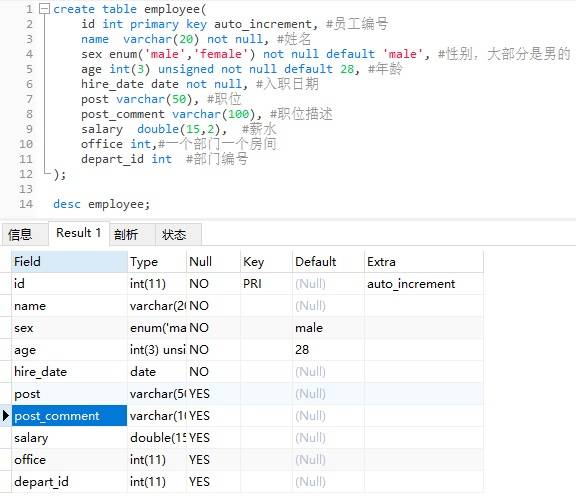
2.插入若干条测试记录。
#插入记录
#三个部门:教学,销售,运营
insert into employee(name ,sex,age,hire_date,post,salary,office,depart_id) values
('egon','male',18,'20170301','老男孩驻沙河办事处外交大使',7300.33,401,1), #以下是教学部
('alex','male',78,'20150302','teacher',1000000.31,401,1),
('wupeiqi','male',81,'20130305','teacher',8300,401,1),
('yuanhao','male',73,'20140701','teacher',3500,401,1),
('liwenzhou','male',28,'20121101','teacher',2100,401,1),
('jingliyang','female',18,'20110211','teacher',9000,401,1),
('jinxin','male',18,'19000301','teacher',30000,401,1),
('xiaomage','male',48,'20101111','teacher',10000,401,1),

('歪歪','female',48,'20150311','sale',3000.13,402,2),#以下是销售部门
('丫丫','female',38,'20101101','sale',2000.35,402,2),
('丁丁','female',18,'20110312','sale',1000.37,402,2),
('星星','female',18,'20160513','sale',3000.29,402,2),
('格格','female',28,'20170127','sale',4000.33,402,2),

('张野','male',28,'20160311','operation',10000.13,403,3), #以下是运营部门
('程咬金','male',18,'19970312','operation',20000,403,3),
('程咬银','female',18,'20130311','operation',19000,403,3),
('程咬铜','male',18,'20150411','operation',18000,403,3),
('程咬铁','female',18,'20140512','operation',17000,403,3)
;

select * from employee;
1.where约束
#1 :单条件查询
select id,name from employee where id > 5;

#2.给查询字段起别名
select id as 编号,name as 姓名 from employee where id > 5;

#3 多条件查询
select name from employee where post='teacher' and salary>10000;

#4.关键字BETWEEN AND
SELECT name,salary FROM employee WHERE salary BETWEEN 10000 AND 20000;

#5:关键字IN集合查询
SELECT name,salary FROM employee  WHERE salary IN (3000,3500,4000,9000);

#6:关键字LIKE模糊查询
SELECT * FROM employee WHERE name LIKE 'jin%';
SELECT  name,age FROM employee WHERE name LIKE 'ale_';
配符必须与 LIKE 运算符一起使用。 %:替代零个或多个字符 _:仅替代一个字符
2.分组查询group by 分组查询
首先明确一点:分组发生在where之后,即分组是基于where之后得到的记录而进行的。 分组指的是:将所有记录按照某个相同字段进行归类,比如针对员工信息表的职位分组,或者按照性别进行分组等。
select * from employee group by post;
由于没有设置ONLY_FULL_GROUP_BY,于是也可以有结果,默认都是组内的第一条记录,但其实这是没有意义的 如果想分组,则必须要设置全局的sql的模式为ONLY_FULL_GROUP_BY.
#设置全局的sql的模式为ONLY_FULL_GROUP_BY
set global sql_mode='ONLY_FULL_GROUP_BY';
#设置成功后,一定要退出,然后重新登录方可生效
select * from employee group by post;

select * from employee group by post  # 报错
> 1055 - Expression #1 of SELECT list is not in GROUP BY clause and contains nonaggregated column 'myschool.employee.id' which is not functionally dependent on columns in GROUP BY clause; this is incompatible with sql_mode=only_full_group_by
> 时间: 0s
改为:
select post from employee group by post;
注意: 通常情况下,使用了group by分组查询那么select中的字段就必须要出现在group by中,比如select id,name,age from tuser group by id,name,age ,或者select中的字段是聚合函数。
3.聚合函数 - max()求最大值 - min()求最小值 - avg()求平均值 - sum()求和 - count()求总个数
#强调:聚合函数聚合的是组的内容,若是没有分组,则默认一组
# 每个部门有多少个员工
select post,count(id) from employee group by post;
# 每个部门的最高薪水
select post,max(salary) from employee group by post;
# 每个部门的最低薪水
select post,min(salary) from employee group by post;
# 每个部门的平均薪水
select post,avg(salary) from employee group by post;
# 每个部门的所有薪水
select post,sum(salary) from employee group by post;
注意:在使用count聚合函数时的count(*)与count(列名)的区别。
count(*)包括了所有的列,相当于行数,在统计结果的时候,不会忽略列值为NULL 。 count(列名)只包括列名那一列,在统计结果的时候,会忽略列值为空(这里的空不是指空字符串或者0,而是null)的计数,即某个字段值为NULL时,不统计。
4.HAVING 过滤
HAVING与WHERE不一样的地方在于
执行优先级从高到低:where > group by > having 1.Where 发生在分组group by之前,因而Where中可以有任意字段,但是绝对不能使用聚合函数。 2.Having发生在分组group by之后,因而Having中可以使用分组的字段,无法直接取到其他字段,可以使用聚合函数。
#查询部门的平均薪水大于10000的部门信息。
select post,avg(salary) from employee group by post having avg(salary) > 10000;
#或者
select post,avg(salary) as 平均工资 from employee group by post having 平均工资 > 10000;

#统计部门人数少于5人的部门信息。
select post,group_concat(name),count(id) from employee group by post having count(id) < 5
5.order by 查询排序
按单列排序 SELECT * FROM employee ORDER BY age; //默认排序 SELECT * FROM employee ORDER BY age ASC; //按照年龄升序排序 SELECT * FROM employee ORDER BY age DESC; //按照年龄降序排序
#查询部门的平均薪水大于1000的部门信息,并且降序排序。
select post,avg(salary) from employee group by post having avg(salary) > 10000 order by avg(salary) desc;
6.limit 限制查询的记录数 使用limit可以实现分页效果。
# 第1页数据
select * from  employee limit 0,5;
# 第2页数据
select * from  employee limit 5,5;