Java 8扩充了大量的函数式编程的功能,Java 8之所以费这么大功夫引入函数式编程,原因有二:
1.代码简洁 ,函数式编程写出的代码简洁且意图明确,使用 stream 接口让你从此告别 for循环。
2.多核友好 ,Java函数式编程使得编写并行程序从未如此简单,你需要的全部就是调用一下 parallel() 方法。
1.如何获得stream
调用 Collection.stream() 或者 Collection.parallelStream() 方法
调用 Arrays.stream(T[] array) 方法
2.stream的特点
1.不是数据结构,不会保存数据。
2.不会修改原来的数据源,它会将操作后的数据保存到另外一个对象中。(保留意见:毕竟peek方法可以修改流中元素)
3.惰性求值,流在中间处理过程中,只是对操作进行了记录,并不会立即执行,需要等到执行终止操作的时候才会进行实际的计算。
分类:
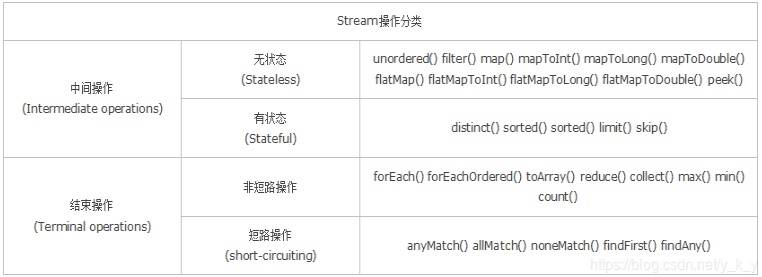
无状态:指元素的处理不受之前元素的影响;
有状态:指该操作只有拿到所有元素之后才能继续下去。
非短路操作:指必须处理所有元素才能得到最终结果;
短路操作:指遇到某些符合条件的元素就可以得到最终结果,如 A || B,只要A为true,则无需判断B的结果。
3.流的创建
1)使用Collection下的 stream() 和 parallelStream() 方法 2)使用Arrays 中的 stream() 方法,将数组转成流 3)使用Stream中的静态方法:of()、iterate()、generate() 4)BufferedReader.lines() 方法,将每行内容转成流
实例:
public class StreamDemo2 {

    public static void main(String[] args) throws Exception {

        File file = new File("streamdemo/test.txt");
        String s = "I love you too too";
        String[] arr = s.split(" ");
        List<String> list = Arrays.asList(arr);

        System.out.println("-----集合转串行流------");
        list.stream().forEach(System.out::println);
        System.out.println("-----集合转并行流------");
        list.parallelStream().forEach(System.out::println);
        System.out.println("-----数组转流------");
        Arrays.stream(arr).forEach(System.out::println);
        System.out.println("--------Stream.of---------");
        Stream<Integer> stream = Stream.of(1,2,3,4,5,6);
        stream.forEach(System.out::println);
        System.out.println("--------Stream.iterate---------");
        Stream<Integer> stream2 = Stream.iterate(0, (x) -> x + 2).limit(6);
        stream2.forEach(System.out::println); // 0 2 4 6 8 10
        System.out.println("--------Stream.generate---------");
        Stream<Double> stream3 = Stream.generate(Math::random).limit(2);
        stream3.forEach(System.out::println);
        System.out.println("--------BufferedReader.lines()---------");
        BufferedReader reader = new BufferedReader(new FileReader(file));
        Stream<String> lineStream = reader.lines();
        lineStream.forEach(System.out::println);

    }
}

运行结果:
-----集合转串行流------
I
love
you
too
too
-----集合转并行流------
you
too
too
love
I
-----数组转流------
I
love
you
too
too
--------Stream.of---------
1
2
3
4
5
6
--------Stream.iterate---------
0
2
4
6
8
10
--------Stream.generate---------
0.5756654517589076
0.660995787637648
--------BufferedReader.lines()---------
床前明月光
疑是地上霜
举头望明月
低头思故乡
4.流的中间操作
筛选与切片 filter:过滤流中的某些元素 limit(n):获取n个元素 skip(n):跳过n元素,配合limit(n)可实现分页 distinct:通过流中元素的 hashCode() 和 equals() 去除重复元素
映射 map:接收一个函数作为参数,该函数会被应用到每个元素上,并将其映射成一个新的元素。 flatMap:接收一个函数作为参数,将流中的每个值都换成另一个流,然后把所有流连接成一个流。
排序 sorted():自然排序,流中元素需实现Comparable接口 sorted(Comparator com):定制排序,自定义Comparator排序器
消费 peek:如同于map,能得到流中的每一个元素。但map接收的是一个Function表达式,有返回值;而peek接收的是Consumer表达式,没有返回值。
5.流的终止操作
匹配、聚合操作
allMatch:接收一个 Predicate 函数,当流中每个元素都符合该断言时才返回true,否则返回false noneMatch:接收一个 Predicate 函数,当流中每个元素都不符合该断言时才返回true,否则返回false anyMatch:接收一个 Predicate 函数,只要流中有一个元素满足该断言则返回true,否则返回false findFirst:返回流中第一个元素 findAny:返回流中的任意元素 count:返回流中元素的总个数 max:返回流中元素最大值 min:返回流中元素最小值
规约操作
Optional
收集操作
collect:接收一个Collector实例,将流中元素收集成另外一个数据结构。
Collector
Set
综合实例:
class Students {
    private String name;
    private int age;
    private int score;

    public Students() {
    }

    public Students(String name, int age, int score) {
        this.name = name;
        this.age = age;
        this.score = score;
    }

    public String getName() {
        return name;
    }

    public void setName(String name) {
        this.name = name;
    }

    public int getAge() {
        return age;
    }

    public void setAge(int age) {
        this.age = age;
    }

    public int getScore() {
        return score;
    }

    public void setScore(int score) {
        this.score = score;
    }

    @Override
    public String toString() {
        return "Students{" +
                "name='" + name + '\'' +
                ", age=" + age +
                ", score=" + score +
                '}';
    }
}

class StudentsComparator implements Comparator<Students>{
    @Override
    public int compare(Students s1, Students s2) {
        if(s1.getAge()==s2.getAge()){
            return s2.getScore()-s1.getScore();
        }else{
            return s1.getAge() - s2.getAge();
        }
     }
}

public class StreamDemo {

    public static void main(String[] args) {

        String s = "I love you too too";
        String[] arr = s.split(" ");
        List<String> list = Arrays.asList(arr);
        System.out.println("--------输出每一个元素---------");
        list.stream().forEach(System.out::println);
        System.out.println("--------输出长度为3的字符串---------");
        list.stream().filter(str -> str.length() == 3).forEach(System.out::println);
        System.out.println("--------去除重复的字符串---------");
        list.stream().distinct().forEach(System.out::println);
        System.out.println("------每一个元素转换为大写字母------");
        list.stream().map(str -> str.toUpperCase()).forEach(System.out::println);
        System.out.println("-----------输出元素个数-----------");
        System.out.println(list.stream().count());

        List<Students> list2 = new ArrayList<Students>();
        list2.add(new Students("张三", 18, 89));
        list2.add(new Students("孙琦", 16, 80));
        list2.add(new Students("李四", 18, 99));
        list2.add(new Students("王五", 17, 79));
        System.out.println("-----------按照学生年龄排序-----------");
        list2.stream().sorted(Comparator.comparing(Students::getAge)).forEach(System.out::println);

        System.out.println("-----------先按照学生年龄排序再按照考试分数降序排序-----------");
        list2.stream().
                sorted(Comparator.comparing(Students::getAge).thenComparing(Students::getScore))
                .forEach(System.out::println);

        System.out.println("-----------先按照学生年龄排序再按照考试分数降序排序(自定义排序规则)-----------");
        list2.stream().sorted(new StudentsComparator()).forEach(System.out::println);

    }
}

运行结果:
--------输出每一个元素---------
I
love
you
too
too
--------输出长度为3的字符串---------
you
too
too
--------去除重复的字符串---------
I
love
you
too
------每一个元素转换为大写字母------
I
LOVE
YOU
TOO
TOO
-----------输出元素个数-----------
5
-----------按照学生年龄排序-----------
Students{name='孙琦', age=16, score=80}
Students{name='王五', age=17, score=79}
Students{name='张三', age=18, score=89}
Students{name='李四', age=18, score=99}
-----------先按照学生年龄排序再按照考试分数降序排序-----------
Students{name='孙琦', age=16, score=80}
Students{name='王五', age=17, score=79}
Students{name='张三', age=18, score=89}
Students{name='李四', age=18, score=99}
-----------先按照学生年龄排序再按照考试分数降序排序(自定义排序规则)-----------
Students{name='孙琦', age=16, score=80}
Students{name='王五', age=17, score=79}
Students{name='李四', age=18, score=99}
Students{name='张三', age=18, score=89}