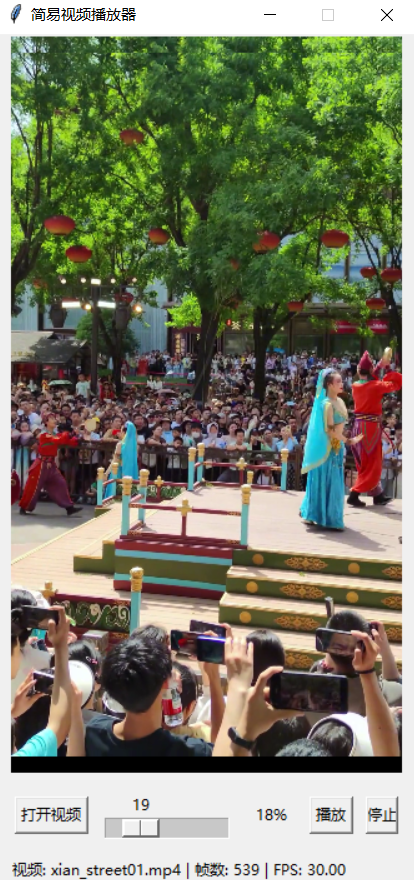
OpenCV实现简易视频播放器
OpenCV实现简易视频播放器
OpenCV实现简易视频播放器
实现代码:
import cv2
import numpy as np
import tkinter as tk
from tkinter import filedialog


class VideoPlayer:
    def __init__(self, root):
        self.root = root
        self.root.title("简易视频播放器")

        # 禁用窗口的最大化按钮
        self.root.resizable(False, False)

        # 视频相关变量
        self.video_path = None
        self.cap = None
        self.playing = False
        self.paused = False
        self.frame_count = 0
        self.current_frame = 0
        self.fps = 0
        self.frame_delay = 0
        self.video_loaded = False  # 用于标记视频是否已加载

        # 创建UI
        self.create_widgets()

    def create_widgets(self):
        # 视频显示区域
        self.video_frame = tk.Frame(self.root, bg="black")
        self.video_frame.pack(fill=tk.BOTH, expand=True, padx=10, pady=0)
        self.canvas = tk.Canvas(self.video_frame, bg="black")
        self.canvas.pack(fill=tk.BOTH, expand=True)

        # 控制面板
        self.control_panel = tk.Frame(self.root)
        self.control_panel.pack(fill=tk.X, padx=10, pady=10)

        # 按钮
        self.open_button = tk.Button(self.control_panel, text="打开视频", command=self.open_video)
        self.open_button.pack(side=tk.LEFT, padx=5)

        self.play_pause_button = tk.Button(self.control_panel, text="播放", command=self.toggle_play_pause)
        # 初始时隐藏播放/暂停按钮
        self.play_pause_button.pack_forget()

        self.stop_button = tk.Button(self.control_panel, text="停止", command=self.stop_video)
        # 初始时隐藏停止按钮
        self.stop_button.pack_forget()

        # 进度条
        self.progress_var = tk.DoubleVar()
        self.progress_bar = tk.Scale(self.control_panel, variable=self.progress_var,
                                     from_=0, to=100, orient=tk.HORIZONTAL,
                                     command=self.seek_video)
        self.progress_bar.pack(side=tk.LEFT, fill=tk.X, expand=True, padx=5)

        # 进度条百分比标签
        self.progress_percent_var = tk.StringVar()
        self.progress_percent_label = tk.Label(self.control_panel, textvariable=self.progress_percent_var, width=5)
        self.progress_percent_label.pack(side=tk.LEFT, padx=5)

        # 信息显示
        self.info_var = tk.StringVar()
        self.info_label = tk.Label(self.root, textvariable=self.info_var, anchor=tk.W)
        self.info_label.pack(fill=tk.X, padx=10)

    def open_video(self):
        # 打开文件对话框选择视频
        self.video_path = filedialog.askopenfilename(
            title="选择视频文件",
            filetypes=[("视频文件", "*.mp4 *.avi *.mov *.mkv")]
        )

        if self.video_path:
            # 打开视频
            self.cap = cv2.VideoCapture(self.video_path)

            # 获取视频信息
            self.frame_count = int(self.cap.get(cv2.CAP_PROP_FRAME_COUNT))
            self.fps = self.cap.get(cv2.CAP_PROP_FPS)
            self.frame_delay = int(1000 / self.fps) if self.fps > 0 else 30

            # 读取第一帧
            ret, frame = self.cap.read()
            if ret:
                # 获取视频原始尺寸
                original_height, original_width = frame.shape[:2]

                # 计算缩放尺寸,确保宽度不超过800像素
                max_width = 800
                max_height = 600  # 限制最大高度
                if original_width > max_width or original_height > max_height:
                    # 计算缩放比例
                    width_ratio = max_width / original_width
                    height_ratio = max_height / original_height
                    scale_ratio = min(width_ratio, height_ratio)

                    display_width = int(original_width * scale_ratio)
                    display_height = int(original_height * scale_ratio)
                else:
                    display_width = original_width
                    display_height = original_height

                # 设置窗口大小
                self.root.geometry(f"{display_width}x{display_height + 80}")  # 80为控制面板和其他元素的高度

                # 显示第一帧
                self.current_frame = 1
                self.progress_var.set((self.current_frame / self.frame_count) * 100)
                self.progress_percent_var.set(f"{int((self.current_frame / self.frame_count) * 100)}%")
                self.show_frame(frame)

                # 更新UI
                self.info_var.set(
                    f"视频: {self.video_path.split('/')[-1]} | 帧数: {self.frame_count} | FPS: {self.fps:.2f}")

            # 自动播放
            self.video_loaded = True
            self.play_pause_button.pack(side=tk.LEFT, padx=5)
            self.stop_button.pack(side=tk.LEFT, padx=5)
            self.play_video()

    def toggle_play_pause(self):
        if not self.video_loaded or self.cap is None:
            return

        if not self.playing:
            self.play_video()
        else:
            self.pause_video()

    def play_video(self):
        if self.cap is None or self.playing:
            return

        self.playing = True
        self.paused = False
        self.play_pause_button.config(text="暂停")

        # 在UI线程中播放视频
        self.play_loop()

    def play_loop(self):
        if self.playing and not self.paused and self.cap.isOpened():
            ret, frame = self.cap.read()
            if ret:
                self.current_frame += 1
                # 更新进度条
                progress_percent = (self.current_frame / self.frame_count) * 100
                self.progress_var.set(progress_percent)
                self.progress_percent_var.set(f"{int(progress_percent)}%")

                # 显示帧
                self.show_frame(frame)

                # 控制播放速度
                self.root.after(self.frame_delay, self.play_loop)
            else:
                self.stop_video()

    def pause_video(self):
        if self.cap is not None and self.playing:
            self.paused = True
            self.playing = False
            self.play_pause_button.config(text="播放")

    def stop_video(self):
        if self.cap is not None:
            self.playing = False
            self.paused = False
            self.play_pause_button.config(text="播放")
            self.cap.release()
            self.cap = None
            self.video_loaded = False
            self.current_frame = 0
            self.progress_var.set(0)
            self.progress_percent_var.set("0%")
            self.info_var.set("视频已停止")
            self.canvas.delete("all")

            # 隐藏播放和停止按钮
            self.play_pause_button.pack_forget()
            self.stop_button.pack_forget()

    def seek_video(self, value):
        if self.cap is not None:
            frame_number = int((float(value) / 100) * self.frame_count)
            self.cap.set(cv2.CAP_PROP_POS_FRAMES, frame_number)
            ret, frame = self.cap.read()
            if ret:
                self.show_frame(frame)
                self.current_frame = frame_number + 1  # 因为set后读取的是该帧
                self.progress_var.set((self.current_frame / self.frame_count) * 100)
                self.progress_percent_var.set(f"{int((self.current_frame / self.frame_count) * 100)}%")

    def show_frame(self, frame):
        # 转换颜色空间 (BGR to RGB)
        frame = cv2.cvtColor(frame, cv2.COLOR_BGR2RGB)

        # 调整帧大小以适应窗口
        canvas_width = self.canvas.winfo_width()
        canvas_height = self.canvas.winfo_height()

        if canvas_width > 0 and canvas_height > 0:
            height, width = frame.shape[:2]
            aspect_ratio = width / height

            # 计算新的宽度和高度,确保视频保持原始宽高比
            if aspect_ratio > 1:  # 横屏视频
                new_width = canvas_width
                new_height = int(new_width / aspect_ratio)
                if new_height > canvas_height:
                    new_height = canvas_height
                    new_width = int(new_height * aspect_ratio)
            else:  # 竖屏视频
                new_height = canvas_height
                new_width = int(new_height * aspect_ratio)
                if new_width > canvas_width:
                    new_width = canvas_width
                    new_height = int(new_width / aspect_ratio)

            # 缩放帧
            frame = cv2.resize(frame, (new_width, new_height))

        # 使用 PIL 处理图像
        from PIL import Image, ImageTk
        image = Image.fromarray(frame)
        self.photo = ImageTk.PhotoImage(image)

        # 在Canvas上显示图像
        self.canvas.delete("all")  # 清空画布
        self.canvas.create_image(0, 0, image=self.photo, anchor=tk.NW)

        # 计算居中显示的位置
        canvas_width = self.canvas.winfo_width()
        canvas_height = self.canvas.winfo_height()
        image_width = self.photo.width()
        image_height = self.photo.height()

        x_offset = (canvas_width - image_width) // 2
        y_offset = (canvas_height - image_height) // 2

        # 重新绘制图像以居中显示
        self.canvas.create_image(x_offset, y_offset, image=self.photo, anchor=tk.NW)

    def run(self):
        self.root.mainloop()


if __name__ == "__main__":
    root = tk.Tk()
    app = VideoPlayer(root)
    app.run()
运行效果: