WebUI之Gradio
WebUI之Gradio
1.gradio 介绍
Gradio 是一个简单易用的 Python 库,能够帮助开发者快速搭建用户友好的 Web 应用,特别适合用于机器学习模型的展示。本课程将使用 Gradio 来搭建一个可以与FastAPI 后端交互的对话机器人。
2.Gradio 组件简介
首先介绍 Gradio 的核心组件,包括: - Gradio Blocks:用于组织界面布局的容器。 - Slider:用于调整生成参数,如 temperature 和 top_p。 - Textbox:用户输入对话的地方。 - Button:发送用户输入或清空历史记录。 - Chatbot:用于显示对话历史的组件
3.基于Gradio-UI的聊天机器人
在上一节的基于FastAPI构建聊天机器人的基础上使用Gradio-UI构建聊天界面。
为了保证兼容性,推荐安装以下版本的gradio。
pip install gradio==5.0.2
代码实现:
import gradio as gr
import requests

# 定义后台的fastapi的URL
backend_url = "http://127.0.0.1:6066/chat"

def chat_with_backend(prompt, history, sys_prompt, history_len, temperature, top_p, max_tokens, stream):
    # history:["role": "user", "metadata":{'title':None},"content":"xxxx"],去掉metadata字段
    history_none_meatdata = [{"role": h.get("role"), "content": h.get("content")} for h in history]
    # print(history)
    # 构建请求的数据
    data = {
        "query": prompt,
        "sys_prompt": sys_prompt,
        "history": history_none_meatdata,
        "history_len": history_len,
        "temperature": temperature,
        "top_p": top_p,
        "max_tokens": max_tokens
    }
    response = requests.post(backend_url, json=data, stream=True)
    if response.status_code == 200:
        chunks = ""
        if stream:
            for chunk in response.iter_content(chunk_size=None, decode_unicode=True):
                chunks += chunk
                yield chunks
        else:
            for chunk in response.iter_content(chunk_size=None, decode_unicode=True):
                chunks += chunk
            yield chunks


# 使用gr.Blocks创建一个块,并设置可以填充高度和宽度
with gr.Blocks(fill_width=True, fill_height=True) as demo:
    # 创建一个标签页
    with gr.Tab("基于GradioUI的聊天机器人"):
        # 添加标题
        gr.Markdown("## GradioUI聊天机器人")

        # 创建一个行布局
        with gr.Row():
            # 创一个左侧的列布局
            with gr.Column(scale=1, variant="panel") as sidebar_left:
                sys_prompt = gr.Textbox(label="系统提示词", value="You are a helpful assistant")
                history_len = gr.Slider(minimum=1, maximum=10, value=1, label="保留历史对话的数量")
                temperature = gr.Slider(minimum=0.01, maximum=2.0, value=0.5, step=0.01, label="temperature")
                top_p = gr.Slider(minimum=0.01, maximum=1.0, value=0.5, step=0.01, label="top_p")
                max_tokens = gr.Slider(minimum=512, maximum=4096, value=1024, step=8, label="max_tokens")
                stream = gr.Checkbox(label="stream", value=True)

            # 创建右侧的列布局,设置比例为10
            with gr.Column(scale=10) as main:
                # 创建聊天机器人的聊天界面,高度为500px
                chatbot = gr.Chatbot(type="messages", height=500)
                # 创建chatinterface, 用于处理聊天的逻辑
                gr.ChatInterface(fn=chat_with_backend,
                                 type="messages",
                                 chatbot=chatbot,
                                 additional_inputs=[
                                     sys_prompt,
                                     history_len,
                                     temperature,
                                     top_p,
                                     max_tokens,
                                     stream
                                 ])

#demo.launch()

gradio_port = 8080
gradio_url = f"http://127.0.0.1:{gradio_port}"
demo.launch(
    server_name="127.0.0.1",
    server_port=gradio_port,
    debug=True
)
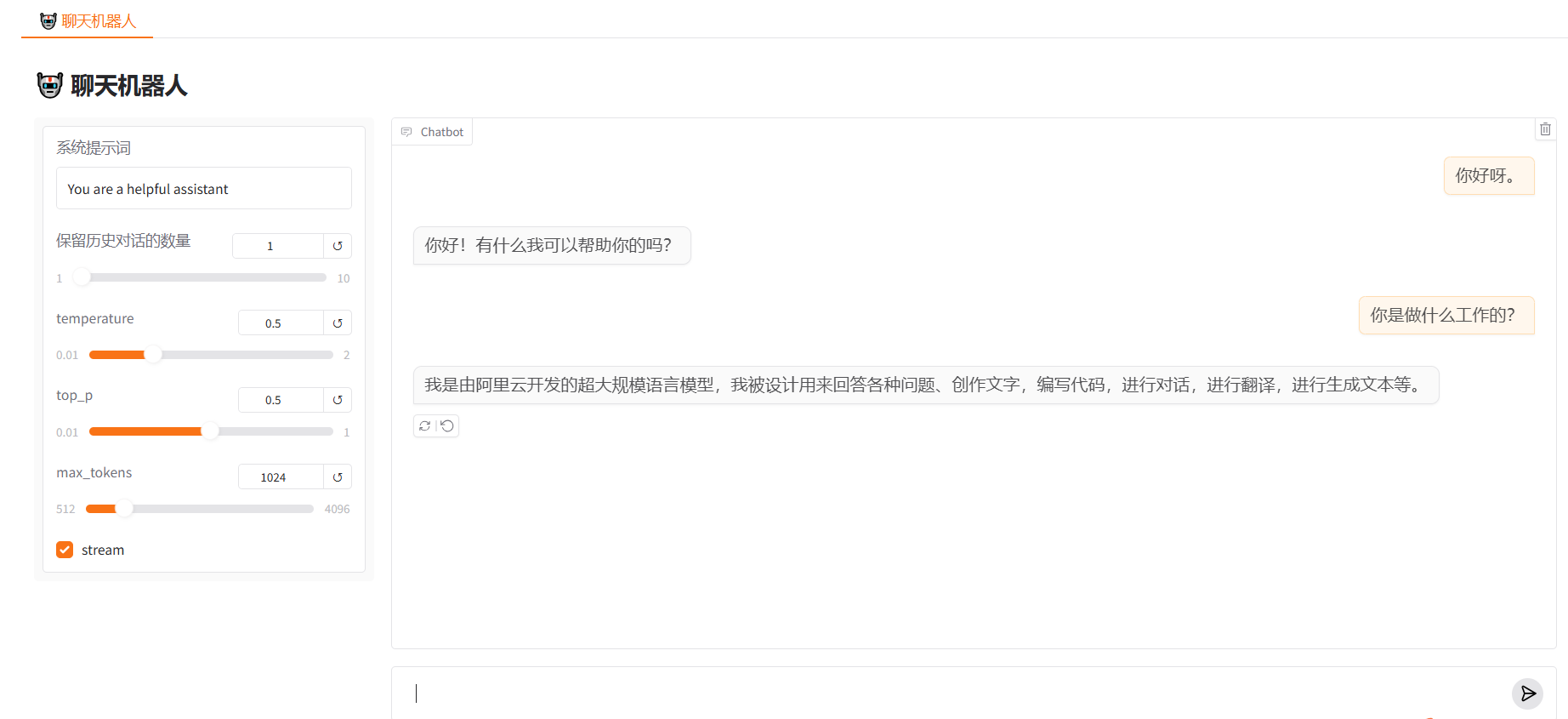
运行效果: