1.Qwen2.5-0.5B本地部署
Qwen2.5是Qwen大模型的全新系列,参数量从 0.5 到 720 亿不等。我们以Qwen2.5-0.5B为例介绍本地部署(Windows下)方式。 网址:https://qwen.readthedocs.io/zh-cn/latest/
1.1 本地部署Qwen2.5-0.5B大模型环境准备
步骤1:使用Conda创建虚拟环境。
# 安装 Miniconda 或 Anaconda 后,创建新的虚拟环境
conda create --name AI_env python=3.11.9
# 激活虚拟环境
conda activate AI_env
步骤2:安装必要依赖。
使用以下命令安装所需的依赖库 安装 pytorch cpu版本(可选)。
pip install torch
安装 pytorch gpu版本(可选,如果有CUDA)。
pip install torch torchvision torchaudio --index-url https://download.pytorch.org/whl/cu121
安装 transformers:
pip install transformers==4.45.0
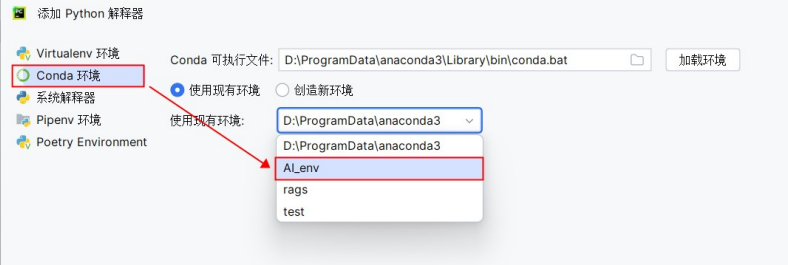
步骤3:在Pycharm中使用创建的环境 在设置中添加刚创建的虚拟环境。
1.2 下载Qwen模型
为了加快下载速度,我们使用魔搭社区的下载方式。
pip install modelscope
下载模型:
from modelscope.hub.snapshot_download import snapshot_download
llm_model_dir = snapshot_download('Qwen/Qwen2.5-0.5B-Instruct',cache_dir='models')
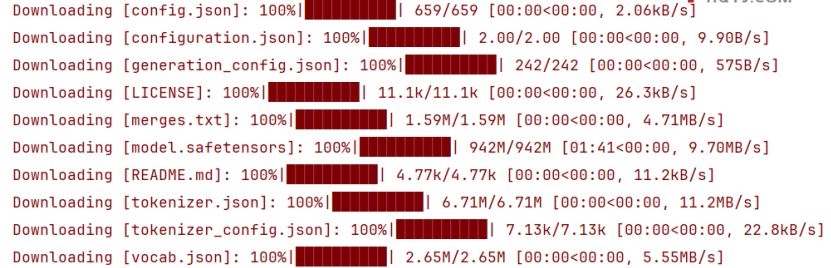
Qwen/Qwen2.5-0.5B-Instruct为魔搭社区上的路径。models为本地路径。下载完毕(下载过程中最好不要有断网等操作):
1.3 模型推理
transformers 是一个非常流行的库,由 Hugging Face 提供,用于处理自然语言处理(NLP)任务。这个库中包含了许多预训练模型以及相应的工具,可以用来进行文本生成、情感分析、翻译等多种任务。代码中需要 AutoModelForCausalLM 和 AutoTokenizer ,它们是 transformers库中的两个重要组件,它们的作用如下: 1. AutoTokenizer: 这是一个自动化的分词器类,可以根据指定的预训练模型自动选择合适的分词器。分词器的主要功能是将原始文本转换为模型可以理解的形式,比如将句子分解成单词或子词单元,并将这些单元映射到对应的数字ID(这个过程通常称为“tokenization”)。不同的模型可能需要不同类型的分词策略,而AutoTokenizer 能够根据模型名称自动加载正确的分词器配置。
- AutoModelForCausalLM: 这个类代表了一个用于因果语言建模(即给定前文预测下一个词的任务)的自动模型。它能够根据指定的模型名称自动加载一个适合做语言生成任务的预训练模型。这类模型常用于文本生成、对话系统等场景。
这两个类配合使用时,通常流程如下: - 首先,使用 AutoTokenizer 加载或创建一个分词器实例,准备对输入文本进行处理。 - 然后,使用 AutoModelForCausalLM 加载一个预训练的语言模型。 - 接下来,利用分词器将原始文本转换为模型输入所需的格式。 - 最后,将处理后的数据输入到模型中,执行特定的任务,如文本生成。
代码示例:
import torch
from transformers import AutoModelForCausalLM, AutoTokenizer

# 查看设备,运行在CPU或者cuda
device = torch.device("cuda" if torch.cuda.is_available() else "cpu")
print("模型会运行在:", device)

# 实例化一个因果语言模型,并且放在设备上:CPU或者cuda
model = AutoModelForCausalLM.from_pretrained("./models/Qwen/Qwen2___5-0___5B-Instruct")
# 实例化一个分词器
tokenizer = AutoTokenizer.from_pretrained("./models/Qwen/Qwen2___5-0___5B-Instruct")

model = torch.nn.DataParallel(model, [0, 1])

# 设置prompt
prompt = "你是谁?"

# 组建message
messages = [
    {"role": "system", "content": "You are a helpful assiatant."},
    {"role": "user", "content": prompt},
    # {"role": "assistant", "content": "{"}
]

# 使用分词器将对话转换成适用于模型输入的格式,并添加生成提示
text = tokenizer.apply_chat_template(
    messages,
    tokenize=False,
    add_generation_prompt=True
)
print(text)
#cpu方式
#model_inputs = tokenizer([text], return_tensors="pt")
#GPU方式
model_inputs = tokenizer([text], return_tensors="pt").to(device)
print(model_inputs)

# 预测新的token序列,最大生成512个token
generated_ids = model.module.generate(
    model_inputs.input_ids,
    max_new_tokens=512
)

# 截取生成tokens部分
generated_ids = [output_ids[len(input_ids):] for input_ids, output_ids in zip(model_inputs.input_ids, generated_ids)]

response = tokenizer.batch_decode(generated_ids, skip_special_tokens=True)[0]
print(response)
运行效果:
模型会运行在: cuda
Sliding Window Attention is enabled but not implemented for `sdpa`; unexpected results may be encountered.
<|im_start|>system
You are a helpful assiatant.<|im_end|>
<|im_start|>user
你是谁?<|im_end|>
<|im_start|>assistant

{'input_ids': tensor([[151644,   8948,    198,   2610,    525,    264,  10950,   1071,  10358,
            517,     13, 151645,    198, 151644,    872,    198, 105043, 100165,
          11319, 151645,    198, 151644,  77091,    198]]), 'attention_mask': tensor([[1, 1, 1, 1, 1, 1, 1, 1, 1, 1, 1, 1, 1, 1, 1, 1, 1, 1, 1, 1, 1, 1, 1, 1]])}
The attention mask is not set and cannot be inferred from input because pad token is same as eos token. As a consequence, you may observe unexpected behavior. Please pass your input's `attention_mask` to obtain reliable results.
我是阿里云开发的一款超大规模语言模型,我叫通义千问。
1.4 对话模型与分词对比
from transformers import AutoTokenizer

# 实例化一个分词器
tokenizer = AutoTokenizer.from_pretrained("./models/Qwen/Qwen2___5-0___5B-Instruct")

model_inputs = tokenizer(["你好"], return_tensors="pt")

print("model_inputs:", model_inputs)

token_ids = model_inputs["input_ids"].squeeze().tolist()
# token_ids = [0]
response = tokenizer.decode(token_ids=token_ids)
print("response:", response, "-------->",token_ids)
运行效果:
model_inputs: {'input_ids': tensor([[108386]]), 'attention_mask': tensor([[1]])}
response: 你好 --------> 108386