图像轮廓特征
图像轮廓特征
在计算机视觉和图像处理中,轮廓特征是指图像中对象的边界或边缘所具有的几何和拓扑属性。轮廓特征是图像分析和目标识别中的重要工具,因为它们能够提供关于对象形状、大小、方向和结构的丰富信息。
1.图像轮廓特征
图像的轮廓特征可以分为以下几类: - 基础特征:面积、周长、质心、凸包、最小外接矩形等。这些特征可以直接从轮廓序列中计算得到。 - 矩特征:Hu 矩、中心矩、惯性矩等。这些特征可以用于描述轮廓的形状和大小。 - 几何特征:最小闭合圆、拟合椭圆等。这些特征可以用于描述轮廓的几何形状。
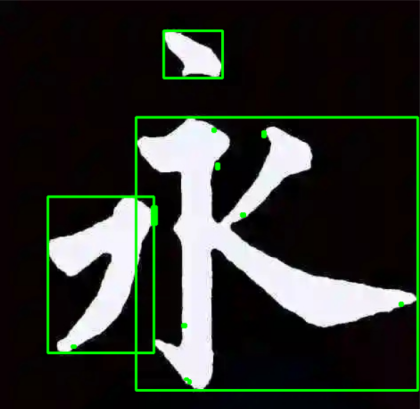
2.最小外接矩形轮廓
代码实现:
import cv2

# 读取图像
image = cv2.imread('./images/jpg/yongzi.jpg')
if image is None:
    print("Error: Image cannot be read.")
    exit()

# 转换为灰度图像
gray = cv2.cvtColor(image, cv2.COLOR_BGR2GRAY)

# 应用Canny边缘检测(可选)
edges = cv2.Canny(gray, threshold1=40, threshold2=255)

# 查找轮廓
contours, hierarchy = cv2.findContours(edges, cv2.RETR_TREE, cv2.CHAIN_APPROX_SIMPLE)

# 绘制外接矩形并显示结果图像
for contour in contours:
    x, y, w, h = cv2.boundingRect(contour)
    cv2.rectangle(image, (x, y), (x + w, y + h), (0, 255, 0), 2)  # 绿色矩形边框

cv2.imshow('Contours with bounding rectangles', image)
cv2.waitKey(0)
cv2.destroyAllWindows()
3.最大内切圆和最小外接圆轮廓
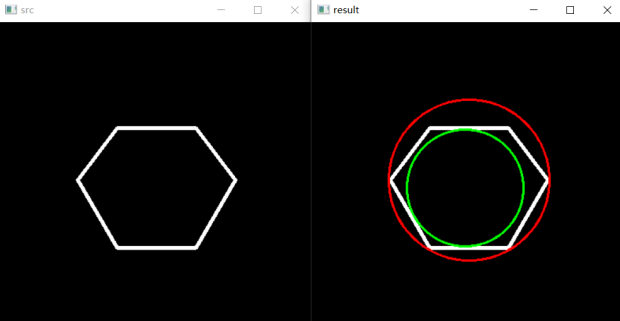
代码实现:
import cv2 as cv
import numpy as np

# Create an image
r = 100
src = np.zeros((4 * r, 4 * r), dtype=np.uint8)

# Create a sequence of points to make a contour
vert = [None] * 6
vert[0] = (3 * r // 2, int(1.34 * r))
vert[1] = (1 * r, 2 * r)
vert[2] = (3 * r // 2, int(2.866 * r))
vert[3] = (5 * r // 2, int(2.866 * r))
vert[4] = (3 * r, 2 * r)
vert[5] = (5 * r // 2, int(1.34 * r))
# Draw it in src
for i in range(6):
    cv.line(src, vert[i], vert[(i + 1) % 6], (255), 3)

cv.imshow("src", src)
cv.imwrite('./images/jpg/hexagon.jpg',src)


"""
src = cv.imread('./images/jpg/hexagon.jpg', cv.IMREAD_UNCHANGED)
cv.imshow("src", src)
cv.waitKey(0)
"""
# Get the contours
contours, _ = cv.findContours(src, cv.RETR_TREE, cv.CHAIN_APPROX_SIMPLE)

# Calculate the distances to the contour
raw_dist = np.empty(src.shape, dtype=np.float32)
for i in range(src.shape[0]):
    for j in range(src.shape[1]):
        raw_dist[i, j] = cv.pointPolygonTest(contours[1], (j, i), True)

# 获取最大值即内接圆半径,中心点坐标
minVal, maxVal, _, maxDistPt = cv.minMaxLoc(raw_dist)
minVal = abs(minVal)
maxVal = abs(maxVal)

result = cv.cvtColor(src, cv.COLOR_GRAY2BGR)

center, radius = cv.minEnclosingCircle(contours[0])
cv.circle(result, (int(center[0]), int(center[1])), int(radius), (0, 0, 255), 2)

cv.circle(result, maxDistPt, np.int8(maxVal), (0, 255, 0), 2, cv.LINE_8, 0)
cv.imshow('result', result)

cv.waitKey(0)
cv.destroyAllWindows()