1.鸢尾花数据集
鸢尾花数据集是机器学习中常用的经典数据集之一,由英国统计学家 R. A. Fisher 于 1936 年收集整理。该数据集包含 150 个样本,每个样本对应一种鸢尾花。并包含 4 个特征:
- 花萼长度
- 花萼宽度
- 花瓣长度
- 花瓣宽度
根据这 4 个特征,可以将鸢尾花分为 3 类:
- 山鸢尾 (Iris setosa)
- 变色鸢尾 (Iris versicolor)
- 维吉尼亚鸢尾 (Iris virginica)
注意:在机器学习的相关细分领域,数据的收集工作一般是由行业专家来完成的。因为只有这些专家才知道哪些特征重要,哪些特征不重要。
2. 鸢尾花数据集获取和属性介绍
from sklearn.datasets import load_iris
import seaborn as sns
import matplotlib.pyplot as plt
import pandas as pd

if __name__ == '__main__':

    # 1. 数据集获取
    # 1.1 获取小数据集用datasets.load_*()
    iris = load_iris()
    print(iris) # 会显示一堆的内容,但是阅读起来不方便
    print("样本的数量:",len(iris.data))

    print("##################打印数据集的一些特征#####################")
    # 2. 数据集属性描述
    print('数据集的特征值:\n', iris.data)
    print('数据集的目标值:\n', iris['target'])
    print('数据集的特征值名字:\n', iris.feature_names)
    print('数据集的目标值名字:\n', iris.target_names)
    print('数据集的描述:\n', iris.DESCR)
运行效果:
{'data': array([[5.1, 3.5, 1.4, 0.2],
       [4.9, 3. , 1.4, 0.2],
       [4.7, 3.2, 1.3, 0.2],
       [4.6, 3.1, 1.5, 0.2],
       [5. , 3.6, 1.4, 0.2],
       [5.4, 3.9, 1.7, 0.4],
       [4.6, 3.4, 1.4, 0.3],
       [5. , 3.4, 1.5, 0.2],
       [4.4, 2.9, 1.4, 0.2],
       [4.9, 3.1, 1.5, 0.1],
       [5.4, 3.7, 1.5, 0.2],
       [4.8, 3.4, 1.6, 0.2],
       [4.8, 3. , 1.4, 0.1],
       [4.3, 3. , 1.1, 0.1],
       [5.8, 4. , 1.2, 0.2],
       [5.7, 4.4, 1.5, 0.4],
       [5.4, 3.9, 1.3, 0.4],
       [5.1, 3.5, 1.4, 0.3],
       [5.7, 3.8, 1.7, 0.3],
       [5.1, 3.8, 1.5, 0.3],
       [5.4, 3.4, 1.7, 0.2],
       [5.1, 3.7, 1.5, 0.4],
       [4.6, 3.6, 1. , 0.2],
       [5.1, 3.3, 1.7, 0.5],
       [4.8, 3.4, 1.9, 0.2],
       [5. , 3. , 1.6, 0.2],
       [5. , 3.4, 1.6, 0.4],
       [5.2, 3.5, 1.5, 0.2],
       [5.2, 3.4, 1.4, 0.2],
       [4.7, 3.2, 1.6, 0.2],
       [4.8, 3.1, 1.6, 0.2],
       [5.4, 3.4, 1.5, 0.4],
       [5.2, 4.1, 1.5, 0.1],
       [5.5, 4.2, 1.4, 0.2],
       [4.9, 3.1, 1.5, 0.2],
       [5. , 3.2, 1.2, 0.2],
       [5.5, 3.5, 1.3, 0.2],
       [4.9, 3.6, 1.4, 0.1],
       [4.4, 3. , 1.3, 0.2],
       [5.1, 3.4, 1.5, 0.2],
       [5. , 3.5, 1.3, 0.3],
       [4.5, 2.3, 1.3, 0.3],
       [4.4, 3.2, 1.3, 0.2],
       [5. , 3.5, 1.6, 0.6],
       [5.1, 3.8, 1.9, 0.4],
       [4.8, 3. , 1.4, 0.3],
       [5.1, 3.8, 1.6, 0.2],
       [4.6, 3.2, 1.4, 0.2],
       [5.3, 3.7, 1.5, 0.2],
       [5. , 3.3, 1.4, 0.2],
       [7. , 3.2, 4.7, 1.4],
       [6.4, 3.2, 4.5, 1.5],
       [6.9, 3.1, 4.9, 1.5],
       [5.5, 2.3, 4. , 1.3],
       [6.5, 2.8, 4.6, 1.5],
       [5.7, 2.8, 4.5, 1.3],
       [6.3, 3.3, 4.7, 1.6],
       [4.9, 2.4, 3.3, 1. ],
       [6.6, 2.9, 4.6, 1.3],
       [5.2, 2.7, 3.9, 1.4],
       [5. , 2. , 3.5, 1. ],
       [5.9, 3. , 4.2, 1.5],
       [6. , 2.2, 4. , 1. ],
       [6.1, 2.9, 4.7, 1.4],
       [5.6, 2.9, 3.6, 1.3],
       [6.7, 3.1, 4.4, 1.4],
       [5.6, 3. , 4.5, 1.5],
       [5.8, 2.7, 4.1, 1. ],
       [6.2, 2.2, 4.5, 1.5],
       [5.6, 2.5, 3.9, 1.1],
       [5.9, 3.2, 4.8, 1.8],
       [6.1, 2.8, 4. , 1.3],
       [6.3, 2.5, 4.9, 1.5],
       [6.1, 2.8, 4.7, 1.2],
       [6.4, 2.9, 4.3, 1.3],
       [6.6, 3. , 4.4, 1.4],
       [6.8, 2.8, 4.8, 1.4],
       [6.7, 3. , 5. , 1.7],
       [6. , 2.9, 4.5, 1.5],
       [5.7, 2.6, 3.5, 1. ],
       [5.5, 2.4, 3.8, 1.1],
       [5.5, 2.4, 3.7, 1. ],
       [5.8, 2.7, 3.9, 1.2],
       [6. , 2.7, 5.1, 1.6],
       [5.4, 3. , 4.5, 1.5],
       [6. , 3.4, 4.5, 1.6],
       [6.7, 3.1, 4.7, 1.5],
       [6.3, 2.3, 4.4, 1.3],
       [5.6, 3. , 4.1, 1.3],
       [5.5, 2.5, 4. , 1.3],
       [5.5, 2.6, 4.4, 1.2],
       [6.1, 3. , 4.6, 1.4],
       [5.8, 2.6, 4. , 1.2],
       [5. , 2.3, 3.3, 1. ],
       [5.6, 2.7, 4.2, 1.3],
       [5.7, 3. , 4.2, 1.2],
       [5.7, 2.9, 4.2, 1.3],
       [6.2, 2.9, 4.3, 1.3],
       [5.1, 2.5, 3. , 1.1],
       [5.7, 2.8, 4.1, 1.3],
       [6.3, 3.3, 6. , 2.5],
       [5.8, 2.7, 5.1, 1.9],
       [7.1, 3. , 5.9, 2.1],
       [6.3, 2.9, 5.6, 1.8],
       [6.5, 3. , 5.8, 2.2],
       [7.6, 3. , 6.6, 2.1],
       [4.9, 2.5, 4.5, 1.7],
       [7.3, 2.9, 6.3, 1.8],
       [6.7, 2.5, 5.8, 1.8],
       [7.2, 3.6, 6.1, 2.5],
       [6.5, 3.2, 5.1, 2. ],
       [6.4, 2.7, 5.3, 1.9],
       [6.8, 3. , 5.5, 2.1],
       [5.7, 2.5, 5. , 2. ],
       [5.8, 2.8, 5.1, 2.4],
       [6.4, 3.2, 5.3, 2.3],
       [6.5, 3. , 5.5, 1.8],
       [7.7, 3.8, 6.7, 2.2],
       [7.7, 2.6, 6.9, 2.3],
       [6. , 2.2, 5. , 1.5],
       [6.9, 3.2, 5.7, 2.3],
       [5.6, 2.8, 4.9, 2. ],
       [7.7, 2.8, 6.7, 2. ],
       [6.3, 2.7, 4.9, 1.8],
       [6.7, 3.3, 5.7, 2.1],
       [7.2, 3.2, 6. , 1.8],
       [6.2, 2.8, 4.8, 1.8],
       [6.1, 3. , 4.9, 1.8],
       [6.4, 2.8, 5.6, 2.1],
       [7.2, 3. , 5.8, 1.6],
       [7.4, 2.8, 6.1, 1.9],
       [7.9, 3.8, 6.4, 2. ],
       [6.4, 2.8, 5.6, 2.2],
       [6.3, 2.8, 5.1, 1.5],
       [6.1, 2.6, 5.6, 1.4],
       [7.7, 3. , 6.1, 2.3],
       [6.3, 3.4, 5.6, 2.4],
       [6.4, 3.1, 5.5, 1.8],
       [6. , 3. , 4.8, 1.8],
       [6.9, 3.1, 5.4, 2.1],
       [6.7, 3.1, 5.6, 2.4],
       [6.9, 3.1, 5.1, 2.3],
       [5.8, 2.7, 5.1, 1.9],
       [6.8, 3.2, 5.9, 2.3],
       [6.7, 3.3, 5.7, 2.5],
       [6.7, 3. , 5.2, 2.3],
       [6.3, 2.5, 5. , 1.9],
       [6.5, 3. , 5.2, 2. ],
       [6.2, 3.4, 5.4, 2.3],
       [5.9, 3. , 5.1, 1.8]]), 'target': array([0, 0, 0, 0, 0, 0, 0, 0, 0, 0, 0, 0, 0, 0, 0, 0, 0, 0, 0, 0, 0, 0,
       0, 0, 0, 0, 0, 0, 0, 0, 0, 0, 0, 0, 0, 0, 0, 0, 0, 0, 0, 0, 0, 0,
       0, 0, 0, 0, 0, 0, 1, 1, 1, 1, 1, 1, 1, 1, 1, 1, 1, 1, 1, 1, 1, 1,
       1, 1, 1, 1, 1, 1, 1, 1, 1, 1, 1, 1, 1, 1, 1, 1, 1, 1, 1, 1, 1, 1,
       1, 1, 1, 1, 1, 1, 1, 1, 1, 1, 1, 1, 2, 2, 2, 2, 2, 2, 2, 2, 2, 2,
       2, 2, 2, 2, 2, 2, 2, 2, 2, 2, 2, 2, 2, 2, 2, 2, 2, 2, 2, 2, 2, 2,
       2, 2, 2, 2, 2, 2, 2, 2, 2, 2, 2, 2, 2, 2, 2, 2, 2, 2]), 'frame': None, 'target_names': array(['setosa', 'versicolor', 'virginica'], dtype='<U10'), 'DESCR': '.. _iris_dataset:\n\nIris plants dataset\n--------------------\n\n**Data Set Characteristics:**\n\n:Number of Instances: 150 (50 in each of three classes)\n:Number of Attributes: 4 numeric, predictive attributes and the class\n:Attribute Information:\n    - sepal length in cm\n    - sepal width in cm\n    - petal length in cm\n    - petal width in cm\n    - class:\n            - Iris-Setosa\n            - Iris-Versicolour\n            - Iris-Virginica\n\n:Summary Statistics:\n\n============== ==== ==== ======= ===== ====================\n                Min  Max   Mean    SD   Class Correlation\n============== ==== ==== ======= ===== ====================\nsepal length:   4.3  7.9   5.84   0.83    0.7826\nsepal width:    2.0  4.4   3.05   0.43   -0.4194\npetal length:   1.0  6.9   3.76   1.76    0.9490  (high!)\npetal width:    0.1  2.5   1.20   0.76    0.9565  (high!)\n============== ==== ==== ======= ===== ====================\n\n:Missing Attribute Values: None\n:Class Distribution: 33.3% for each of 3 classes.\n:Creator: R.A. Fisher\n:Donor: Michael Marshall (MARSHALL%PLU@io.arc.nasa.gov)\n:Date: July, 1988\n\nThe famous Iris database, first used by Sir R.A. Fisher. The dataset is taken\nfrom Fisher\'s paper. Note that it\'s the same as in R, but not as in the UCI\nMachine Learning Repository, which has two wrong data points.\n\nThis is perhaps the best known database to be found in the\npattern recognition literature.  Fisher\'s paper is a classic in the field and\nis referenced frequently to this day.  (See Duda & Hart, for example.)  The\ndata set contains 3 classes of 50 instances each, where each class refers to a\ntype of iris plant.  One class is linearly separable from the other 2; the\nlatter are NOT linearly separable from each other.\n\n.. dropdown:: References\n\n  - Fisher, R.A. "The use of multiple measurements in taxonomic problems"\n    Annual Eugenics, 7, Part II, 179-188 (1936); also in "Contributions to\n    Mathematical Statistics" (John Wiley, NY, 1950).\n  - Duda, R.O., & Hart, P.E. (1973) Pattern Classification and Scene Analysis.\n    (Q327.D83) John Wiley & Sons.  ISBN 0-471-22361-1.  See page 218.\n  - Dasarathy, B.V. (1980) "Nosing Around the Neighborhood: A New System\n    Structure and Classification Rule for Recognition in Partially Exposed\n    Environments".  IEEE Transactions on Pattern Analysis and Machine\n    Intelligence, Vol. PAMI-2, No. 1, 67-71.\n  - Gates, G.W. (1972) "The Reduced Nearest Neighbor Rule".  IEEE Transactions\n    on Information Theory, May 1972, 431-433.\n  - See also: 1988 MLC Proceedings, 54-64.  Cheeseman et al"s AUTOCLASS II\n    conceptual clustering system finds 3 classes in the data.\n  - Many, many more ...\n', 'feature_names': ['sepal length (cm)', 'sepal width (cm)', 'petal length (cm)', 'petal width (cm)'], 'filename': 'iris.csv', 'data_module': 'sklearn.datasets.data'}
样本的数量: 150
##################打印数据集的一些特征#####################
数据集的特征值:
 [[5.1 3.5 1.4 0.2]
 [4.9 3.  1.4 0.2]
 [4.7 3.2 1.3 0.2]
 [4.6 3.1 1.5 0.2]
 [5.  3.6 1.4 0.2]
 [5.4 3.9 1.7 0.4]
 [4.6 3.4 1.4 0.3]
 [5.  3.4 1.5 0.2]
 [4.4 2.9 1.4 0.2]
 [4.9 3.1 1.5 0.1]
 [5.4 3.7 1.5 0.2]
 [4.8 3.4 1.6 0.2]
 [4.8 3.  1.4 0.1]
 [4.3 3.  1.1 0.1]
 [5.8 4.  1.2 0.2]
 [5.7 4.4 1.5 0.4]
 [5.4 3.9 1.3 0.4]
 [5.1 3.5 1.4 0.3]
 [5.7 3.8 1.7 0.3]
 [5.1 3.8 1.5 0.3]
 [5.4 3.4 1.7 0.2]
 [5.1 3.7 1.5 0.4]
 [4.6 3.6 1.  0.2]
 [5.1 3.3 1.7 0.5]
 [4.8 3.4 1.9 0.2]
 [5.  3.  1.6 0.2]
 [5.  3.4 1.6 0.4]
 [5.2 3.5 1.5 0.2]
 [5.2 3.4 1.4 0.2]
 [4.7 3.2 1.6 0.2]
 [4.8 3.1 1.6 0.2]
 [5.4 3.4 1.5 0.4]
 [5.2 4.1 1.5 0.1]
 [5.5 4.2 1.4 0.2]
 [4.9 3.1 1.5 0.2]
 [5.  3.2 1.2 0.2]
 [5.5 3.5 1.3 0.2]
 [4.9 3.6 1.4 0.1]
 [4.4 3.  1.3 0.2]
 [5.1 3.4 1.5 0.2]
 [5.  3.5 1.3 0.3]
 [4.5 2.3 1.3 0.3]
 [4.4 3.2 1.3 0.2]
 [5.  3.5 1.6 0.6]
 [5.1 3.8 1.9 0.4]
 [4.8 3.  1.4 0.3]
 [5.1 3.8 1.6 0.2]
 [4.6 3.2 1.4 0.2]
 [5.3 3.7 1.5 0.2]
 [5.  3.3 1.4 0.2]
 [7.  3.2 4.7 1.4]
 [6.4 3.2 4.5 1.5]
 [6.9 3.1 4.9 1.5]
 [5.5 2.3 4.  1.3]
 [6.5 2.8 4.6 1.5]
 [5.7 2.8 4.5 1.3]
 [6.3 3.3 4.7 1.6]
 [4.9 2.4 3.3 1. ]
 [6.6 2.9 4.6 1.3]
 [5.2 2.7 3.9 1.4]
 [5.  2.  3.5 1. ]
 [5.9 3.  4.2 1.5]
 [6.  2.2 4.  1. ]
 [6.1 2.9 4.7 1.4]
 [5.6 2.9 3.6 1.3]
 [6.7 3.1 4.4 1.4]
 [5.6 3.  4.5 1.5]
 [5.8 2.7 4.1 1. ]
 [6.2 2.2 4.5 1.5]
 [5.6 2.5 3.9 1.1]
 [5.9 3.2 4.8 1.8]
 [6.1 2.8 4.  1.3]
 [6.3 2.5 4.9 1.5]
 [6.1 2.8 4.7 1.2]
 [6.4 2.9 4.3 1.3]
 [6.6 3.  4.4 1.4]
 [6.8 2.8 4.8 1.4]
 [6.7 3.  5.  1.7]
 [6.  2.9 4.5 1.5]
 [5.7 2.6 3.5 1. ]
 [5.5 2.4 3.8 1.1]
 [5.5 2.4 3.7 1. ]
 [5.8 2.7 3.9 1.2]
 [6.  2.7 5.1 1.6]
 [5.4 3.  4.5 1.5]
 [6.  3.4 4.5 1.6]
 [6.7 3.1 4.7 1.5]
 [6.3 2.3 4.4 1.3]
 [5.6 3.  4.1 1.3]
 [5.5 2.5 4.  1.3]
 [5.5 2.6 4.4 1.2]
 [6.1 3.  4.6 1.4]
 [5.8 2.6 4.  1.2]
 [5.  2.3 3.3 1. ]
 [5.6 2.7 4.2 1.3]
 [5.7 3.  4.2 1.2]
 [5.7 2.9 4.2 1.3]
 [6.2 2.9 4.3 1.3]
 [5.1 2.5 3.  1.1]
 [5.7 2.8 4.1 1.3]
 [6.3 3.3 6.  2.5]
 [5.8 2.7 5.1 1.9]
 [7.1 3.  5.9 2.1]
 [6.3 2.9 5.6 1.8]
 [6.5 3.  5.8 2.2]
 [7.6 3.  6.6 2.1]
 [4.9 2.5 4.5 1.7]
 [7.3 2.9 6.3 1.8]
 [6.7 2.5 5.8 1.8]
 [7.2 3.6 6.1 2.5]
 [6.5 3.2 5.1 2. ]
 [6.4 2.7 5.3 1.9]
 [6.8 3.  5.5 2.1]
 [5.7 2.5 5.  2. ]
 [5.8 2.8 5.1 2.4]
 [6.4 3.2 5.3 2.3]
 [6.5 3.  5.5 1.8]
 [7.7 3.8 6.7 2.2]
 [7.7 2.6 6.9 2.3]
 [6.  2.2 5.  1.5]
 [6.9 3.2 5.7 2.3]
 [5.6 2.8 4.9 2. ]
 [7.7 2.8 6.7 2. ]
 [6.3 2.7 4.9 1.8]
 [6.7 3.3 5.7 2.1]
 [7.2 3.2 6.  1.8]
 [6.2 2.8 4.8 1.8]
 [6.1 3.  4.9 1.8]
 [6.4 2.8 5.6 2.1]
 [7.2 3.  5.8 1.6]
 [7.4 2.8 6.1 1.9]
 [7.9 3.8 6.4 2. ]
 [6.4 2.8 5.6 2.2]
 [6.3 2.8 5.1 1.5]
 [6.1 2.6 5.6 1.4]
 [7.7 3.  6.1 2.3]
 [6.3 3.4 5.6 2.4]
 [6.4 3.1 5.5 1.8]
 [6.  3.  4.8 1.8]
 [6.9 3.1 5.4 2.1]
 [6.7 3.1 5.6 2.4]
 [6.9 3.1 5.1 2.3]
 [5.8 2.7 5.1 1.9]
 [6.8 3.2 5.9 2.3]
 [6.7 3.3 5.7 2.5]
 [6.7 3.  5.2 2.3]
 [6.3 2.5 5.  1.9]
 [6.5 3.  5.2 2. ]
 [6.2 3.4 5.4 2.3]
 [5.9 3.  5.1 1.8]]
数据集的目标值:
 [0 0 0 0 0 0 0 0 0 0 0 0 0 0 0 0 0 0 0 0 0 0 0 0 0 0 0 0 0 0 0 0 0 0 0 0 0
 0 0 0 0 0 0 0 0 0 0 0 0 0 1 1 1 1 1 1 1 1 1 1 1 1 1 1 1 1 1 1 1 1 1 1 1 1
 1 1 1 1 1 1 1 1 1 1 1 1 1 1 1 1 1 1 1 1 1 1 1 1 1 1 2 2 2 2 2 2 2 2 2 2 2
 2 2 2 2 2 2 2 2 2 2 2 2 2 2 2 2 2 2 2 2 2 2 2 2 2 2 2 2 2 2 2 2 2 2 2 2 2
 2 2]
数据集的特征值名字:
 ['sepal length (cm)', 'sepal width (cm)', 'petal length (cm)', 'petal width (cm)']
数据集的目标值名字:
 ['setosa' 'versicolor' 'virginica']
数据集的描述:
 .. _iris_dataset:

Iris plants dataset
--------------------

**Data Set Characteristics:**

:Number of Instances: 150 (50 in each of three classes)
:Number of Attributes: 4 numeric, predictive attributes and the class
:Attribute Information:
    - sepal length in cm
    - sepal width in cm
    - petal length in cm
    - petal width in cm
    - class:
            - Iris-Setosa
            - Iris-Versicolour
            - Iris-Virginica

:Summary Statistics:

============== ==== ==== ======= ===== ====================
                Min  Max   Mean    SD   Class Correlation
============== ==== ==== ======= ===== ====================
sepal length:   4.3  7.9   5.84   0.83    0.7826
sepal width:    2.0  4.4   3.05   0.43   -0.4194
petal length:   1.0  6.9   3.76   1.76    0.9490  (high!)
petal width:    0.1  2.5   1.20   0.76    0.9565  (high!)
============== ==== ==== ======= ===== ====================

:Missing Attribute Values: None
:Class Distribution: 33.3% for each of 3 classes.
:Creator: R.A. Fisher
:Donor: Michael Marshall (MARSHALL%PLU@io.arc.nasa.gov)
:Date: July, 1988

The famous Iris database, first used by Sir R.A. Fisher. The dataset is taken
from Fisher's paper. Note that it's the same as in R, but not as in the UCI
Machine Learning Repository, which has two wrong data points.

This is perhaps the best known database to be found in the
pattern recognition literature.  Fisher's paper is a classic in the field and
is referenced frequently to this day.  (See Duda & Hart, for example.)  The
data set contains 3 classes of 50 instances each, where each class refers to a
type of iris plant.  One class is linearly separable from the other 2; the
latter are NOT linearly separable from each other.

.. dropdown:: References

  - Fisher, R.A. "The use of multiple measurements in taxonomic problems"
    Annual Eugenics, 7, Part II, 179-188 (1936); also in "Contributions to
    Mathematical Statistics" (John Wiley, NY, 1950).
  - Duda, R.O., & Hart, P.E. (1973) Pattern Classification and Scene Analysis.
    (Q327.D83) John Wiley & Sons.  ISBN 0-471-22361-1.  See page 218.
  - Dasarathy, B.V. (1980) "Nosing Around the Neighborhood: A New System
    Structure and Classification Rule for Recognition in Partially Exposed
    Environments".  IEEE Transactions on Pattern Analysis and Machine
    Intelligence, Vol. PAMI-2, No. 1, 67-71.
  - Gates, G.W. (1972) "The Reduced Nearest Neighbor Rule".  IEEE Transactions
    on Information Theory, May 1972, 431-433.
  - See also: 1988 MLC Proceedings, 54-64.  Cheeseman et al"s AUTOCLASS II
    conceptual clustering system finds 3 classes in the data.
  - Many, many more ...


Process finished with exit code 0
load和fetch返回的数据类型是datasets.base.Bunch(字典格式):
- data:特征数据数组,是二维numpy.ndarray数组;
- target:标签数据,是一位numpy.ndarray数组;
- DESCR:数据描述信息;
- feature_names:特证名;
- target_names:标签名。
3. 鸢尾花数据集数据可视化
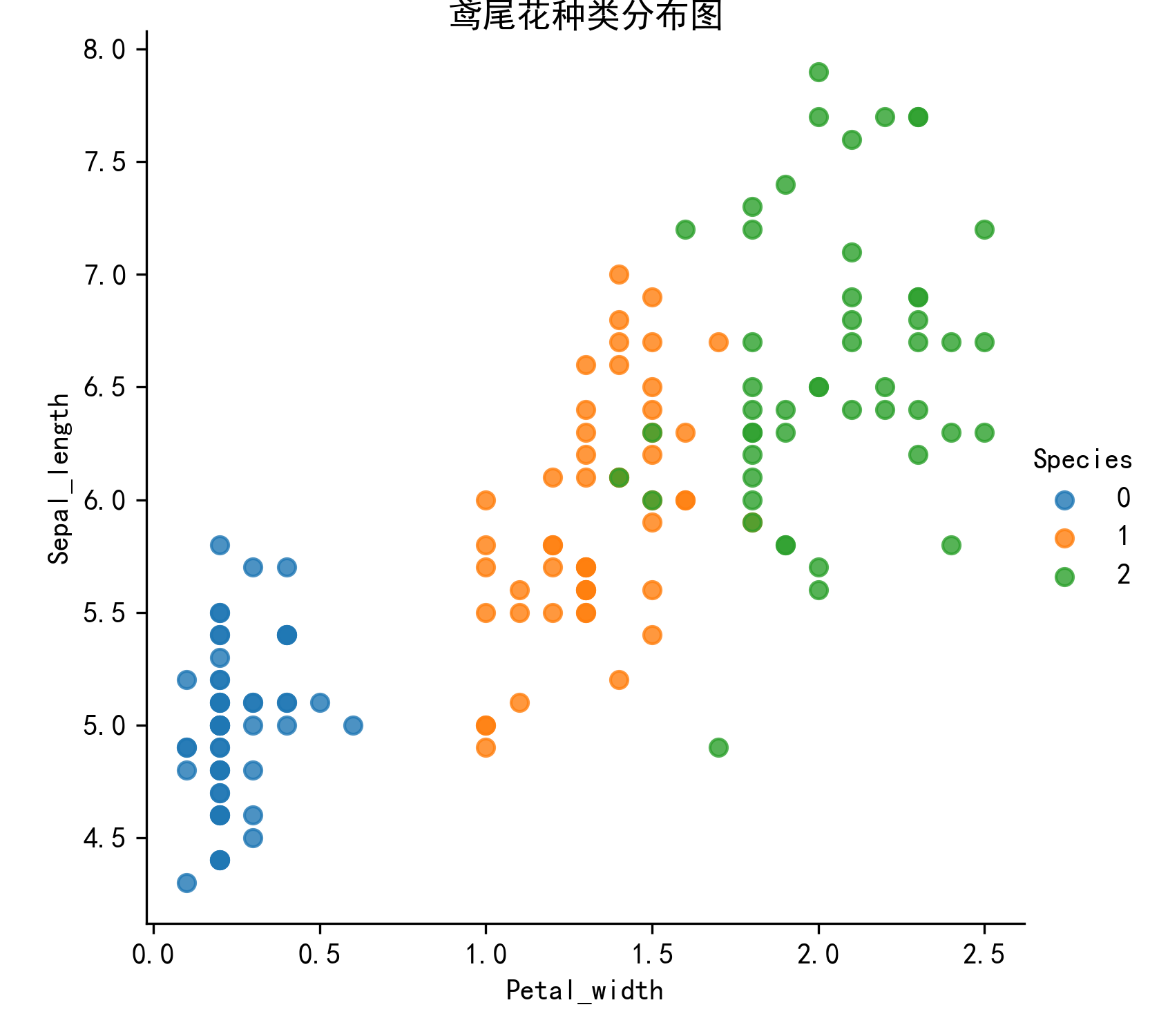
通过创建一些图,来查看不同类别是如何通过特征来区分的。在理想情况下,标签类将由一个或多个特征对完美分割,在现实世界中,这种情况很少发生。
seaborn基于Matplotlib核心库进行了更高级的API封装,可以让你轻松地画出更漂亮的图形。 seaborn的常用API介绍:
- seaborn.lmplot()是一个非常有用的方法,它会在绘制二维散点图时,自动完成回归拟合。
- sns.lmplot()里的x,y分别表示横纵坐标的列名;
- data:数据集,是DataFrame类型;
- hue:代表按照species即花的类别分类显示;
- fit_reg:表示是否进行线性拟合。
from sklearn.datasets import load_iris
import seaborn as sns
import matplotlib.pyplot as plt
import pandas as pd

#数据集可视化方法
def plot_iris(iris_d, col1, col2):
    plt.rcParams['font.sans-serif']=['SimHei']  # 用来正常显示中文标签
    plt.rcParams['axes.unicode_minus']=False  # 用来正常显示负号
    sns.lmplot(x=col1, y=col2, data=iris_d, hue='Species', fit_reg=False)
    plt.xlabel(col1)
    plt.ylabel(col2)
    plt.title('鸢尾花种类分布图',fontsize=12,pad=-30)
    plt.savefig('flower.png', dpi=300)

if __name__ == '__main__':

    # 1. 数据集获取
    # 1.1 获取小数据集用datasets.load_*()
    iris = load_iris()

    # 2. 数据可视化
    # 把数据转换成dataframe的格式
    iris_d = pd.DataFrame(iris.data, columns=['Sepal_length', 'Sepal_width', 'Petal_length', 'Petal_width'])
    iris_d['Species'] = iris.target  # 增加一列目标值

    print(type(iris_d))
    print("花朵的数量:",len(iris_d))
    plot_iris(iris_d, 'Petal_width', 'Sepal_length')  # 这两个特征也可以换
4.鸢尾花数据集的划分
4.1 机器学习一般的数据集会划分为两个部分:
训练数据:用于训练,构建模型; 测试数据:在模型检验时使用,用于评估模型是否有效。
4.2 划分比例:
训练集:70%,80%,75%; 测试集:30%,20%,25%。
4.3 数据集划分
api:sklearn.model_selection.train_test_split(arrays, *options)
1)参数:
- x:数据集的特征值;
- y:数据集的标签值;
- test_size:测试集占全集的百分比,一般穿float类型数据;
- random_state:随机数种子,不同的种子会造成不同的随机取样结果;相同的种子采样结果相同。
2)返回值:
x_train,x_test,y_train,y_test:一共四个返回值,一定要按顺序接收。分别是训练集特征值,测试集特征值,训练集目标值,测试集目标值。
from sklearn.datasets import load_iris, fetch_20newsgroups
from sklearn.model_selection import train_test_split

# 1. 数据集获取
iris = load_iris()

# 2. 数据集的划分
x_train, x_test, y_train, y_test = train_test_split(iris.data, iris.target, test_size=0.2, random_state=22)
print('训练集的特征值:\n', x_train)
print('训练集的目标值:\n', y_train)
print('测试集的特征值:\n', x_test)
print('测试集的目标值:\n', y_test)

# 可以发现,随机数种子一样,测试集的目标值一样,即测试结果一样
x_train1, x_test1, y_train1, y_test1 = train_test_split(iris.data, iris.target, test_size=0.2, random_state=2)
x_train2, x_test2, y_train2, y_test2 = train_test_split(iris.data, iris.target, test_size=0.2, random_state=2)
print('测试集的目标值:\n', y_test1)
print('测试集的目标值:\n', y_test2)
5.特征工程
5.1 归一化
通过对原始数据进行变换把数据映射到一个区间(默认为[0, 1])之间。
归一化公式:

mx,mi分别为指定区间值默认mx为1,mi为0。
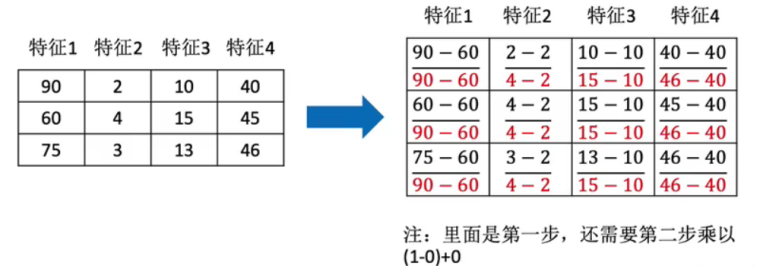
先实例化MinMaxScaler,再通过fit_transform()处理数据:
import numpy as np
import pandas as pd

from sklearn.preprocessing import MinMaxScaler

data = pd.DataFrame(np.random.randint(200, 4000, size=(5, 4)))
print(data)
print(data.shape)

transfer = MinMaxScaler(feature_range=(2, 3))  # 实例化转换器
ret = transfer.fit_transform(data[[0, 1, 2]])  # 只处理前三列,目标值不用处理
print("最小值最大值归一化处理结果:\n", ret)
print(ret.shape)
运行结果:
      0     1     2     3
0  1841  3975  3710  3464
1  2704  1218  3707  1129
2  1420  1504   975  2022
3  3813  2788   730  2786
4  2853  2078  3580  2092
(5, 4)
最小值最大值归一化处理结果:
 [[2.1759298  3.         3.        ]
 [2.53656498 2.         2.99899329]
 [2.         2.10373594 2.08221477]
 [3.         2.56945956 2.        ]
 [2.59882992 2.31193326 2.95637584]]
(5, 3)
最小值和最大值非常容易受到异常点的影响,所以这归一化方法的鲁棒性(稳定性)较差,只适用于传统精确小数据场景。可以通过标准化解决。
5.2 标准化
通过对原始数据进行变换把数据变换到均值为0,标准差为1的范围内。
标准化公式:
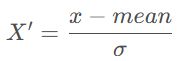
作用于每一列,mean 为平均值,σ为标准差。
- 对于归一化:如果出现异常点,影响了最大值和最小值,那么结果显然会发生改变;
- 对于标准化:如果出现异常点,由于具有一定数据量,少量的异常点对于平均值的影响并不大,从而方差改变较小。
先实例化StandardScaler,再用fit_transform()处理数据:
import pandas as pd
import numpy as np
from sklearn.preprocessing import StandardScaler

data = pd.DataFrame(np.random.randint(200, 4000, size=(5, 4)))
print(data)
# 1. 实例化一个转换器嘞
transfer = StandardScaler()
# 2. 调用fit_transform
ret = transfer.fit_transform(data[[0, 1, 2]])
print('标准化的结果:\n', ret)
print('每一列特征的平均值:\n', transfer.mean_)
print('每一列特征的方差:\n', transfer.var_)
运行效果:
      0     1     2     3
0  1780  3565  1438  1085
1  3268  1683  3216   621
2  2444  1442  1649   617
3  2592  1681  3733  1605
4   412  2067  3760   361
标准化的结果:
 [[-0.33006061  1.93030722 -1.3035055 ]
 [ 1.20856778 -0.52863294  0.45068219]
 [ 0.35653163 -0.84351316 -1.09533137]
 [ 0.50956725 -0.53124605  0.96075814]
 [-1.74460606 -0.02691507  0.98739654]]
每一列特征的平均值:
 [2099.2 2087.6 2759.2]
每一列特征的方差:
 [ 935272.96  585791.84 1027333.36]
6.鸢尾花种类预测
再识K-近邻算法API:sklearn.neighbors.KNeighborsClassifier(n_neighbors=5, algorithm='auto')
- n_neighbors:int类型数据,可选,默认为5,表示查询的邻居数;
- algorithm:{‘auto’, ‘ball_tree’, ‘kd_tree’, ‘brute’}
- auto:默认参数为auto,表示自动选择算法;
- brute:蛮力搜索,也就是线性扫描,当训练集很大时,计算非常耗时;
- kd_tree:构造kd树存储数据,以便对其进行快速检索。在维数小于20时效率高;
- ball_tree:是为了客服kd树高维失效而发明的,其构造过程是以质心C和半径r分割样本空间,每个节点是一个超球体。
用K近邻算法实现鸢尾花的种类预测:
from sklearn.datasets import load_iris
from sklearn.model_selection import train_test_split
from sklearn.preprocessing import StandardScaler
from sklearn.neighbors import KNeighborsClassifier

# 1. 获取数据
iris = load_iris()

# 2. 数据基本处理
x_train, x_test, y_train, y_test = train_test_split(iris.data, iris.target, test_size=0.2, random_state=22)

# 3. 特征工程 - 特征预处理
transfer = StandardScaler() # 标准化
x_train = transfer.fit_transform(x_train)
x_test = transfer.fit_transform(x_test)

# 4. 机器学习-KNN
# 4.1 实例化一个估计器
estimator = KNeighborsClassifier(n_neighbors=5)
# 4.2 模型训练
estimator.fit(x_train, y_train)

# 5. 模型评估
# 5.1 预测值结果输出
y_pre = estimator.predict(x_test) # 预测值
print('预测值是:\n', y_pre)
print('预测值和真实值的对比:\n', y_pre==y_test)
# 5.2 准确率计算
score = estimator.score(x_test, y_test)
print('准确率为:\n', score)
运行效果:
预测值是:
 [0 2 1 1 1 1 1 1 1 0 2 1 2 2 0 2 1 1 1 1 0 2 0 1 1 0 1 1 2 1]
预测值和真实值的对比:
 [ True  True  True False  True  True  True False  True  True  True  True
  True  True  True  True  True  True False  True  True  True  True  True
 False  True False False  True False]
准确率为:
 0.7666666666666667
7.交叉验证和网格搜索
7.1 交叉验证
7.1.1 什么是交叉验证:
将拿到的训练集数据,再细分为训练集和验证集。将数据分为S份,其中一份作为验证集,然后经过S组的测试,每次更换不同的验证集。会得到了S组泛化误差,取平均值为最终。又称S折交叉验证。
7.1.2 交叉验证过程:
1)随机将训练数据等分成k份,S1,S2,…,Sk;
2)对于每一个模型Mi,算法执行k次,每次选择一个Sj作为验证集,而其他作为训练集来训练模型Mi,把训练得到的模型在Sj上进行测试,这样一来,每次都会得到一个误差E,最后对k次得到的误差求平均,就可以得到Mi的泛化误差;
3)算法选择具有最小泛化误差的模型作为最终模型,并且在整个训练集上再次训练该模型,从而得到最终的模型。
以4折交叉验证为例:
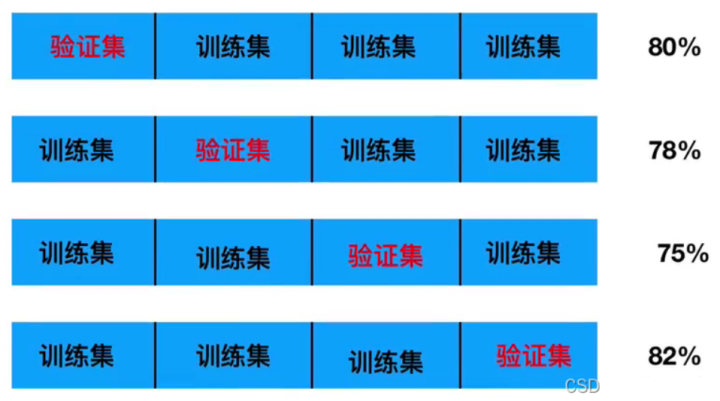
将训练集数据等分成4份,用不同的验证集做4次训练,得到4组准确率,求这4组准确率的平均数。用1减去这个平均数可以得到一个泛化误差。交叉验证的目的:为了让被评估的模型更加准确可信。注意,只是准确可信,不能优化模型。
7.2 网格搜索
7.2.1 什么是网格搜索:
通常情况下,有很多参数是需要手动指定的(如K-近邻算法中的K值),这种参数叫超参数。但是手动指定过程繁杂,所以需要对模型预设几种参数组合。每组超参数都采用交叉验证来进行评估。最后选出最优参数组合,建立模型。
7.2.2 交叉验证、网格搜索(模型选择与调优)API:
sklearn.model_selection.GridSearchCV(estimator, param_grid=None, cv=None)
1)参数: - estimator:估计器对象; - param_grid:估计器参数,字典类型数据; - cv:指定几折交叉验证。
2)结果分析: - best_score_:在交叉验证中得到的最好结果; - best_estimator_:最好的参数模型(有时打印时不显示参数,可用best_params_代替); - cv_results_:每次交叉验证后的验证集准确率结果和训练集准确率结果。
网格搜索实例:
from sklearn.datasets import load_iris
from sklearn.model_selection import train_test_split, GridSearchCV
from sklearn.preprocessing import StandardScaler
from sklearn.neighbors import KNeighborsClassifier

# 1. 获取数据
iris = load_iris()

# 2. 数据基本处理
x_train, x_test, y_train, y_test = train_test_split(iris.data, iris.target, test_size=0.2, random_state=22)

# 3. 特征工程 - 特征预处理
transfer = StandardScaler() # 标准化
x_train = transfer.fit_transform(x_train)
x_test = transfer.fit_transform(x_test)

# 4. 机器学习-KNN
# 4.1 实例化一个估计器
estimator = KNeighborsClassifier(n_neighbors=5)
# 4.2 模型调优 -- 交叉验证,网格搜索
param_grid = {'n_neighbors': [1, 3, 5, 7]}
estimator = GridSearchCV(estimator, param_grid=param_grid, cv=5)
# 4.3 模型训练
estimator.fit(x_train, y_train)

# 5. 模型评估
# 5.1 预测值结果输出
y_pre = estimator.predict(x_test) # 预测值
print('预测值是:\n', y_pre)
print('预测值和真实值的对比:\n', y_pre==y_test)
# 5.2 准确率计算
score = estimator.score(x_test, y_test)
print('准确率为:\n', score)
# 5.3 查看交叉验证,网格搜索的一些属性
print('交叉验证中,得到的最好结果:\n', estimator.best_score_)
print('交叉验证中,得到的最好模型的参数:\n', estimator.best_params_)
print('交叉验证中,得到的模型结果是:\n', estimator.cv_results_)
运行效果:
预测值是:
 [0 2 1 1 1 1 1 1 1 0 2 1 2 2 0 2 1 1 1 1 0 2 0 1 1 0 1 1 2 1]
预测值和真实值的对比:
 [ True  True  True False  True  True  True False  True  True  True  True
  True  True  True  True  True  True False  True  True  True  True  True
 False  True False False  True False]
准确率为:
 0.7666666666666667
交叉验证中,得到的最好结果:
 0.9583333333333333
交叉验证中,得到的最好模型的参数:
 {'n_neighbors': 5}
交叉验证中,得到的模型结果是:
 {'mean_fit_time': array([0.00079808, 0.00059881, 0.00079808, 0.00099735]), 'std_fit_time': array([3.99041272e-04, 4.88928058e-04, 3.99041215e-04, 3.50402318e-07]), 'mean_score_time': array([0.00259285, 0.0025928 , 0.00259261, 0.00199466]), 'std_score_time': array([4.89239511e-04, 4.88811327e-04, 4.88655833e-04, 2.78041453e-07]), 'param_n_neighbors': masked_array(data=[1, 3, 5, 7],
             mask=[False, False, False, False],
       fill_value=999999), 'params': [{'n_neighbors': 1}, {'n_neighbors': 3}, {'n_neighbors': 5}, {'n_neighbors': 7}], 'split0_test_score': array([0.95833333, 0.95833333, 1.        , 1.        ]), 'split1_test_score': array([0.95833333, 0.91666667, 0.91666667, 0.91666667]), 'split2_test_score': array([0.95833333, 0.95833333, 1.        , 1.        ]), 'split3_test_score': array([0.875     , 0.875     , 0.91666667, 0.91666667]), 'split4_test_score': array([0.95833333, 0.95833333, 0.95833333, 0.95833333]), 'mean_test_score': array([0.94166667, 0.93333333, 0.95833333, 0.95833333]), 'std_test_score': array([0.03333333, 0.03333333, 0.0372678 , 0.0372678 ]), 'rank_test_score': array([3, 4, 1, 1])}