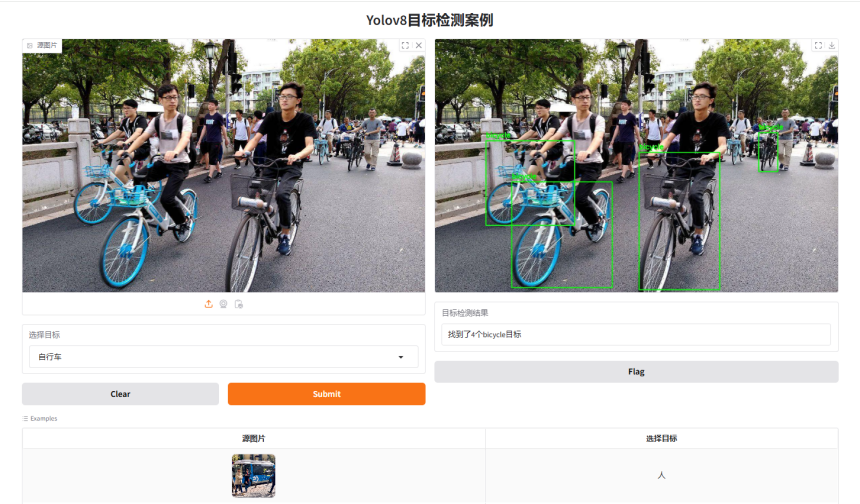
Yolov8+Gradio目标检测可视化基础案例
Yolov8+Gradio目标检测可视化基础案例
Yolov8+Gradio目标检测可视化基础案例。
1.代码实现
import cv2
import gradio as gr
from ultralytics import YOLO

model = YOLO('./model/yolov8n.pt')
classes = model.names
print(classes)
print(type(classes))


def object_detected(src, dest):
    # 预测图片
    predictions = model.predict(src)
    # 解析预测结果
    # 提取检测结果
    object_counter = 0
    result_msg = f'找到了{object_counter}个{dest}目标'

    for result in predictions:
        boxes = result.boxes.xyxy  # 边界框坐标
        scores = result.boxes.conf  # 置信度分数
        classes = result.boxes.cls  # 类别索引

        # 如果有类别名称,可以通过类别索引获取
        class_names = [model.names[int(cls)] for cls in classes]

        # 打印检测结果
        for box, score, class_name in zip(boxes, scores, class_names):
            if class_name == dest:  # 找到了一个目标
                object_counter += 1  # 目标数量加一
                print(f"Class: {class_name}, Score: {score:.2f}, Box: {box}")
                print(type(box))
                coordinates = [box[i].item() for i in range(len(box))]  # 将所有坐标值存储在
                print(coordinates)

                x1, y1, x2, y2 = coordinates
                # Draw the bounding box on the BGR frame
                cv2.rectangle(src, (int(x1), int(y1)), (int(x2), int(y2)), (0, 255, 0), 2)
                # Add a label above the box
                cv2.putText(src, dest, (int(x1), int(y1) - 10),
                            cv2.FONT_HERSHEY_SIMPLEX, 0.7, (0, 255, 0), 2)

        result_msg = f'找到了{object_counter}个{dest}目标'
    return src, result_msg


demo = gr.Interface(
    fn=object_detected,
    title='Yolov8目标检测案例',
    inputs=[gr.Image(label='源图片'), gr.Dropdown(classes.values(), value='person', label='选择目标')],
    outputs=[gr.Image(show_label=False), gr.Text(label='目标检测结果')],
    examples=[['./images/sample001.png','person'], ['./images/sample002.jpg','bicycle'], ['./images/sample003.jpg','airplane'],['./images/sample004.jpg','car'],['./images/sample005.jpg','bus']]
)

if __name__ == "__main__":
    demo.launch()
实现效果:
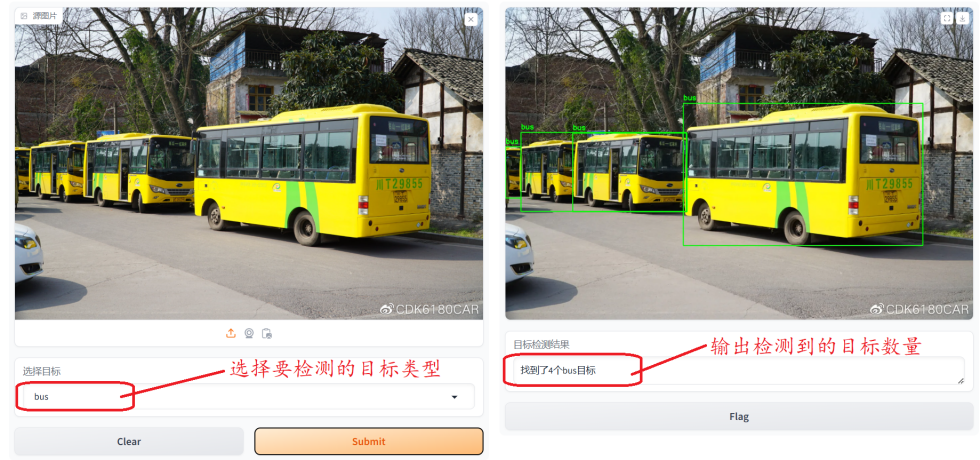
识别类别汉化版代码优化:
import cv2
import gradio as gr
from ultralytics import YOLO

model = YOLO('./model/predict/yolov8n.pt')
classes = model.names
print(classes)
print(type(classes))

chinese_classes={
    0: '人',
    1: '自行车',
    2: '汽车',
    3: '摩托车',
    4: '飞机',
    5: '公交车',
    6: '火车',
    7: '卡车',
    8: '船',
    9: '交通信号灯',
    10: '消防栓',
    11: '停车标志',
    12: '停车计时器',
    13: '长椅',
    14: '鸟',
    15: '猫',
    16: '狗',
    17: '马',
    18: '羊',
    19: '牛',
    20: '大象',
    21: '熊',
    22: '斑马',
    23: '长颈鹿',
    24: '背包',
    25: '雨伞',
    26: '手提包',
    27: '领带',
    28: '行李箱',
    29: '飞盘',
    30: '滑雪板',
    31: '滑板',
    32: '运动球',
    33: '风筝',
    34: '棒球棒',
    35: '棒球手套',
    36: '滑板',
    37: '冲浪板',
    38: '网球拍',
    39: '瓶子',
    40: '酒杯',
    41: '杯子',
    42: '叉子',
    43: '刀',
    44: '勺子',
    45: '碗',
    46: '香蕉',
    47: '苹果',
    48: '三明治',
    49: '橙子',
    50: '西兰花',
    51: '胡萝卜',
    52: '热狗',
    53: '披萨',
    54: '甜甜圈',
    55: '蛋糕',
    56: '椅子',
    57: '沙发',
    58: '盆栽植物',
    59: '床',
    60: '餐桌',
    61: '马桶',
    62: '电视',
    63: '笔记本电脑',
    64: '鼠标',
    65: '遥控器',
    66: '键盘',
    67: '手机',
    68: '微波炉',
    69: '烤箱',
    70: '烤面包机',
    71: '水槽',
    72: '冰箱',
    73: '书',
    74: '钟表',
    75: '花瓶',
    76: '剪刀',
    77: '泰迪熊',
    78: '吹风机',
    79: '牙刷'
}


def search_key_by_value(dest):
    keys_with_value = [key for key, value in chinese_classes.items() if value == dest]
    #print(keys_with_value)

    return classes[keys_with_value[0]]
def object_detected(src, dest):
    dest = search_key_by_value(dest)
    # 预测图片
    predictions = model.predict(src)
    # 解析预测结果
    # 提取检测结果
    object_counter = 0
    result_msg = f'找到了{object_counter}个{dest}目标'

    for result in predictions:
        boxes = result.boxes.xyxy  # 边界框坐标
        scores = result.boxes.conf  # 置信度分数
        classes = result.boxes.cls  # 类别索引

        # 如果有类别名称,可以通过类别索引获取
        class_names = [model.names[int(cls)] for cls in classes]

        # 打印检测结果
        for box, score, class_name in zip(boxes, scores, class_names):
            if class_name == dest:  # 找到了一个目标
                object_counter += 1  # 目标数量加一
                print(f"Class: {class_name}, Score: {score:.2f}, Box: {box}")
                print(type(box))
                coordinates = [box[i].item() for i in range(len(box))]  # 将所有坐标值存储在
                print(coordinates)

                x1, y1, x2, y2 = coordinates
                # Draw the bounding box on the BGR frame
                cv2.rectangle(src, (int(x1), int(y1)), (int(x2), int(y2)), (0, 255, 0), 2)
                # Add a label above the box
                cv2.putText(src, dest, (int(x1), int(y1) - 10),
                            cv2.FONT_HERSHEY_SIMPLEX, 0.7, (0, 255, 0), 2)

        result_msg = f'找到了{object_counter}个{dest}目标'
    return src, result_msg


demo = gr.Interface(
    fn=object_detected,
    title='Yolov8目标检测案例',
    inputs=[gr.Image(label='源图片'), gr.Dropdown(chinese_classes.values(), value='人', label='选择目标')],
    outputs=[gr.Image(show_label=False), gr.Text(label='目标检测结果')],
    examples=[['./images/sample001.jpg','人'], ['./images/sample002.jpg','自行车'], ['./images/sample003.jpg','飞机'],['./images/sample004.jpg','汽车'],['./images/sample005.jpg','公交车']]
)

if __name__ == "__main__":
    demo.launch()