PaddleSpeech 是基于飞桨 PaddlePaddle 的语音方向的开源模型库,用于语音和音频中的各种关键任务的开发,包含大量基于深度学习前沿和有影响力的语音模型。
1.PaddleSpeech安装
@echo off
#1.install base enviornment
call conda create -n paddlespeech_env python==3.10.0
call conda activate paddlespeech_env
#2.install paddlepaddle
pip install paddlepaddle==2.4.2 -i https://pypi.tuna.tsinghua.edu.cn/simple
call conda install -y -c conda-forge sox libsndfile swig bzip2
pip install pytest-runner -i https://pypi.tuna.tsinghua.edu.cn/simple
#3.install paddlespeech
pip install paddlespeech==1.4.1 -i https://pypi.tuna.tsinghua.edu.cn/simple
#4.install paddlenlp
pip install paddlenlp==2.5.2
#5.other dependencies
pip install aiofiles
pip install faiss-cpu
pip install praatio>=5.0.0
pip install pydantic
pip install python-multipart
pip install starlette
pip install onnxruntime==1.14.1
pip install onnxruntime-gpu==1.14.1
pip install scipy==1.7.3
pip install numpy==1.23
2.语音识别
下载测试音频:
wget -c https://paddlespeech.bj.bcebos.com/PaddleAudio/zh.wav
wget -c https://paddlespeech.bj.bcebos.com/PaddleAudio/en.wav
如果windows没有wget命令,可以去以下网站下载后复制到 c:\windows\system32下即可。
https://eternallybored.org/misc/wget/
创建项目目录结构如下:
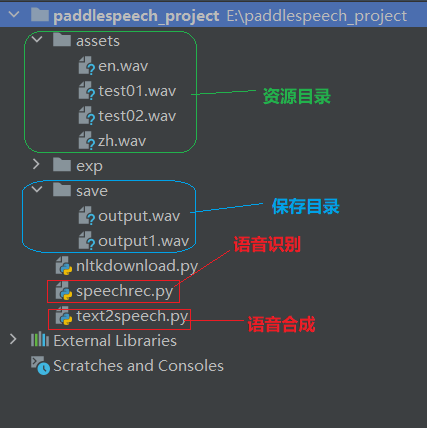
2.1 命令识别方式
#识别中文语音
paddlespeech asr --lang zh --input ./assets/zh.wav

#识别英文语音
paddlespeech asr --lang en --model transformer_librispeech  --input ./assets/en.wav
识别结果:
2024-11-29 12:41:46.324 | INFO     | paddlespeech.s2t.modules.ctc:<module>:45 - paddlespeech_ctcdecoders not installed!
2024-11-29 12:41:46.457 | INFO     | paddlespeech.s2t.modules.embedding:__init__:150 - max len: 5000
D:\miniconda3\envs\paddlespeech_env\lib\site-packages\paddle\fluid\dygraph\math_op_patch.py:275: UserWarning: The dtype of left and right variables are not the same, left dtype is padd
le.int64, but right dtype is paddle.bool, the right dtype will convert to paddle.int64
  warnings.warn(
我认为跑步最重要的就是给我带来了身体健康

i knocked at the door on the ancient side of the building
第一次运行语音识别命令,如果报以下错误:
AttributeError: module 'numpy' has no attribute 'complex'
我们只需要把np.complex修改成np.complex_即可在不更换numpy版本的前提下解决numpy库没有 'complex’属性的问题。
# wn_freqs_mul = np.zeros(treal.shape, dtype=np.complex) # 修改前
wn_freqs_mul = np.zeros(treal.shape, dtype=np.complex_) # 修改后
2.2 API方式
中文音频的语音识别:
from paddlespeech.cli.asr.infer import ASRExecutor

if __name__ == '__main__':
    asr = ASRExecutor()
    result = asr(audio_file="./assets/zh.wav",model='conformer_wenetspeech')
    print(result)
运行效果:
我认为跑步最重要的就是给我带来了身体健康
英文音频的语音识别:
from paddlespeech.cli.asr.infer import ASRExecutor

if __name__ == '__main__':
    asr = ASRExecutor()
    result = asr(audio_file="./assets/en.wav",model='transformer_librispeech',lang='en')
    print(result)
3.语音合成
3.1 命令合成方式
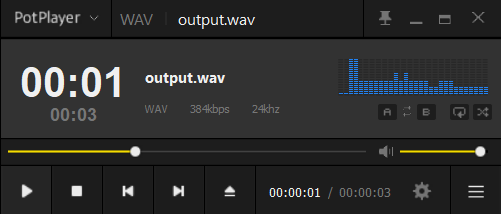
paddlespeech tts --input "你好,欢迎使用百度飞桨深度学习框架!" --output ./save/output.wav
合成结果:
语音合成过程中如果报以下异常:
ImportError: DLL load failed while importing onnxruntime_pybind11_state: 动态链接库(DLL)初始化例程失败
可以尝试降低onnxruntime和onnxruntime-gpu的版本:
pip install onnxruntime==1.14.1
pip install onnxruntime-gpu==1.14.1
3.2 API方式
中文语音合成。
from paddlespeech.cli.tts.infer import TTSExecutor

if __name__ == '__main__':

    tts = TTSExecutor()
    tts(text="OpenStack广泛应用于公共和私有云的建设与管理,适用于各种规模的企业和云服务商。", output="./save/output1.wav")
英文语音合成。
from paddlespeech.cli.tts.infer import TTSExecutor

if __name__ == '__main__':
    tts = TTSExecutor()
    tts(text="Hello, welcome to use the Baidu PaddlePaddle deep learning framework.", am='tacotron2_ljspeech',
        voc='hifigan_ljspeech', lang='en', output="./save/output2.wav")
4.Paddle Speech Demo
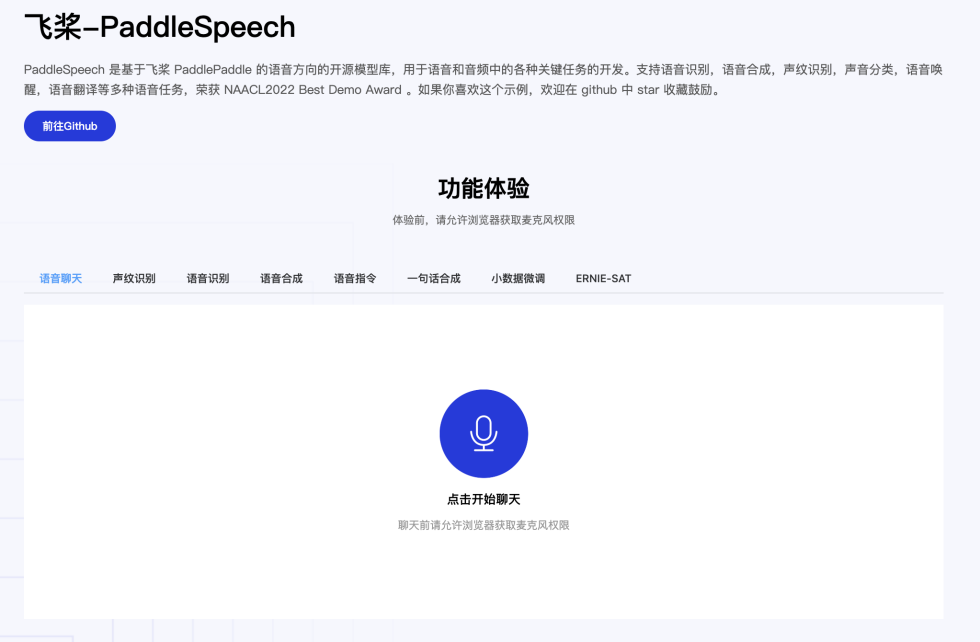
Paddle Speech Demo 是一个以 PaddleSpeech 的语音交互功能为主体开发的 Demo 展示项目,项目路径位于 PaddleSpeech-develop\demos\speech_web,用于帮助大家更好的上手 PaddleSpeech 以及使用 PaddleSpeech 构建自己的应用。
智能语音交互部分使用 PaddleSpeech,对话以及信息抽取部分使用 PaddleNLP,网页前端展示部分基于 Vue3 进行开发。
主要功能:
main.py 中包含功能
+ 语音聊天:PaddleSpeech 的语音识别能力+语音合成能力,对话部分基于 PaddleNLP 的闲聊功能
+ 声纹识别:PaddleSpeech 的声纹识别功能展示
+ 语音识别:支持【实时语音识别】,【端到端识别】,【音频文件识别】三种模式
+ 语音合成:支持【流式合成】与【端到端合成】两种方式
+ 语音指令:基于 PaddleSpeech 的语音识别能力与 PaddleNLP 的信息抽取,实现交通费的智能报销
- ERNIE-SAT:语言-语音跨模态大模型 ERNIE-SAT 可视化展示示例,支持个性化合成,跨语言语音合成(音频为中文则输入英文文本进行合成),语音编辑(修改音频文字中间的结果)功能。 ERNIE-SAT 更多实现细节,可以参考:
- 【ERNIE-SAT with AISHELL-3 dataset】
- 【ERNIE-SAT with AISHELL3 and VCTK datasets】
- 【ERNIE-SAT with VCTK dataset】
运行效果:
基础环境安装
后端环境安装
# 需要先安装 PaddleSpeech
cd speech_server
pip install -r requirements.txt -i https://mirror.baidu.com/pypi/simple
cd ../
前端环境安装
前端依赖 node.js ,需要提前安装,确保 npm 可用,作者使用的npm 测试版本为: node-v23.3.0-win-x64,建议下载官网稳定版的 node.js
如果因为网络问题,无法下载依赖库,可以参考 FAQ 部分,npm / yarn 下载速度慢问题
# 进入前端目录
cd web_client
# 安装 `yarn`,已经安装可跳过
npm install -g yarn
# 使用yarn安装前端依赖
yarn install
cd ../
启动项目次序
1.启动后端服务
cd speech_server
# 默认8010端口
python main.py --port 8010
2.启动前端服务
cd web_client
yarn dev --port 8011