1.颜色识别
颜色识别的本质是在寻找色块,而色块是指图像中具有相同或相近颜色的连续区域。这些色块可以通过CanMV的图像处理算法进行识别和检测,从而实现多种有趣和实用的功能,例如物体追踪、自动分类等。
1.1引入库
代码如下(示例):
import sensor,lcd,time
1.2初始化摄像头
首先导入摄像头(sensor)、LCD(lcd)和时间(time)模块。
sensor.reset()
sensor.set_pixformat(sensor.RGB565)
sensor.set_framesize(sensor.QVGA)
sensor.set_vflip(1)
接下来我们分别介绍一下这部分函数:
- sensor.reset( ) 这个函数用于重置摄像头传感器到默认状态。在初始化摄像头或者需要重新配置摄像头参数时,这个函数非常有用。调用sensor.reset()后,摄像头将恢复到初始设置,所有之前通过其他函数设置的参数(如分辨率、像素格式等)都会被清除。 参数:无 返回值:无
- sensor.set_pixformat( ) 这个函数用于设置摄像头传感器的像素格式。像素格式决定了每个像素的颜色信息是如何表示的。在这个例子中,sensor.RGB565表示每个像素由16位组成,其中红色占5位,绿色占6位,蓝色占5位。这种格式可以节省存储空间,但颜色深度相对较低。 参数:sensor.RGB565 或 sensor.GRAYSCALE 返回值:无
- sensor.set_framesize( ) 这个函数用于设置摄像头传感器的帧大小,也就是摄像头的分辨率。sensor.QVGA是一个预定义的分辨率,通常为320x240像素。 参数:sensor.QVGA、sensor.VGA、sensor.HD 等 返回值:无
- sensor.set_vflip( ) 这个函数用于垂直翻转摄像头传感器的图像。参数1表示启用垂直翻转,0表示禁用。在某些应用中,可能需要根据摄像头安装的方向来调整图像的方向,这时这个函数就非常有用了。 参数:0 或 1 返回值:无
1.3初始化屏幕
#lcd初始化
lcd.init()
#用于获取当前的时间,并将其赋值给变量 clock
clock=time.clock()
1.4定义用于颜色识别的阈值
这些阈值分别用于识别红色、绿色和蓝色区域,这也是我们在进行采集的时候需要不断调整的。
#颜色识别阈值 (L Min, L Max, A Min, A Max, B Min, B Max) LAB模型
#下面的阈值元组是用来识别 红、绿、蓝三种颜色,当然你也可以调整让识别变得更好。
thresholds = [(30, 100, 15, 127, 15, 127), # 红色阈值
             (30, 100, -64, -8, -32, 32), # 绿色阈值
             (23, 74, -119, 19, -125, -29)] # 蓝色阈值
在给定的阈值中,通常使用LAB色彩空间来表示颜色范围,以便在图像处理中识别特定的颜色。通过调整阈值的L、A、B值,可以选择性地识别不同的颜色。Lab色彩空间的主要优势在于其色域广阔,比RGB空间还要大,这意味着RGB和CMYK所能描述的色彩信息,在Lab颜色空间中都能得以体现。此外,Lab色彩空间具有跨平台兼容性,是一种独立于设备和操作系统的颜色模型,因此在制造业中,通过使用Lab色彩空间,可以对不同颜色的产品进行精确的颜色比较和质量控制。 在图像处理中,Lab色彩空间具有很大的应用价值。由于其均匀分布的颜色模型,它能更准确地表示图像中的颜色信息,从而实现更好的图像处理效果。其中,L表示亮度(从黑到白的变化),A和B表示色度。A通道表示从绿色到红色的变化,负值表示绿色,正值表示红色。B通道表示从蓝色到黄色的变化,负值表示蓝色,正值表示黄色。
1.5 img.find_blobs( )函数
这是一个在 micropython-opencv 库中用于图像处理的函数,主要用于在图像中查找和识别特定的颜色块(blobs)。 函数的常见参数包括:
- threshold:一个颜色阈值元组,用于确定哪些颜色被认为是 blob 的一部分。
- area_threshold:一个整数值,用于过滤掉小于此面积阈值的 blob。
- merge:一个布尔值,如果为 True,则合并相近的 blob。
函数的返回值是一个包含所有找到的 blob 的列表。每个 blob 都是一个对象,其中包含有关该 blob 的信息,例如其位置、大小和颜色。
1.6 完整代码
import sensor,lcd,time
import gc


sensor.reset()
sensor.set_pixformat(sensor.RGB565)
sensor.set_framesize(sensor.QVGA)
sensor.set_hmirror(1)
sensor.set_vflip(1)

#lcd初始化
lcd.init()
#用于获取当前的时间,并将其赋值给变量 clock
clock=time.clock()

#颜色识别阈值 (L Min, L Max, A Min, A Max, B Min, B Max) LAB模型
#下面的阈值元组是用来识别 红、绿、蓝三种颜色,当然你也可以调整让识别变得更好。
thresholds = [(30, 100, 15, 127, 15, 127), # 红色阈值
             (30, 100, -64, -8, -32, 32), # 绿色阈值
             (23, 74, -119, 19, -125, -29)] # 蓝色阈值

while True:

    clock.tick()

    img=sensor.snapshot()

    blobs = img.find_blobs([thresholds[2]]) # 0,1,2分别表示红,绿,蓝色。
    if blobs:
        for b in blobs:
            tmp=img.draw_rectangle(b[0:4])
            tmp=img.draw_cross(b[5], b[6])

    lcd.display(img)     #LCD显示图片
    print(clock.fps())   #打印FPS
    #释放内存
    gc.collect()
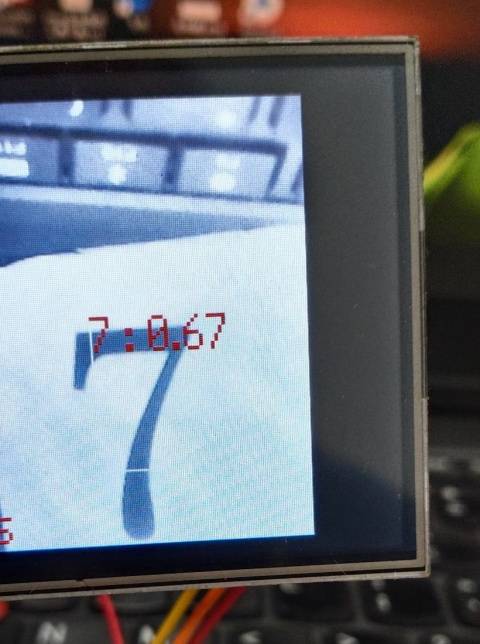
2.数字识别
链接:https://pan.baidu.com/s/1afhE_IAwn87fW_VEDrft4g 提取码:lypg
模型压缩包文件:1.main.py 2.model-54796.kmodel 3.report.json
把这三个文件,全丢SD卡里,在插上K210Bit,上电就能自动执行了。因为原main.py里的label使用了汉字显示不出来就要重命名。识别数字后需要简单的串口打印,程序改写如下:
# generated by maixhub, tested on maixpy3 v0.4.8
# copy files to TF card and plug into board and power on
import sensor, image, lcd, time
import KPU as kpu
import gc, sys

input_size = (224, 224)
labels = ['1', '2', '3', '4', '5', '6', '7', '8']
anchors = [0.84, 1.22, 1.66, 2.34, 1.31, 1.75, 1.88, 2.59, 1.47, 2.09]

def lcd_show_except(e):
    import uio
    err_str = uio.StringIO()
    sys.print_exception(e, err_str)
    err_str = err_str.getvalue()
    img = image.Image(size=input_size)
    img.draw_string(0, 10, err_str, scale=1, color=(0xff,0x00,0x00))
    lcd.display(img)

def main(anchors, labels = None, model_addr="/sd/m.kmodel", sensor_window=input_size, lcd_rotation=0, sensor_hmirror=False, sensor_vflip=False):
    sensor.reset()
    sensor.set_pixformat(sensor.RGB565)
    sensor.set_framesize(sensor.QVGA)
    sensor.set_windowing(sensor_window)
    sensor.set_hmirror(sensor_hmirror)
    sensor.set_vflip(sensor_vflip)
    sensor.run(1)
    #sensor.set_vflip(1)        #屏幕垂直翻转

    lcd.init(type=1)
    lcd.rotation(lcd_rotation)
    lcd.clear(lcd.WHITE)

    if not labels:
        with open('labels.txt','r') as f:
            exec(f.read())
    if not labels:
        print("no labels.txt")
        img = image.Image(size=(320, 240))
        img.draw_string(90, 110, "no labels.txt", color=(255, 0, 0), scale=2)
        lcd.display(img)
        return 1
    try:
        img = image.Image("startup.jpg")
        lcd.display(img)
    except Exception:
        img = image.Image(size=(320, 240))
        img.draw_string(90, 110, "loading model...", color=(255, 255, 255), scale=2)
        lcd.display(img)

    try:
        task = None
        task = kpu.load(model_addr)
        kpu.init_yolo2(task, 0.5, 0.3, 5, anchors) # threshold:[0,1], nms_value: [0, 1]
        while(True):
            img = sensor.snapshot()
            t = time.ticks_ms()
            objects = kpu.run_yolo2(task, img)
            t = time.ticks_ms() - t
            if objects:
                for obj in objects:
                    pos = obj.rect()
                    img.draw_rectangle(pos)
                    OutNum=labels[obj.classid()]
                    img.draw_string(pos[0], pos[1], "%s : %.2f" %(OutNum, obj.value()), scale=2, color=(255, 0, 0))
                    print(OutNum)
            img.draw_string(0, 200, "t:%dms" %(t), scale=2, color=(255, 0, 0))
            lcd.display(img)
            gc.collect()
    except Exception as e:
        raise e
    finally:
        if not task is None:
            kpu.deinit(task)


if __name__ == "__main__":
    try:
        # main(anchors = anchors, labels=labels, model_addr=0x300000, lcd_rotation=0)
        main(anchors = anchors, labels=labels, model_addr="/sd/model-54796.kmodel")
    except Exception as e:
        sys.print_exception(e)
        lcd_show_except(e)
    finally:
        gc.collect()
运行效果: