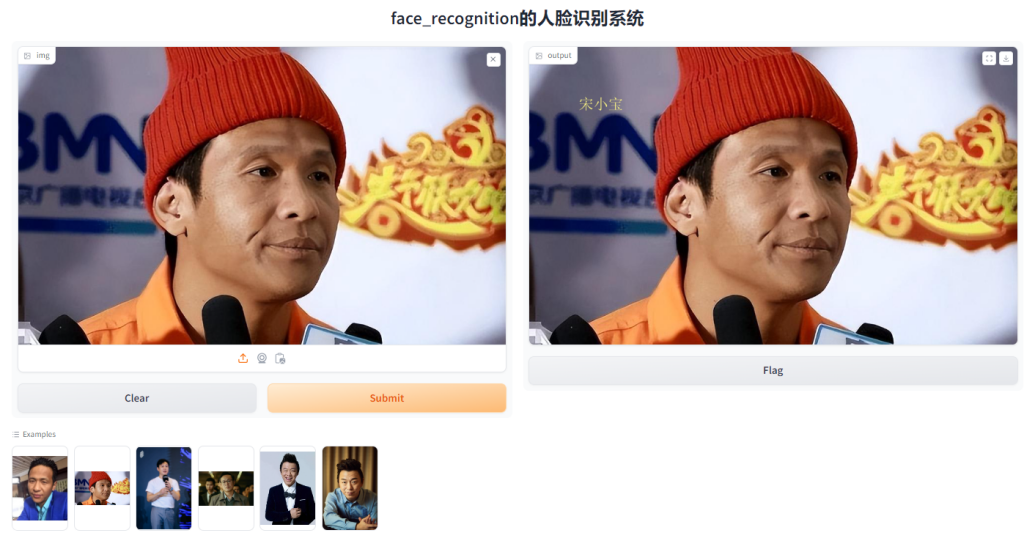
OpenCV+Dlib+Gradio的人脸识别系统
OpenCV+Dlib+Gradio的人脸识别系统
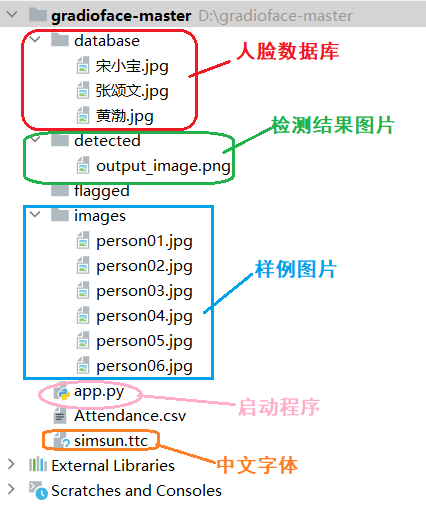
1.项目结构
项目结构截图如下:
2.安装依赖
pip install opencv-python -i https://pypi.tuna.tsinghua.edu.cn/simple
pip install numpy -i https://pypi.tuna.tsinghua.edu.cn/simple
pip install cmake -i https://pypi.tuna.tsinghua.edu.cn/simple
pip install dlib -i https://pypi.tuna.tsinghua.edu.cn/simple
pip install face_recognition -i https://pypi.tuna.tsinghua.edu.cn/simple
pip install gradio -i https://pypi.tuna.tsinghua.edu.cn/simple
3.程序实现
app.py
import cv2
import numpy as np
import face_recognition
import os
from datetime import datetime
import gradio as gr
from PIL import Image, ImageDraw, ImageFont

path = 'database'  # 人像存储位置
images = []
className = []
myList = os.listdir(path)  # 返回指定文件目录下的列表,这里返回的是人像图片
print(myList)


def cv2AddChineseText(img, text, position, textColor, textSize):
    if (isinstance(img, np.ndarray)):  # 判断是否OpenCV图片类型
        img = Image.fromarray(cv2.cvtColor(img, cv2.COLOR_BGR2RGB))
    # 创建一个可以在给定图像上绘图的对象
    draw = ImageDraw.Draw(img)
    # 字体的格式
    fontStyle = ImageFont.truetype(
        "simsun.ttc", textSize, encoding="utf-8")  # simsun.ttc语言包放在程序同级目录下
    # 绘制文本
    draw.text(position, text, textColor, font=fontStyle)
    # 转换回OpenCV格式
    return cv2.cvtColor(np.asarray(img), cv2.COLOR_RGB2BGR)

for cl in myList:  # 获取每张人像的名称
    #curImg = cv2.imread(f'{path}/{cl}')
    # 字符流转换字节流,这样可以读取中文文件名
    with open(f'{path}/{cl}', 'rb') as f:
        image_data = f.read()
    curImg = cv2.imdecode(np.frombuffer(image_data, np.uint8), cv2.IMREAD_COLOR)

    images.append(curImg)
    className.append(os.path.splitext(cl)[0])
print(className)


def findEncodings(images):  # 获取所有存储的人像编码
    encodeList = []
    for img in images:
        img = cv2.cvtColor(img, cv2.COLOR_BGR2RGB)
        encode = face_recognition.face_encodings(img)[0]
        encodeList.append(encode)
    return encodeList


def markAttendance(name):  # 打卡,生成记录
    with open('Attendance.csv', 'r+',encoding='utf-8') as f:
        myDatalist = f.readlines()  # 读取文件中所有的行
        nameList = []
        for line in myDatalist:
            entry = line.split(',')
            nameList.append(entry[0])
        if name not in nameList:
            now = datetime.now()
            dtString = now.strftime('%H:%M:%S')  # 将日期时间格式化成字符串
            f.writelines(f'\n{name},{dtString}')  # 将包含多个字符串的可迭代对象写入文件中,这里是记录人名


encodeListKnown = findEncodings(images)
print('encoding complete')

# 人脸检测函数
def face_rec(img):
    imgs = cv2.cvtColor(img, cv2.COLOR_BGR2RGB)
    faceCurFrame = face_recognition.face_locations(imgs)  # 获取人脸位置信息
    encodesCurFrame = face_recognition.face_encodings(imgs, faceCurFrame)  # 获取人脸编码

    for encodeFace, faceLoc in zip(encodesCurFrame, faceCurFrame):  # zip函数,连接成字典
        matches = face_recognition.compare_faces(encodeListKnown, encodeFace)  # 人脸匹配度
        faceDis = face_recognition.face_distance(encodeListKnown, encodeFace)  # 欧式距离
        # print(faceDis)
        matchIndex = np.argmin(faceDis)  # 返回数组中小元素的索引
        if matches[matchIndex]:
            name = className[matchIndex].upper()
            print(name)
            y1, x2, y2, x1 = faceLoc  # 人脸位置
            y1, x2, y2, x1 = y1 * 4, x2 * 4, y2 * 4, x1 * 4
            cv2.rectangle(imgs, (x1, y1), (x2, y2), (0, 255, 0), 1)
            cv2.rectangle(imgs, (x1, y2 - 35), (x2, y2), (0, 255, 0), cv2.FILLED)
            #cv2.putText(imgs, name, (x1 + 6, y2 - 6), cv2.QT_FONT_NORMAL, 1, (255, 255, 255), 2)
            imgs = cv2AddChineseText(imgs, name, (100, 100), (250, 242, 131), 30)
            markAttendance(name)  # 记录人名
            filename = "detected/output_image.png"
            cv2.imwrite(filename, imgs)
            dest_img = ''
    #cv2.imshow(str('Face_Detector'), img)
    return filename

demo = gr.Interface(
    fn = face_rec,
    title='face_recognition的人脸识别系统',
    inputs = gr.Image(),
    outputs = "image",
    examples=["images/person01.jpg", "images/person02.jpg", "images/person03.jpg","images/person04.jpg","images/person05.jpg","images/person06.jpg"],
)
if __name__ == "__main__":
    demo.launch()
运行效果: