偏好查询
偏好查询
偏好查询
1.偏好查询
ES中的索引数据最终都是存储在分片里面的,分片有多个,并且分片还分为主分片和副本分片。
ES在查询索引库中的数据时,具体是到哪些分片里面查询数据呢?
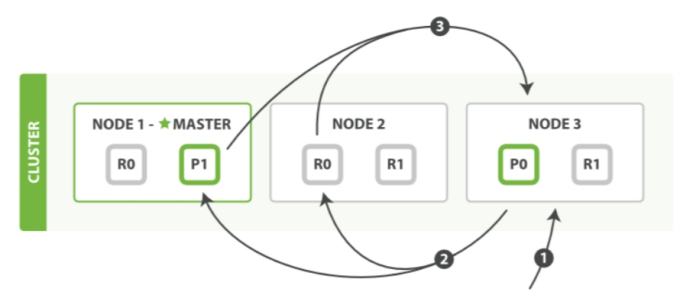
这个表示是一个3个节点的ES集群,集群内有一个索引库,索引库里面有P0和P1两个主分片,这两个主分片分别都有2个副本分片,R0和R1。
查询过程主要包含三个步骤:
- 客户端发送一个查询 请求到 Node 3 , Node 3 会创建一个空优先队列,主要为了存储结果数据。
- Node 3 将查询请求转发到索引的主分片或副本分片中。每个分片在本地执行查询并将查询到的结果添加到本地的有序优先队列中。 具体这里面Node 3 将查询请求转发到索引的哪个分片中,可以是随机的,也可以由我们程序员来控制。默认是randomize across shards:表示随机从分片中取数据。
- 每个分片返回各自优先队列中所有文档的 ID 和排序值给到 Node 3 ,Node 3合并这些值到自己的优先队列中来产生一个全局排序后的结果列表。
注意:当客户端的一个搜索请求被发送到某个节点时,这个节点就变成了协调节点。 这个节点的任务是广播查询请求到所有相关分片,并将它们查询到的结果整合成全局排序后的结果集合,这个结果集合会返回给客户端。这里面的Node3节点其实就是协调节点。
接下来我们来具体分析一下如何控制查询请求到分片之间的分发规则: 先创建一个具有5个分片,0个副本的索引库。分片太少不好验证效果。
curl -H "Content-Type: application/json" -XPUT 'http://master:9200/pre/' -d'{"settings":{"number_of_shards":5,"number_of_replicas":0}}'
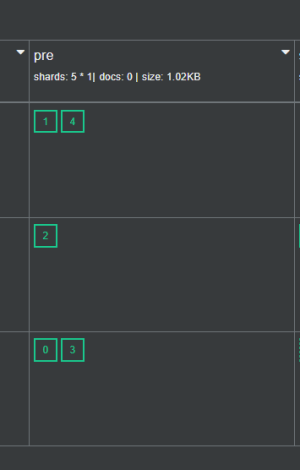
在索引库中初始化一批测试数据:
curl -H "Content-Type: application/json" -XPOST 'http://master:9200/pre/_doc/1' -d'{"name":"tom","age":18}'
curl -H "Content-Type: application/json" -XPOST 'http://master:9200/pre/_doc/2' -d'{"name":"jack","age":29}'
curl -H "Content-Type: application/json" -XPOST 'http://master:9200/pre/_doc/3' -d'{"name":"jessica","age":18}'
curl -H "Content-Type: application/json" -XPOST 'http://master:9200/pre/_doc/4' -d'{"name":"dave","age":19}'
curl -H "Content-Type: application/json" -XPOST 'http://master:9200/pre/_doc/5' -d'{"name":"lilei","age":18}'
curl -H "Content-Type: application/json" -XPOST 'http://master:9200/pre/_doc/6' -d'{"name":"lili","age":29}'
curl -H "Content-Type: application/json" -XPOST 'http://master:9200/pre/_doc/7' -d'{"name":"messi","age":37}'
curl -H "Content-Type: application/json" -XPOST 'http://master:9200/pre/_doc/8' -d'{"name":"ronaldo","age":39}'
可以在cerebro->more->catapis->shards,然后点击execute

在代码层面通过preference(...)来设置具体的分片查询方式,分别有以下几个取值:
- _local:表示查询操作会优先在本地节点(协调节点)的分片中查询,没有的话再到其它节点中查询。
- _only_local:表示查询只会在本地节点的分片中查询。
- _only_nodes:表示只在指定的节点中查询。
- _prefer_nodes:表示优先在指定的节点上查询。
- _shards:表示只查询索引库中指定分片的数据。
- custom-string:自定义一个参数,不能以下划线(_)开头。
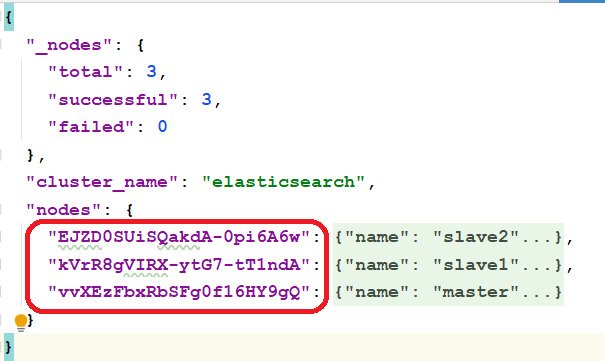
通过ES中针对节点信息的RestAPI可以快速获取: http://master:9200/_nodes?pretty 返回的信息有点多,建议在专业的json编辑器中打开阅读。
java实现如下:
package com.simoniu.db_elasticsearch.shards;
import org.apache.http.HttpHost;
import org.elasticsearch.action.search.SearchRequest;
import org.elasticsearch.action.search.SearchResponse;
import org.elasticsearch.client.RequestOptions;
import org.elasticsearch.client.RestClient;
import org.elasticsearch.client.RestHighLevelClient;
import org.elasticsearch.common.text.Text;
import org.elasticsearch.search.SearchHit;
import org.elasticsearch.search.SearchHits;
import org.elasticsearch.search.fetch.subphase.highlight.HighlightField;

import java.util.Map;


/**
 * 偏好查询(分片查询方式)
 * Created by simoniu
 */
public class EsShardsDemo {
    public static void main(String[] args) throws Exception{
        //获取RestClient连接
        RestHighLevelClient client = new RestHighLevelClient(
                RestClient.builder(
                        new HttpHost("master",9200,"http"),
                        new HttpHost("slave1",9200,"http"),
                        new HttpHost("slave2",9200,"http")));
        SearchRequest searchRequest = new SearchRequest();
        searchRequest.indices("pre");

        //指定分片查询方式
        //searchRequest.preference();//默认随机
        //_local:表示查询操作会优先在本地节点(协调节点)的分片中查询,没有的话再到其它节点中查询。
        searchRequest.preference("_local");
        //_only_local:表示查询只会在本地节点的分片中查询。
        searchRequest.preference("_only_local");
        //_only_nodes:表示只在指定的节点中查询
        searchRequest.preference("_only_nodes:EJZD0SUiSQakdA-0pi6A6w,kVrR8gVIRX-ytG7-tT1ndA,vvXEzFbxRbSFg0f16HY9gQ");
        //_prefer_nodes:表示优先在指定的节点上查询。
        searchRequest.preference("_prefer_nodes:EJZD0SUiSQakdA-0pi6A6w");
        //_shards:表示只查询索引库中指定分片的数据
        searchRequest.preference("_shards:0,1");
        //custom-string:自定义一个参数,不能以下划线(_)开头。
        searchRequest.preference("mypreference");//自定义参数

        //执行查询操作
        SearchResponse searchResponse = client.search(searchRequest, RequestOptions.DEFAULT);

        //获取查询返回的结果
        SearchHits hits = searchResponse.getHits();
        //获取数据总量
        long numHits = hits.getTotalHits().value;
        System.out.println("数据总数:"+numHits);
        //获取具体内容
        SearchHit[] searchHits = hits.getHits();
        //迭代解析具体内容
        for (SearchHit hit : searchHits) {
            String sourceAsString = hit.getSourceAsString();
            System.out.println(sourceAsString);
        }

        //关闭连接
        client.close();
    }
}