高亮功能
高亮功能
高亮功能。
1.高亮功能
针对用户搜索时的关键词,如果匹配到了,最终在页面展现的时候可以标红高亮显示,看起来比较清晰。 设置高亮的核心代码如下:
package com.simoniu.db_elasticsearch.highlight;

import org.apache.http.HttpHost;
import org.elasticsearch.action.search.SearchRequest;
import org.elasticsearch.action.search.SearchResponse;
import org.elasticsearch.client.RequestOptions;
import org.elasticsearch.client.RestClient;
import org.elasticsearch.client.RestHighLevelClient;
import org.elasticsearch.common.text.Text;
import org.elasticsearch.index.query.QueryBuilders;
import org.elasticsearch.search.SearchHit;
import org.elasticsearch.search.SearchHits;
import org.elasticsearch.search.builder.SearchSourceBuilder;
import org.elasticsearch.search.fetch.subphase.highlight.HighlightBuilder;
import org.elasticsearch.search.fetch.subphase.highlight.HighlightField;
import org.elasticsearch.search.sort.SortOrder;

import java.util.Map;

/**
 * Search详解
 * Created by simoniu
 */

public class EsHighlightOperateDemo {

    public static void main(String[] args) throws Exception {
        //获取RestClient连接
        RestHighLevelClient client = new RestHighLevelClient(
                RestClient.builder(
                        new HttpHost("master", 9200, "http"),
                        new HttpHost("slave1", 9200, "http"),
                        new HttpHost("slave2", 9200, "http")));


        SearchRequest searchRequest = new SearchRequest();
        //指定索引库,支持指定一个或者多个,也支持通配符,例如:user*
        searchRequest.indices("myschool");

        //设置搜索类型
        //searchRequest.searchType(SearchType.DEFAULT);
        //searchRequest.searchType(SearchType.DFS_QUERY_THEN_FETCH);

        //指定查询条件
        SearchSourceBuilder searchSourceBuilder = new SearchSourceBuilder();
        //查询所有,可以不指定,默认就是查询索引库中的所有数据
        searchSourceBuilder.query(QueryBuilders.matchAllQuery());

        //高亮
        //设置高亮字段
        HighlightBuilder highlightBuilder = new HighlightBuilder()
                .field("name");//支持多个高亮字段,使用多个field方法指定即可
        //设置高亮字段的前缀和后缀内容
        highlightBuilder.preTags("<font color='red'>");
        highlightBuilder.postTags("</font>");
        searchSourceBuilder.highlighter(highlightBuilder);

        //分页
        //设置每页的起始位置,默认是0
        searchSourceBuilder.from(0);
        //设置每页的数据量,默认是10
        searchSourceBuilder.size(17);

        //排序
        //按照age字段,倒序排序
        searchSourceBuilder.sort("age", SortOrder.DESC);

        //注意:如果使用高亮查询就不能指定字段的keyword类型实现精确查询。
        //searchSourceBuilder.query(QueryBuilders.matchQuery("name.keyword", "刘德华"));
        searchSourceBuilder.query(QueryBuilders.matchQuery("name", "tom"));

        //设置 SearchSourceBuilder
        searchRequest.source(searchSourceBuilder);
        //执行查询操作
        SearchResponse searchResponse = client.search(searchRequest, RequestOptions.DEFAULT);

        //获取查询返回的结果
        SearchHits hits = searchResponse.getHits();
        //获取数据总量
        long numHits = hits.getTotalHits().value;
        System.out.println("数据总数:"+numHits);
        //获取具体内容
        SearchHit[] searchHits = hits.getHits();
        //迭代解析具体内容
        for (SearchHit hit : searchHits) {

            Map<String, Object> sourceAsMap = hit.getSourceAsMap();
            String name = sourceAsMap.get("name").toString();
            int age = Integer.parseInt(sourceAsMap.get("age").toString());
            //获取高亮字段内容
            Map<String, HighlightField> highlightFields = hit.getHighlightFields();
            //获取name字段的高亮内容
            HighlightField highlightField = highlightFields.get("name");
            if(highlightField!=null){
                Text[] fragments = highlightField.getFragments();
                name = "";
                for (Text text : fragments) {
                    name += text;
                }
            }
            //获取最终的结果数据
            System.out.println(name+"===>"+age);
        }
        //关闭连接
        client.close();
    }
}
运行结果:
数据总数:2
<font color='red'>tom</font>===>20
<font color='red'>tom</font>===>15
注意:要使用高亮查询功能必须要设置查询的字段,否则无法实现高亮。
2.评分依据
ES在返回满足条件的数据的时候,按照搜索条件的匹配度返回数据的,匹配度最高的数据排在最前面,这个匹配度其实就是ES中返回结果中的score字段的值。
package com.simoniu.db_elasticsearch.highlight;

import org.apache.http.HttpHost;
import org.apache.lucene.search.Explanation;
import org.elasticsearch.action.search.SearchRequest;
import org.elasticsearch.action.search.SearchResponse;
import org.elasticsearch.client.RequestOptions;
import org.elasticsearch.client.RestClient;
import org.elasticsearch.client.RestHighLevelClient;
import org.elasticsearch.common.text.Text;
import org.elasticsearch.index.query.QueryBuilders;
import org.elasticsearch.search.SearchHit;
import org.elasticsearch.search.SearchHits;
import org.elasticsearch.search.builder.SearchSourceBuilder;
import org.elasticsearch.search.fetch.subphase.highlight.HighlightBuilder;
import org.elasticsearch.search.fetch.subphase.highlight.HighlightField;
import org.elasticsearch.search.sort.SortOrder;

import java.util.Map;

/**
 * Search详解
 * Created by simoniu
 */

public class EsHighlightOperateDemo {

    public static void main(String[] args) throws Exception {
        //获取RestClient连接
        RestHighLevelClient client = new RestHighLevelClient(
                RestClient.builder(
                        new HttpHost("master", 9200, "http"),
                        new HttpHost("slave1", 9200, "http"),
                        new HttpHost("slave2", 9200, "http")));


        SearchRequest searchRequest = new SearchRequest();
        //指定索引库,支持指定一个或者多个,也支持通配符,例如:user*
        searchRequest.indices("myschool");

        //指定查询条件
        SearchSourceBuilder searchSourceBuilder = new SearchSourceBuilder();
        //开启评分依据。
        searchSourceBuilder.explain(true);
        //高亮
        //设置高亮字段
        HighlightBuilder highlightBuilder = new HighlightBuilder()
                .field("name");//支持多个高亮字段,使用多个field方法指定即可
        //设置高亮字段的前缀和后缀内容
        highlightBuilder.preTags("<font color='red'>");
        highlightBuilder.postTags("</font>");
        searchSourceBuilder.highlighter(highlightBuilder);

        //注意:如果使用高亮查询就不能指定字段的keyword类型实现精确查询。
        //searchSourceBuilder.query(QueryBuilders.matchQuery("name.keyword", "刘德华"));
        searchSourceBuilder.query(QueryBuilders.matchQuery("name", "刘德华"));

        //设置 SearchSourceBuilder
        searchRequest.source(searchSourceBuilder);
        //执行查询操作
        SearchResponse searchResponse = client.search(searchRequest, RequestOptions.DEFAULT);

        //获取查询返回的结果
        SearchHits hits = searchResponse.getHits();
        //获取数据总量
        long numHits = hits.getTotalHits().value;
        System.out.println("数据总数:" + numHits);
        //获取具体内容
        SearchHit[] searchHits = hits.getHits();
        //迭代解析具体内容
        for (SearchHit hit : searchHits) {

            Map<String, Object> sourceAsMap = hit.getSourceAsMap();
            String name = sourceAsMap.get("name").toString();
            int age = Integer.parseInt(sourceAsMap.get("age").toString());
            //获取高亮字段内容
            Map<String, HighlightField> highlightFields = hit.getHighlightFields();
            //获取name字段的高亮内容
            HighlightField highlightField = highlightFields.get("name");
            if (highlightField != null) {
                Text[] fragments = highlightField.getFragments();
                name = "";
                for (Text text : fragments) {
                    name += text;
                }
            }

            float score = hit.getScore();
            //获取最终的结果数据
            System.out.println(name + "===>" + age + ",score==>" + score);
            System.out.println("-------------------------评分依据---------------------------");
            //获取Score的评分依据
            Explanation explanation = hit.getExplanation();
            //打印评分依据
            if (explanation != null) {
                System.out.println(explanation.toString());
            }
        }

        //关闭连接
        client.close();
    }
}
注意:要想显示评分标准必须,保证不能出现重复查询的情况,比如在上面的代码中出现了两次查询语句。
searchSourceBuilder.query(QueryBuilders.matchAllQuery());
searchSourceBuilder.query(QueryBuilders.matchQuery("name", "刘德华"));
运行结果:
数据总数:2
<font color='red'>刘</font><font color='red'>德</font><font color='red'>华</font>===>59,score==>4.382622
-------------------------评分依据---------------------------
4.382622 = sum of:
  1.2459364 = weight(name:刘 in 0) [PerFieldSimilarity], result of:
    1.2459364 = score(freq=1.0), computed as boost * idf * tf from:
      2.2 = boost
      1.974081 = idf, computed as log(1 + (N - n + 0.5) / (n + 0.5)) from:
        2.0 = n, number of documents containing term
        17.0 = N, total number of documents with field
      0.2868852 = tf, computed as freq / (freq + k1 * (1 - b + b * dl / avgdl)) from:
        1.0 = freq, occurrences of term within document
        1.2 = k1, term saturation parameter
        0.75 = b, length normalization parameter
        3.0 = dl, length of field
        1.2352941 = avgdl, average length of field
  1.5683427 = weight(name:德 in 0) [PerFieldSimilarity], result of:
    1.5683427 = score(freq=1.0), computed as boost * idf * tf from:
      2.2 = boost
      2.4849067 = idf, computed as log(1 + (N - n + 0.5) / (n + 0.5)) from:
        1.0 = n, number of documents containing term
        17.0 = N, total number of documents with field
      0.2868852 = tf, computed as freq / (freq + k1 * (1 - b + b * dl / avgdl)) from:
        1.0 = freq, occurrences of term within document
        1.2 = k1, term saturation parameter
        0.75 = b, length normalization parameter
        3.0 = dl, length of field
        1.2352941 = avgdl, average length of field
  1.5683427 = weight(name:华 in 0) [PerFieldSimilarity], result of:
    1.5683427 = score(freq=1.0), computed as boost * idf * tf from:
      2.2 = boost
      2.4849067 = idf, computed as log(1 + (N - n + 0.5) / (n + 0.5)) from:
        1.0 = n, number of documents containing term
        17.0 = N, total number of documents with field
      0.2868852 = tf, computed as freq / (freq + k1 * (1 - b + b * dl / avgdl)) from:
        1.0 = freq, occurrences of term within document
        1.2 = k1, term saturation parameter
        0.75 = b, length normalization parameter
        3.0 = dl, length of field
        1.2352941 = avgdl, average length of field

<font color='red'>刘</font>老虎===>47,score==>1.2459364
-------------------------评分依据---------------------------
1.2459364 = sum of:
  1.2459364 = weight(name:刘 in 1) [PerFieldSimilarity], result of:
    1.2459364 = score(freq=1.0), computed as boost * idf * tf from:
      2.2 = boost
      1.974081 = idf, computed as log(1 + (N - n + 0.5) / (n + 0.5)) from:
        2.0 = n, number of documents containing term
        17.0 = N, total number of documents with field
      0.2868852 = tf, computed as freq / (freq + k1 * (1 - b + b * dl / avgdl)) from:
        1.0 = freq, occurrences of term within document
        1.2 = k1, term saturation parameter
        0.75 = b, length normalization parameter
        3.0 = dl, length of field
        1.2352941 = avgdl, average length of field
3.ES中分页的性能问题
在使用ES实现分页查询的时候,不要一次请求过多或者页码过大的结果,这样会对服务器造成很大的压力,因为它们会在返回前排序。
以百度网为例,如下图:
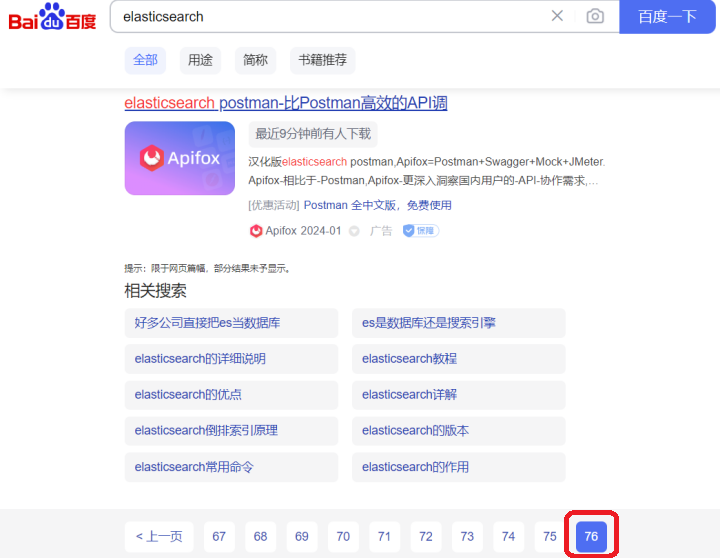
我们搜索"elasticsearch"关键字,返回的最大页数也仅仅是76页,还有一点原因是后面的搜索结果由于评分很低基本上也不是我们想要的数据了,我们在使用搜索引擎的时候,通常只会看前3页的数据。