添加热更新词库。
1.添加热更新词库
针对前面分析的自定义词库,后期只要词库内容发生了变动,就需要重启ES才能生效,在实际工作中,频繁重启ES集群不是一个好办法。所以ES提供了热更新词库的解决方案,在不重启ES集群的情况下识别新增的词语,这样就很方便了,也不会对线上业务产生影响。
下面来演示一下热更新词库的使用,实现步骤如下:
1).在master上部署HTTP服务
在这使用tomcat作为Web容器,先下载一个tomcat 8.5版本。我们把下载好的tar包apache-tomcat-8.5.81.tar.gz上传到/root/tools目录下。并且解压到/usr/local下。
[root@master tools]# tar -zxvf apache-tomcat-8.5.81.tar.gz -C /usr/local
2).tomcat的ROOT项目中创建一个自定义词库文件hot.dic,在文件中输入一行内容:测试
tomcat的ROOT项目路径为:/usr/local/apache-tomcat-8.5.81/webapps/ROOT
测试
3).添加tomcat环境变量
#配置Tomcat的环境变量
export TOMCAT_HOME=/usr/local/apache-tomcat-8.5.81
4).启动Tomcat。
[root@master bin]# cd $TOMCAT_HOME
[root@master apache-tomcat-8.5.81]# bin/startup.sh
Using CATALINA_BASE:   /usr/local/apache-tomcat-8.5.81
Using CATALINA_HOME:   /usr/local/apache-tomcat-8.5.81
Using CATALINA_TMPDIR: /usr/local/apache-tomcat-8.5.81/temp
Using JRE_HOME:        /usr/local/jdk/jdk1.8.0_271
Using CLASSPATH:       /usr/local/apache-tomcat-8.5.81/bin/bootstrap.jar:/usr/local/apache-tomcat-8.5.81/bin/tomcat-juli.jar
Using CATALINA_OPTS:
Tomcat started.
5).验证一下hot.dic文件是否可以通过浏览器访问:
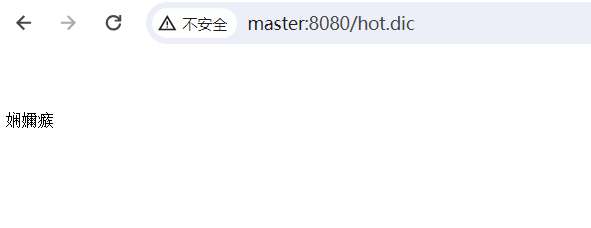
注意:页面会显示乱码,这是正常的,无需处理。
6).修改ES集群中ik插件的IKAnalyzer.cfg.xml配置文件,在master上修改。
在key="remote_ext_dict"这个entry中添加hot.dic的远程访问链接。
<?xml version="1.0" encoding="UTF-8"?>
<!DOCTYPE properties SYSTEM "http://java.sun.com/dtd/properties.dtd">
<properties>
    <comment>IK Analyzer 扩展配置</comment>
    <!--用户可以在这里配置自己的扩展字典 -->
    <entry key="ext_dict">my.dic</entry>
     <!--用户可以在这里配置自己的扩展停止词字典-->
    <entry key="ext_stopwords"></entry>
    <!--用户可以在这里配置远程扩展字典 -->
    <entry key="remote_ext_dict">http://master:8080/hot.dic</entry>
    <!--用户可以在这里配置远程扩展停止词字典-->
    <!-- <entry key="remote_ext_stopwords">words_location</entry> -->
</properties>
7).将修改好的IK配置文件复制到集群中的所有节点中。
[root@master analysis-ik]# scp -rq IKAnalyzer.cfg.xml slave1:/usr/local/elasticsearch/config/analysis-ik
[root@master analysis-ik]# scp -rq IKAnalyzer.cfg.xml slave2:/usr/local/elasticsearch/config/analysis-ik
8).重启ES集群验证效果。
我们测试:"大唐不夜城位于西安市举世闻名的大雁塔脚下" 这句话的分层效果。
[es@master elasticsearch]$ curl -H "Content-Type: application/json" -XPOST  'http://master:9200/java_test/_analyze?pretty' -d '{"text":"大唐不夜城位于西安市举世闻名的大雁塔脚下","tokenizer":"ik_max_word"}'
{
  "tokens" : [
    {
      "token" : "大唐",
      "start_offset" : 0,
      "end_offset" : 2,
      "type" : "CN_WORD",
      "position" : 0
    },
    {
      "token" : "不夜城",
      "start_offset" : 2,
      "end_offset" : 5,
      "type" : "CN_WORD",
      "position" : 1
    },
    {
      "token" : "位于",
      "start_offset" : 5,
      "end_offset" : 7,
      "type" : "CN_WORD",
      "position" : 2
    },
    {
      "token" : "西安市",
      "start_offset" : 7,
      "end_offset" : 10,
      "type" : "CN_WORD",
      "position" : 3
    },
    {
      "token" : "西安",
      "start_offset" : 7,
      "end_offset" : 9,
      "type" : "CN_WORD",
      "position" : 4
    },
    {
      "token" : "市",
      "start_offset" : 9,
      "end_offset" : 10,
      "type" : "CN_CHAR",
      "position" : 5
    },
    {
      "token" : "举世闻名",
      "start_offset" : 10,
      "end_offset" : 14,
      "type" : "CN_WORD",
      "position" : 6
    },
    {
      "token" : "举世",
      "start_offset" : 10,
      "end_offset" : 12,
      "type" : "CN_WORD",
      "position" : 7
    },
    {
      "token" : "闻名",
      "start_offset" : 12,
      "end_offset" : 14,
      "type" : "CN_WORD",
      "position" : 8
    },
    {
      "token" : "的",
      "start_offset" : 14,
      "end_offset" : 15,
      "type" : "CN_CHAR",
      "position" : 9
    },
    {
      "token" : "大雁塔",
      "start_offset" : 15,
      "end_offset" : 18,
      "type" : "CN_WORD",
      "position" : 10
    },
    {
      "token" : "大雁",
      "start_offset" : 15,
      "end_offset" : 17,
      "type" : "CN_WORD",
      "position" : 11
    },
    {
      "token" : "塔",
      "start_offset" : 17,
      "end_offset" : 18,
      "type" : "CN_CHAR",
      "position" : 12
    },
    {
      "token" : "脚下",
      "start_offset" : 18,
      "end_offset" : 20,
      "type" : "CN_WORD",
      "position" : 13
    }
  ]
}
我希望ES能够把"大唐不夜城"认为是一个完整的词语,又不希望重启ES。
这样就可以修改前面配置的hot.dic文件,在里面增加一个词语:大唐不夜城
测试
大唐不夜城
再对"大唐不夜城位于西安市举世闻名的大雁塔脚下"这句话进行分词。
[es@master elasticsearch]$ curl -H "Content-Type: application/json" -XPOST  'http://master:9200/java_test/_analyze?pretty' -d '{"text":"大唐不夜城位于西安市举世闻名的大雁塔脚下","tokenizer":"ik_max_word"}'
{
  "tokens" : [
    {
      "token" : "大唐不夜城",
      "start_offset" : 0,
      "end_offset" : 5,
      "type" : "CN_WORD",
      "position" : 0
    },
    {
      "token" : "大唐",
      "start_offset" : 0,
      "end_offset" : 2,
      "type" : "CN_WORD",
      "position" : 1
    },
    {
      "token" : "不夜城",
      "start_offset" : 2,
      "end_offset" : 5,
      "type" : "CN_WORD",
      "position" : 2
    },
    {
      "token" : "位于",
      "start_offset" : 5,
      "end_offset" : 7,
      "type" : "CN_WORD",
      "position" : 3
    },
    {
      "token" : "西安市",
      "start_offset" : 7,
      "end_offset" : 10,
      "type" : "CN_WORD",
      "position" : 4
    },
    {
      "token" : "西安",
      "start_offset" : 7,
      "end_offset" : 9,
      "type" : "CN_WORD",
      "position" : 5
    },
    {
      "token" : "市",
      "start_offset" : 9,
      "end_offset" : 10,
      "type" : "CN_CHAR",
      "position" : 6
    },
    {
      "token" : "举世闻名",
      "start_offset" : 10,
      "end_offset" : 14,
      "type" : "CN_WORD",
      "position" : 7
    },
    {
      "token" : "举世",
      "start_offset" : 10,
      "end_offset" : 12,
      "type" : "CN_WORD",
      "position" : 8
    },
    {
      "token" : "闻名",
      "start_offset" : 12,
      "end_offset" : 14,
      "type" : "CN_WORD",
      "position" : 9
    },
    {
      "token" : "的",
      "start_offset" : 14,
      "end_offset" : 15,
      "type" : "CN_CHAR",
      "position" : 10
    },
    {
      "token" : "大雁塔",
      "start_offset" : 15,
      "end_offset" : 18,
      "type" : "CN_WORD",
      "position" : 11
    },
    {
      "token" : "大雁",
      "start_offset" : 15,
      "end_offset" : 17,
      "type" : "CN_WORD",
      "position" : 12
    },
    {
      "token" : "塔",
      "start_offset" : 17,
      "end_offset" : 18,
      "type" : "CN_CHAR",
      "position" : 13
    },
    {
      "token" : "脚下",
      "start_offset" : 18,
      "end_offset" : 20,
      "type" : "CN_WORD",
      "position" : 14
    }
  ]
}
此时,发现"大唐不夜城"这个词语就可以完整被切分出来了,我们就成功实现了热更新自定义词库的功能。
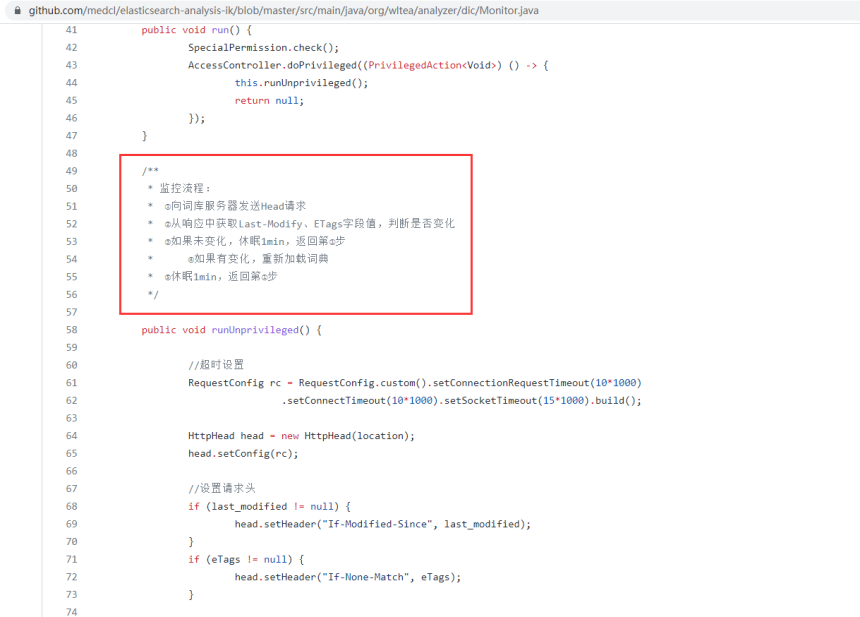
注意:默认情况下,最多一分钟之内就可以识别到新增的词语。通过查看es-ik插件的源码可以发现。
https://github.com/medcl/elasticsearch-analysis-ik/blob/master/src/main/java/org/wltea/analyzer/dic/Monitor.java