1.Properties
java.util.Properties主要用于读取Java的配置文件,各种语言都有自己所支持的配置文件,配置文件中有很多变量是经常改变的,这样做也是为了方便用户,让用户能够脱离程序本身去修改相关的变量配置。
常用方法如下:
| 方法名字 | 说明 |
|---|---|
| getProperty(String key) | 用指定的键在此属性列表中搜索属性。也就是通过参数key,得到key所对应的value。 |
| load(InputStream inStream) | 从输入流中读取属性列表(键和元素对)。通过指定的文件(config.properties)进行装载来获取该文件中的所有键-值对。以供getproperty(String key)来搜索。 |
| setPrperty(String key,String value) | 调用Hashtable的方法put。它通过调用基类的put方法来设置键-值对。 |
| store(OutputStream out,String comments) | 以适合load方法加载到properties表中的格式,将此properties表中的属性列表(键-元素对),写入输出流。与load方法相反,该方法将键-值对写入到指定的文件中去 |
| clear | 清除所有装载的键-值对。该方法在基类中提供 |
实例: 在src根目录下创建users.properties文件,使用Properties类去读取该属性文档内容。
users.properties
username=张三
password=123456
age=20
address=西安电子科技大学
public class PropertiesDemo {

    public static void main(String[] args) throws Exception {

        Properties properties = new Properties();

        //类加载器定位,从项目的ClassPath类路径下获取资源(path不能带’/’)
        InputStream is = PropertiesDemo.class.getClassLoader().getResourceAsStream("users.properties");
        properties.load(is);

        //普通文件定位,文件模块下的根目录下寻找,是绝对地址写法。
        /*
        InputStream is = new FileInputStream(new File("iodemo/src/users.properties"));
        properties.load(is);
        */

        System.out.println(properties.getProperty("username"));
        System.out.println(properties.getProperty("password"));
        System.out.println(properties.getProperty("age"));
        System.out.println(properties.getProperty("address"));


    }
}

运行结果:
张三
123456
20
西安电子科技大学
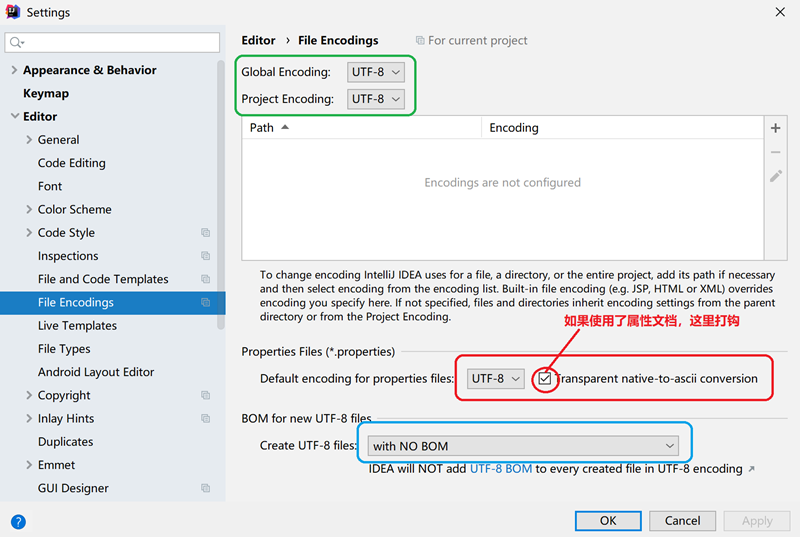
注意:为了确保读取属性文档中的中文不出现乱码,在idea的设置中需配置正确的字符集选项。具体配置方式如下图所示:
2.压缩流
java io支持三种格式,压缩文件大概就为 ZIP、JAR、GZ这些。在这里我只讲ZIP格式的,其他格式的好像特性跟ZIP的格式都差不多 大家有兴趣可以去试一下。
压缩流操作主要的四个类 ZipOutputStream、ZipFile、ZipInputStream,ZipEntry 。
++ZipEntry++
在每一个压缩文件中都会存在多个子文件,那么这每一个的子文件在JAVA中就使用ZipEntry表示。
ZipEntry常用的方法:
1. public ZipEntry(String name) 构造函数 就是设置你所压缩的文件名称为xx (name值)
2. public boolean isDirectory() 返回布尔值 判断ZipEntry是否为文件夹
++ZipOutputStream++ 如果要想完成一个文件或文件夹的压缩,要使用ZipOutputStream类完成,ZipOutputStream是OutputStream的子类。
ZipOutputStream常用的方法:
1. public ZipOutputStream(OutputStream out) 构造函数 传入个字节输出流
2. public void putNextEntry(ZipEntry e) 开始编写新的ZIP文件条目,并将流定位到条目数据的开头。 这个方法是写入一个文件(夹) 看不懂的可以稍后看代码
++ZipInputStream++
ZipInputStream常用的方法:
1. public ZipInputStream(InputStream out) 构造函数 传入个字节输入流
2. public ZipEntry getNextEntry() 读取下一个ZIP文件条目,并将流定位在条目数据的开头。没有则返回null
++ZipFile++
ZipFile常用的方法:
1. public ZipFile(File file) 构造函数 打开一个ZIP文件,读取指定的File对象。传入你需要解压的文件
2. public InputStream getInputStream(ZipEntry entry) 返回用于读取指定zip文件条目内容的输入流。 这个是根据一个压缩类文件 ZipEntry 来返回一个输入流。
实例:使用压缩流实现把某个文件夹压缩为一个压缩文档(xxx.zip)。
public class ZipDemo {

    /**
     * 提供给用户使用的基本压缩类
     * @param srcPath
     * @param outPath
     * @throws IOException
     */
    public static void compressFile(String srcPath, String outPath) throws IOException {
        //读取源文件
        File srcFile = new File(srcPath);
        //判断输出路径是否正确
        File outFile = new File(outPath);
        //如果只是路劲加入对应的压缩名称
        if (outFile.isDirectory()) {
            //用"/"作文判断标准
            if (outPath.endsWith(File.separator)) {
                outPath += srcFile.getName().split("\\.")[0] + ".zip";
            } else {
                outPath += File.separator + srcFile.getName().split("\\.")[0] + ".zip";
            }
        }
        //读取文件流
        FileOutputStream fileOutputStream = new FileOutputStream(outPath);
        ZipOutputStream zipOutputStream = new ZipOutputStream(fileOutputStream);
        //压缩文件
        compressFile(srcFile, srcFile.getName(),zipOutputStream);
        //关闭流
        zipOutputStream.close();
        fileOutputStream.close();
    }

    /**
     * 迭代方式进行文件压缩
     * @param file
     * @param fileName
     * @param outputStream
     * @throws IOException
     */
    private static void compressFile(File file, String fileName, final ZipOutputStream outputStream) throws IOException {
        //如果是目录
        if (file.isDirectory()) {
            //创建文件夹
            outputStream.putNextEntry(new ZipEntry(fileName+"/"));
            //迭代判断,并且加入对应文件路径
            File[] files = file.listFiles();
            Iterator<File> iterator = Arrays.asList(files).iterator();
            while (iterator.hasNext()) {
                File f = iterator.next();
                compressFile(f, fileName+"/"+f.getName(), outputStream);
            }
        } else {
            //创建文件
            outputStream.putNextEntry(new ZipEntry(fileName));
            //读取文件并写出
            FileInputStream fileInputStream = new FileInputStream(file);
            BufferedInputStream bufferedInputStream = new BufferedInputStream(fileInputStream);
            byte[] bytes = new byte[1024];
            int n;
            while ((n = bufferedInputStream.read(bytes)) != -1) {
                outputStream.write(bytes, 0, n);
            }
            //关闭流
            fileInputStream.close();
            bufferedInputStream.close();
        }
    }

    public static void main(String[] args) {
       try {
           compressFile("d:\\java_lesson", "d:\\"); //要压缩的文件夹和生成的压缩文件目标地址。
       }catch(Exception ex){
           ex.printStackTrace();
       }

    }
}