Css工具链
1.Css语言工程化中的问题
Css语法问题主要集中在以下两点:
- 语法缺失:比如缺失(循环,判断,字符串拼接等等)
- 功能缺失:提供的可用函数太少,仅有url等等
由于Css语言有严重的语法缺失和功能缺失,于是诞生了很多新的css语言比如:sass,less,stylus等等。
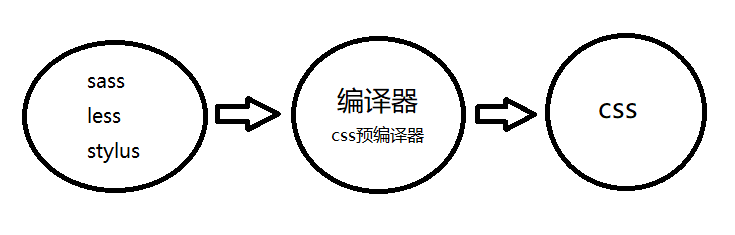
实例:
创建一个名字为:a.scss的样式表文件。
body{
  background: #f40;
}
全局安装sass。
npm i -g sass
第一次执行sass命令,如果报以下异常:
sass : 无法加载文件 D:\node\node-v14.21.3-win-x64\sass.ps1
是因为PowerShell的执行政策阻止了该操作。此时我们要求输入Set-ExecutionPolicy -Scope CurrentUser命令解除受限状态。回车,在黑窗口中输入RemoteSigned解除受限状态,回车,执行策略更改。
PS E:\jsdemo> Set-ExecutionPolicy -Scope CurrentUser

位于命令管道位置 1 的 cmdlet Set-ExecutionPolicy
请为以下参数提供值:
ExecutionPolicy: RemoteSigned
接下来我们查看受限状态 输入get-ExecutionPolicy,此时结果为RemoteSigned(受限移除),这样我们就可以正常使用sass命令了。
PS E:\jsdemo> Get-ExecutionPolicy
RemoteSigned
执行以下命令:
PS E:\jsdemo> sass a.scss a.css
也可以选择不生成source-map文件。
PS E:\jsdemo> sass a.scss a.css --no-source-map

//监听文件的变化自动重新编译
PS E:\jsdemo> sass a.scss a.css --no-source-map -w
在a.scss中添加一个颜色变量。
$color: #0f0;

body{
  background: $color;
}
我们发现,a.css自动变化。
body {
  background: #0f0;
}
关于sass等预编译器案例,请参考:SaaS星空效果 这篇博文的详解。
但是经过sass/less/stylus等css预编译器生成的css还是存在以下问题:
- 厂商前缀:autoprefixer
- 代码压缩:cssnano
- 代码剪枝:purgecss
- 类名冲突:css module
我们把以上处理生成css文件之后的一类问题的工具统称为后置处理器。
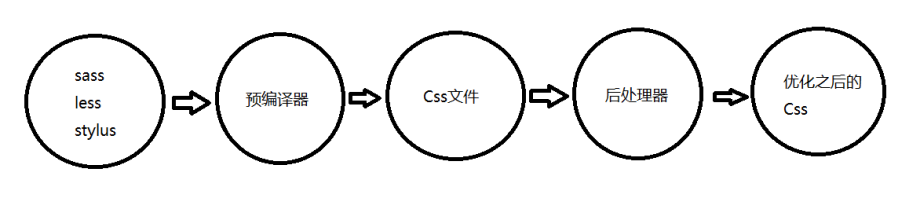
其中后置处理中集大成者就是PostCss,其思想和js工具链中的Babel是类似的。
PostCSS是如何处CSS的,其思想也和Babel类似,如下图所示:

postcss实例:
在package.json添加postcss依赖。scripts的compile脚本表示把src目录下的所有css自动编译到dist目录下。
"scripts": {
    "compile": "postcss src/**/*.css -d dist -w --no-map"
},
...
"devDependencies": {
    "postcss": "^8.4.32",
    "postcss-cli": "^10.1.0",
    "postcss-modules": "^6.0.0",
    "postcss-preset-env": "^7.8.3",
    "tailwindcss": "^3.2.4",
    ...
}
和babel类似,创建postcss.config.js配置文档。
module.exports = {
    map: false,
    plugins: {
        tailwindcss: {},
        'postcss-preset-env': {},
        'postcss-modules': {}
    }
}
在src目录下新建a.css文件。
::placeholder {
    color: #ccc;
}

.container {
    color: #f40;
}
使用npm编译。
PS E:\jsdemo> npm run compile

> jsdemo@1.0.0 compile E:\jsdemo
> postcss src/**/*.css -d dist -w --no-map
我们发现在dist目录下生成了编译后的a.css,帮我们自动实现了厂商前缀和类名冲突问题。其中厂商前缀是postcss-preset-env插件实现的,而类名冲突是postcss-modules插件实现的。
::-moz-placeholder {
    color: #ccc;
}

::placeholder {
    color: #ccc;
}

._container_ult54_9 {
    color: #f40;
}
在src目录里还有a.css.json是实现类名映射功能。
{"container":"_container_ult54_9"}
其中,tailwindcss插件功能更强大,Tailwind CSS 是一个利用公用程序类(Utilize Class,下文皆称Utilize Class)的 CSS 框架。Tailwind CSS包含了 flex、pt-4、text-center 和 rotate-90 等类,可以直接在您的标记中组合以构建任何设计。
在src目录下创建main.css。
@tailwind base;
@tailwind components;
@tailwind utilities;
使用npm重新编译。
PS E:\jsdemo> npm run compile

> jsdemo@1.0.0 compile E:\jsdemo
> postcss src/**/*.css -d dist -w --no-map
我们发现在dist目录生成的main.css就包含了Tailwind CSS的各种各样的原子化样式。
/*
! tailwindcss v3.4.0 | MIT License | https://tailwindcss.com
*//*
1. Prevent padding and border from affecting element width. (https://github.com/mozdevs/cssremedy/issues/4)
2. Allow adding a border to an element by just adding a border-width. (https://github.com/tailwindcss/tailwindcss/pull/116)
*/

*,
::before,
::after {
  box-sizing: border-box; /* 1 */
  border-width: 0; /* 2 */
  border-style: solid; /* 2 */
  border-color: #e5e7eb; /* 2 */
}

::before,
::after {
  --tw-content: '';
}

/*
1. Use a consistent sensible line-height in all browsers.
2. Prevent adjustments of font size after orientation changes in iOS.
3. Use a more readable tab size.
4. Use the user's configured `sans` font-family by default.
5. Use the user's configured `sans` font-feature-settings by default.
6. Use the user's configured `sans` font-variation-settings by default.
7. Disable tap highlights on iOS
*/

html,
:host {
  line-height: 1.5; /* 1 */
  -webkit-text-size-adjust: 100%; /* 2 */
  -moz-tab-size: 4; /* 3 */
  -o-tab-size: 4;
     tab-size: 4; /* 3 */
  font-family: ui-sans-serif, system-ui, -apple-system, Segoe UI, Roboto, Ubuntu, Cantarell, Noto Sans, sans-serif, "Apple Color Emoji", "Segoe UI Emoji", "Segoe UI Symbol", "Noto Color Emoji"; /* 4 */
  font-feature-settings: normal; /* 5 */
  font-variation-settings: normal; /* 6 */
  -webkit-tap-highlight-color: transparent; /* 7 */
}
...