在UNIX/Linux中有一个很有用的概念——管道(pipe),它具有将一个程序的输出当作另一个程序的输入的能力。管道流的主要作用是可以进行两个线程间的通讯,分为管道输入流(PipeOutputStream和PipedWriter)和管道输出流(PipeInputStream和PipedReader)。
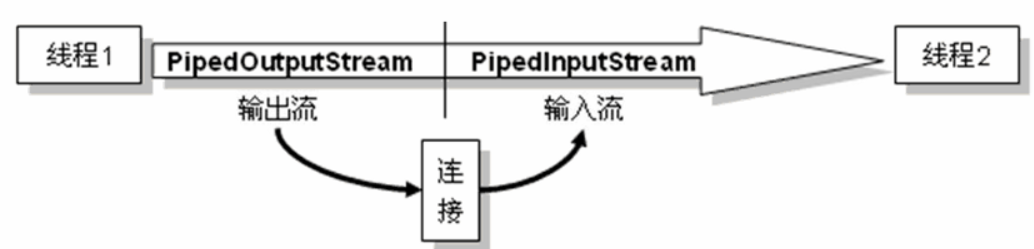
1.如何建立管道
一般我们使用都是先定义一个管道输入流PipedInputStream(或者PipedReader)对象和管道输出流PipedOutputStream(或者PipedWriter)对象,然后将他们关联起来,建立了一条”管道”。
- 使用connect()方法
        PipedInputStream pipedInputStream=new PipedInputStream();
        PipedOutputStream pipedOutputStream=new PipedOutputStream();
        try {
            pipedInputStream.connect(pipedOutputStream);
        } catch (IOException e) {
            e.printStackTrace();
        }
- 不使用connect()方法
        PipedInputStream pipedInputStream=new PipedInputStream();
        PipedOutputStream pipedOutputStream=null;
        try {
            pipedOutputStream = new PipedOutputStream(pipedInputStream);
        } catch (IOException e) {
            e.printStackTrace();
        }
2.管道流常用方法
++PipeOutputStream和PipedWriter输出方法:++
void write(byte[] b, int off, int len) 将 len 字节从初始偏移量为 off 的指定 byte 数组写入该管道输出流。 void write(char[] b, int off, int len),含义与上类似。
++PipeInputStream和PipedReader输入方法:++
读取文件的方法,将连接的PipeOutputStream对象实例的输入流的数据,通过read方法,把内容读取到数组中。 int read(byte[] b, int off, int len) 将最多 len 个数据字节从此管道输入流读入 byte 数组。 int read(char[] b, int off, int len),含义与上类似
实例:使用PipedInputStream和PipedOutputStream实现java源文件的复制效果。
class Sender implements Runnable {

    private PipedOutputStream out = new PipedOutputStream();

    private File srcFile;

    public Sender(File srcFile) {
        this.srcFile = srcFile;
    }

    public PipedOutputStream getOutputStream() {
        return out;
    }

    public void run() {
        BufferedInputStream bin = null;
        try {

            bin = new BufferedInputStream(new FileInputStream(this.srcFile));
            byte[] buffer = new byte[1024];
            int len=-1;
            while((len=bin.read(buffer))!=-1){
                //System.out.println(s);
                out.write(buffer,0,len);
            }

        } catch (IOException e) {
            e.printStackTrace();
        }finally {
            try{
                if(bin!=null){
                    bin.close();
                    bin = null;
                }
                if(out!=null){
                    out.close();
                    out=null;
                }
            }catch(Exception ex){
                ex.printStackTrace();
            }
        }
    }
}

class Receiver implements Runnable {
    private PipedInputStream in = new PipedInputStream();

    private File destFile;

    public Receiver(File destFile) {
        this.destFile = destFile;
    }

    public PipedInputStream getInputStream() {
        return in;
    }

    public void run() {
        BufferedOutputStream bout = null;
        byte[] b = new byte[1024];
        try {
            bout = new BufferedOutputStream(new FileOutputStream(destFile));
            String s = null;
            int len = -1;
            while((len= in.read(b))!=-1){
                bout.write(b,0,len);
            }
            bout.flush();
        } catch (IOException e) {
            e.printStackTrace();
        }finally{
            try{
                if(bout!=null){
                    bout.close();
                    bout=null;
                }
                if(in!=null){
                    in.close();
                    in = null;
                }
            }catch(Exception ex){
                ex.printStackTrace();
            }
        }
    }
}


public class PipedDemo {

    public static void main(String[] args) {
        File srcFile = new File("d:" + File.separator + "MyUtils.java");
        File destFile = new File("e:" + File.separator + "MyUtils.java");
        try {
            Sender sender = new Sender(srcFile);    // 创建线程对象Sender
            Receiver receiver = new Receiver(destFile);    // 创建线程对象Receiver
            PipedOutputStream out = sender.getOutputStream();    // 写入
            PipedInputStream in = receiver.getInputStream();    // 读出
            out.connect(in); // 将输出发送到输入
            Thread senderThread = new Thread(sender);
            Thread receiverThread = new Thread(receiver);
            senderThread.start();// 启动线程
            receiverThread.start();

        } catch (IOException e) {
            e.printStackTrace();
        }
    }

}
因为是读写字符文件,为了提升效率,也可以使用PipedReader和PipedWriter实现java源文件的复制效果。
class Sender implements Runnable {

    private PipedWriter out = new PipedWriter();
    private File srcFile;

    public Sender(File srcFile) {
        this.srcFile = srcFile;
    }

    public PipedWriter getOutputStream() {
        return out;
    }

    public void run() {
        BufferedReader bin = null;
        char[] b = new char[1024];
        try {
          bin = new BufferedReader(new FileReader(this.srcFile));
            int len=-1;
            while((len = bin.read(b))!=-1){
                out.write(b,0,len);
            }

        } catch (IOException e) {
            e.printStackTrace();
        }finally {
            try{
                if(bin!=null){
                    bin.close();
                    bin = null;
                }
                if(out!=null){
                    out.close();
                    out=null;
                }
            }catch(Exception ex){
                ex.printStackTrace();
            }
        }
    }
}

class Receiver implements Runnable {
    private PipedReader in = new PipedReader();
    private File destFile;

    public Receiver(File destFile) {
        this.destFile = destFile;
    }

    public PipedReader getInputStream() {
        return in;
    }

    public void run() {
        BufferedWriter bout = null;
        char[] b = new char[1024];
        try {
            bout = new BufferedWriter(new FileWriter(destFile));
            int len = -1;
            while((len = in.read(b))!=-1){
                bout.write(b,0,len);
            }
            bout.flush();
        } catch (IOException e) {
            e.printStackTrace();
        }finally{
            try{
                if(bout!=null){
                    bout.close();
                    bout=null;
                }
                if(in!=null){
                    in.close();
                    in = null;
                }
            }catch(Exception ex){
                ex.printStackTrace();
            }
        }
    }
}


public class PipedDemo {

    public static void main(String[] args) {
        File srcFile = new File("d:" + File.separator + "MyUtils.java");
        File destFile = new File("e:" + File.separator + "MyUtils.java");
        try {
            Sender sender = new Sender(srcFile);    // 创建线程对象Sender
            Receiver receiver = new Receiver(destFile);    // 创建线程对象Receiver
            PipedWriter out = sender.getOutputStream();    // 写入
            PipedReader in = receiver.getInputStream();    // 读出
            out.connect(in); // 将输出发送到输入
            Thread senderThread = new Thread(sender);
            Thread receiverThread = new Thread(receiver);
            senderThread.start();// 启动线程
            receiverThread.start();

        } catch (IOException e) {
            e.printStackTrace();
        }
    }

}