TableAPI和SQL的使用
TableAPI和SQL的使用
TableAPI和SQL的使用。
1.TableAPI和SQL的使用
目前创建Table的很多方法都过时了,都不推荐使用了,例如:registerTableSource、connect等方法。
目前官方推荐使用executeSql的方式,executeSql里面支持:DDL/DML/DQL/SHOW/DESCRIBE/EXPLAIN/USE等语法。
1).scala实现
测试文件users.csv内容如下:
201,张三丰,123456
202,东方不败,654321
203,任我选,222222
204,风清扬,888888
205,郭靖,888888
206,黄蓉,666666
207,令狐冲,999999
208,王重阳,11111
209,欧阳锋,55555
210,黄药师,66666
package com.simoniu.flink.scala.tablesql

import org.apache.flink.table.api.{EnvironmentSettings, TableEnvironment}

/**
 * TableAPI 和 SQL的使用
 * Created by simoniu
 */
object TableAPIAndSQLOpScalaDemo {
  def main(args: Array[String]): Unit = {
    //获取TableEnvironment
    val sSettings = EnvironmentSettings.newInstance.useBlinkPlanner.inStreamingMode().build
    val sTableEnv = TableEnvironment.create(sSettings)

    //创建输入表
    /**
     * connector.type:指定connector的类型
     * connector.path:指定文件或者目录地址
     * format.type:文件数据格式化类型,现在只支持csv格式
     * 注意:SQL语句如果出现了换行,行的末尾可以添加空格或者\n都可以,最后一行不用添加
     */
    sTableEnv.executeSql("" +
      "create table source_users(\n" +
      "id int,\n" +
      "name string,\n" +
      "password string\n" +
      ") with (\n" +
      "'connector.type' = 'filesystem',\n" +
      "'connector.path' = 'D:\\uploadFiles\\source',\n" +
      "'format.type' = 'csv'\n" +
      ")")


    //使用Table API实现数据查询和过滤等操作
    /*import org.apache.flink.table.api._
    val result = sTableEnv.from("source_users")
        .select($"id",$"name",$"password")
        .filter($"id" > 205)*/

    //使用SQL实现数据查询和过滤等操作
    val result = sTableEnv.sqlQuery("select id,name,password from source_users where id > 205")

    //输出结果到控制台
    result.execute.print()

    //创建输出表
    sTableEnv.executeSql("" +
      "create table dest_users(\n" +
      "id int,\n" +
      "name string,\n" +
      "password string\n" +
      ") with (\n" +
      "'connector.type' = 'filesystem',\n" +
      "'connector.path' = 'D:\\uploadFiles\\dest',\n" +
      "'format.type' = 'csv'\n" +
      ")")

    //输出结果到表newTable中
    result.executeInsert("dest_users")
  }
}
运行结果:
+-------------+--------------------------------+--------------------------------+
|          id |                           name |                       password |
+-------------+--------------------------------+--------------------------------+
|         207 |                         令狐冲 |                         999999 |
|         209 |                         欧阳锋 |                          55555 |
|         206 |                           黄蓉 |                         666666 |
|         208 |                         王重阳 |                          11111 |
|         210 |                         黄药师 |                          66666 |
+-------------+--------------------------------+--------------------------------+
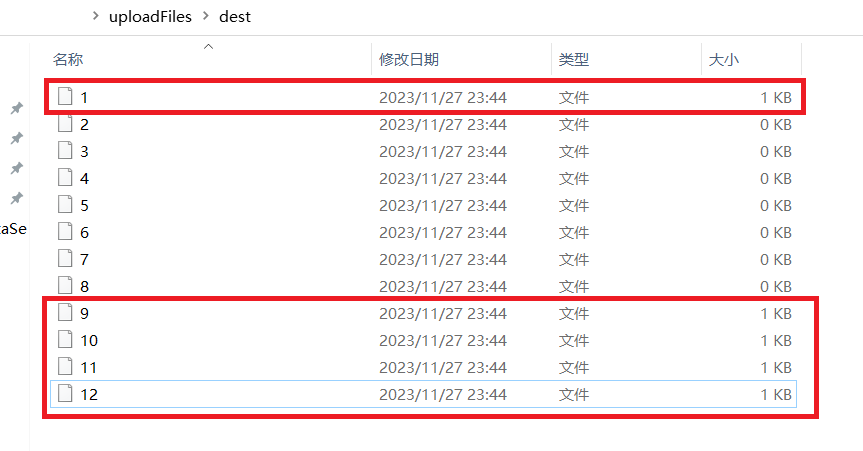
将结果保存到文件里面。
2).java实现
package com.simoniu.flink.java.tablesql;

import org.apache.flink.table.api.EnvironmentSettings;
import org.apache.flink.table.api.Table;
import org.apache.flink.table.api.TableEnvironment;

import static org.apache.flink.table.api.Expressions.$;

/**
 * TableAPI 和 SQL的使用
 * Created by simoniu
 */
public class TableAPIAndSQLOpJavaDemo {

    public static void main(String[] args) {
        //获取TableEnvironment
        EnvironmentSettings sSettings = EnvironmentSettings.newInstance().useBlinkPlanner().inStreamingMode().build();
        TableEnvironment sTableEnv = TableEnvironment.create(sSettings);

        //创建输入表
        sTableEnv.executeSql("" +
                "create table source_users(\n" +
                "id int,\n" +
                "name string,\n" +
                "password string\n" +
                ") with (\n" +
                "'connector.type' = 'filesystem',\n" +
                "'connector.path' = 'D:\\uploadFiles\\source',\n" +
                "'format.type' = 'csv'\n" +
                ")");

        //使用Table API实现数据查询和过滤等操作

        /*Table result = sTableEnv.from("myTable")
                .select($("id"), $("name"))
                .filter($("id").isGreater(1));*/

        //使用SQL实现数据查询和过滤等操作
        Table result = sTableEnv.sqlQuery("select id,name,password from source_users where id > 1");

        //输出结果到控制台
        result.execute().print();

        //创建输出表
        sTableEnv.executeSql("" +
                "create table dest_users(\n" +
                "id int,\n" +
                "name string,\n" +
                "password string\n" +
                ") with (\n" +
                "'connector.type' = 'filesystem',\n" +
                "'connector.path' = 'D:\\uploadFiles\\dest',\n" +
                "'format.type' = 'csv'\n" +
                ")");

        //输出结果到表newTable中
        result.executeInsert("dest_users");
    }
}