Flink ON YARN的两种方式。
1.Flink ON YARN
Flink ON YARN模式就是使用客户端的方式,直接向Hadoop集群提交任务即可。不需要单独启动Flink进程。
Flink ON YARN模式需要注意以下两点:
- Flink ON YARN 模式依赖Hadoop 2.4.1及以上版本。
- Flink ON YARN支持两种使用方式。
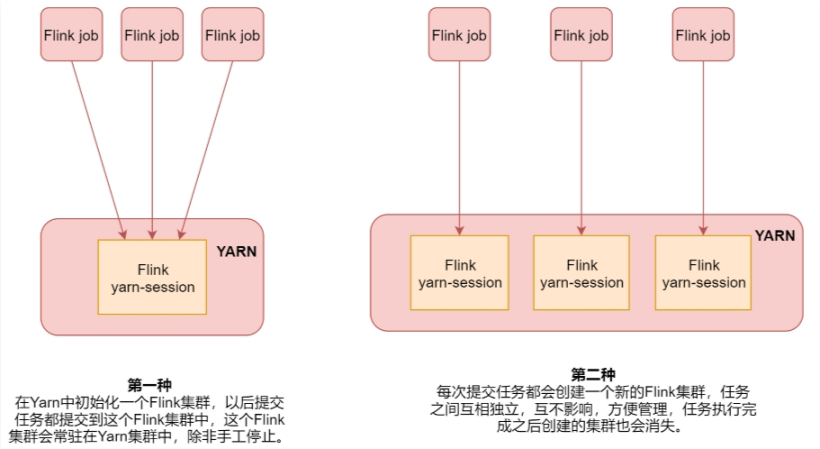
注意: - 第一种适合运行规模小,短时间运行的作业。 - 第二种适合长时间运行的作业。
2.Flink ON YARN第一种方式
第一种方式步骤如下:
- 第一步:在集群中初始化一个长时间运行的Flink集群, 使用yarn-session.sh脚本。
- 第二步:使用flink run命令向Flink集群中提交任务。
注意:使用flink on yarn需要确保hadoop集群已经启动成功。
在执行yarn-session.sh脚本之前我们需要先设置HADOOP_CLASSPATH这个环境变量,否则,执行yarn-session.sh是会报错的,提示找不到hadoop的一些依赖。
[root@master sbin]# vim /etc/profile
export HADOOP_CLASSPATH=`${HADOOP_HOME}/bin/hadoop classpath`
[root@master sbin]# . /etc/profile
接下来,使用yarn-session.sh在YARN中创建一个长时间运行的Flink集群。
[root@master ~]# cd $FLINK_HOME
[root@master flink]# bin/yarn-session.sh -jm 1024m -tm 1024m -d
这个命令表示创建一个Flink集群,-jm是指定主节点的内存,-tm是指定从节点的内存,-d是表示把这个进程放到后台去执行。
启动之后,会看到类似这样的日志信息,这里面会显示flink web界面的地址,以及这个flink集群在yarn中对应的applicationid。
JobManager Web Interface: http://slave1:36787
2023-11-18 21:41:31,329 INFO  org.apache.flink.yarn.cli.FlinkYarnSessionCli                [] - The Flink YARN session cluster has been started in detached mode. In order to stop Flink gracefully, use the following command:
$ echo "stop" | ./bin/yarn-session.sh -id application_1700313965512_0001
If this should not be possible, then you can also kill Flink via YARN's web interface or via:
$ yarn application -kill application_1700313965512_0001
Note that killing Flink might not clean up all job artifacts and temporary files.
此时到YARN的web界面中确实可以看到这个flink集群。
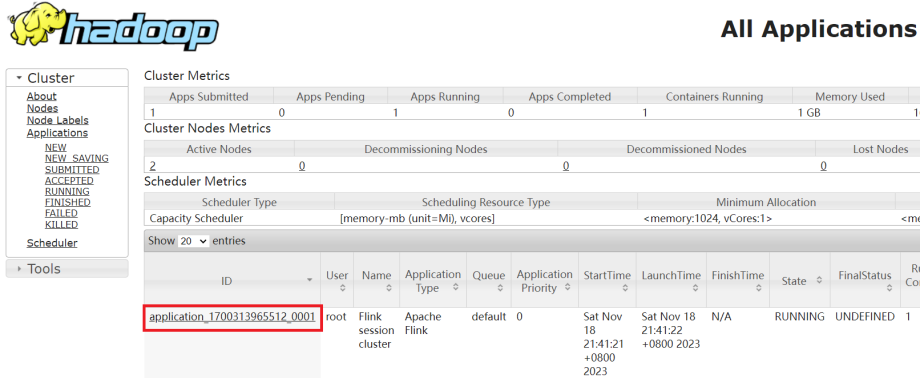
可以使用屏幕中显示的flink的web地址或者yarn中的ApplicationMaster这个链接都是可以进入这个flink的web界面的。
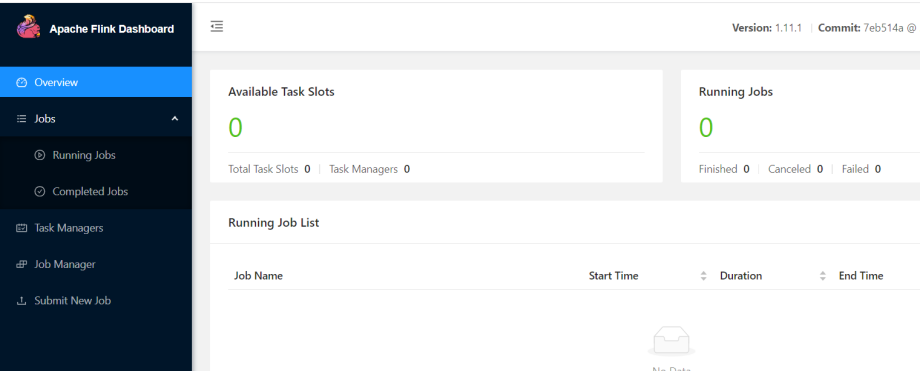
接下来向这个Flink集群中提交任务,此时使用Flink中的内置案例。
[root@master flink]# bin/flink run ./examples/batch/WordCount.jar
执行成功,输出分词统计结果。
(a,5)
(action,1)
(after,1)
(against,1)
(all,2)
(and,12)
(arms,1)
(arrows,1)
(awry,1)
(ay,1)
(bare,1)
(be,4)
(bear,3)
(bodkin,1)
(bourn,1)
(but,1)
(by,2)
(calamity,1)
(cast,1)
(coil,1)
(come,1)
(conscience,1)
(consummation,1)
(contumely,1)
(country,1)
(cowards,1)
(currents,1)
(d,4)
(death,2)
(delay,1)
(despis,1)
(devoutly,1)
(die,2)
(does,1)
(dread,1)
(dream,1)
(dreams,1)
(end,2)
(enterprises,1)
(er,1)
(fair,1)
(fardels,1)
(flesh,1)
(fly,1)
(for,2)
(fortune,1)
(from,1)
(give,1)
(great,1)
(grunt,1)
(have,2)
(he,1)
(heartache,1)
(heir,1)
(himself,1)
(his,1)
(hue,1)
(ills,1)
(in,3)
(insolence,1)
(is,3)
(know,1)
(law,1)
(life,2)
(long,1)
(lose,1)
(love,1)
(make,2)
(makes,2)
(man,1)
(may,1)
(merit,1)
(might,1)
(mind,1)
(moment,1)
(more,1)
(mortal,1)
(must,1)
(my,1)
(name,1)
(native,1)
(natural,1)
(no,2)
(nobler,1)
(not,2)
(now,1)
(nymph,1)
(o,1)
(of,15)
(off,1)
(office,1)
(ophelia,1)
(opposing,1)
(oppressor,1)
(or,2)
(orisons,1)
(others,1)
(outrageous,1)
(pale,1)
(pangs,1)
(patient,1)
(pause,1)
(perchance,1)
(pith,1)
(proud,1)
(puzzles,1)
(question,1)
(quietus,1)
(rather,1)
(regard,1)
(remember,1)
(resolution,1)
(respect,1)
(returns,1)
(rub,1)
(s,5)
(say,1)
(scorns,1)
(sea,1)
(shocks,1)
(shuffled,1)
(sicklied,1)
(sins,1)
(sleep,5)
(slings,1)
(so,1)
(soft,1)
(something,1)
(spurns,1)
(suffer,1)
(sweat,1)
(take,1)
(takes,1)
(than,1)
(that,7)
(the,22)
(their,1)
(them,1)
(there,2)
(these,1)
(this,2)
(those,1)
(thought,1)
(thousand,1)
(thus,2)
(thy,1)
(time,1)
(tis,2)
(to,15)
(traveller,1)
(troubles,1)
(turn,1)
(under,1)
(undiscover,1)
(unworthy,1)
(us,3)
(we,4)
(weary,1)
(what,1)
(when,2)
(whether,1)
(whips,1)
(who,2)
(whose,1)
(will,1)
(wish,1)
(with,3)
(would,2)
(wrong,1)
(you,1)
任务提交上去执行完成之后,再来看flink的web界面,发现这里面有一个已经执行结束的任务了。
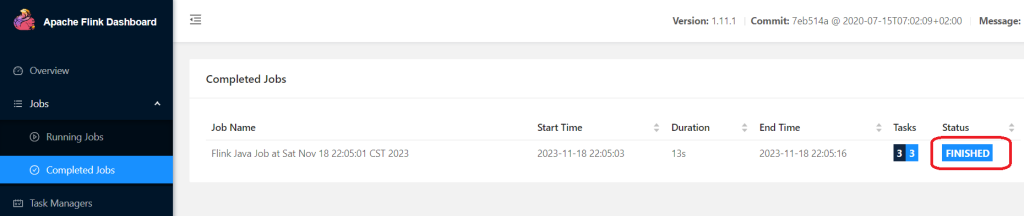
第一种启动模式的原理是查找yarn-properties-root文件里的集群信息。
[root@master flink]# more /tmp/.yarn-properties-root
#Generated YARN properties file
#Sat Nov 18 21:41:31 CST 2023
dynamicPropertiesString=
applicationID=application_1700313965512_0001
注意:这个任务在执行的时候,会动态申请一些资源执行任务,任务执行完毕之后,对应的资源会自动释放掉。
最后把这个Flink集群停掉,使用yarn的kill命令。
[root@master flink]# yarn application -kill application_1700313965512_0001
2023-11-18 22:16:33,267 INFO client.RMProxy: Connecting to ResourceManager at master/192.168.128.128:8032
Killing application application_1700313965512_0001
2023-11-18 22:16:33,798 INFO impl.YarnClientImpl: Killed application application_1700313965512_0001
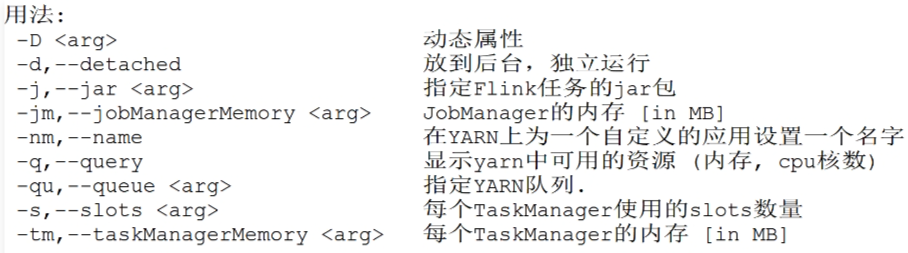
针对yarn-session命令,它后面还支持一些其它参数,可以在后面传一个-help参数,在这我对一些常见的命令进行了整理,添加了中文注释。如下表所示。
3.Flink ON YARN第二种方式
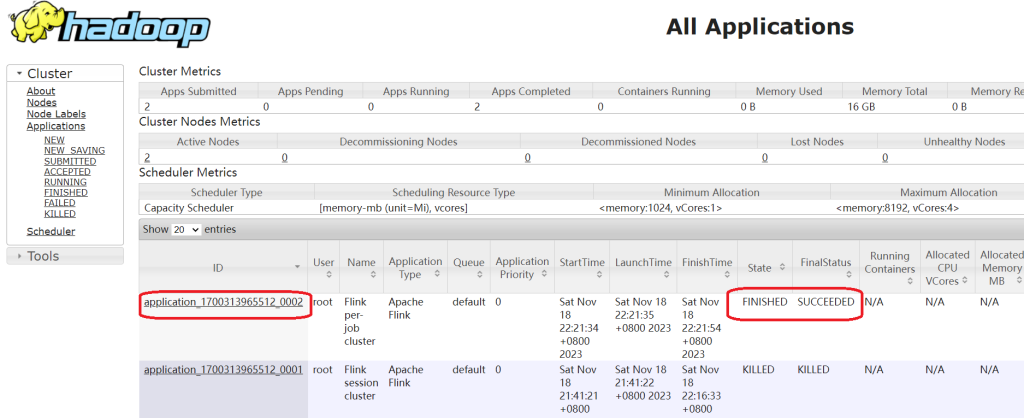
flink run -m yarn-cluster (创建Flink集群+提交任务),使用flink run直接创建一个临时的Flink集群,并且提交任务。此时这里面的参数前面加上了一个y参数。
[root@master flink]# bin/flink run -m yarn-cluster -yjm 1024 -ytm 1024 ./examples/batch/WordCount.jar
提交上去之后,会先创建一个Flink集群,然后在这个Flink集群中执行任务。执行结束也就是自动完成了。
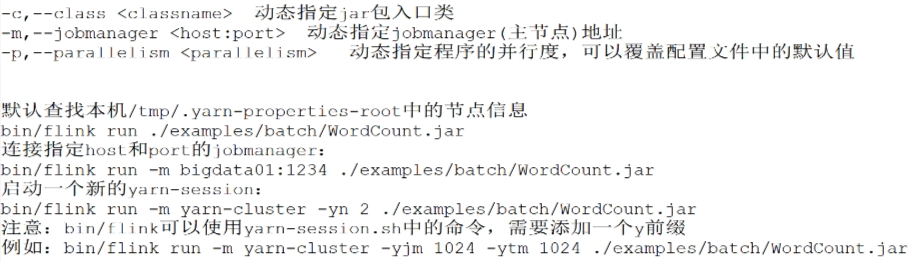
针对Flink命令的一些用法汇总。
Flink ON YARN的好处:
- 提高大数据集群机器的利用率。
- 一套集群,可以执行MR任务,Spark任务,Flink任务等。