Redis高级特性之pipeline和info
Redis高级特性之pipeline和info
Redis高级特性之pipeline和info。
1.pipeline管道
针对批量操作数据或者批量初始化数据的时候使用,效率高。Redis的pipeline功能在命令行中没有实现,在Java客户端(jedis)中是可以实现的。
pipeline 管道的原理如下图所示:
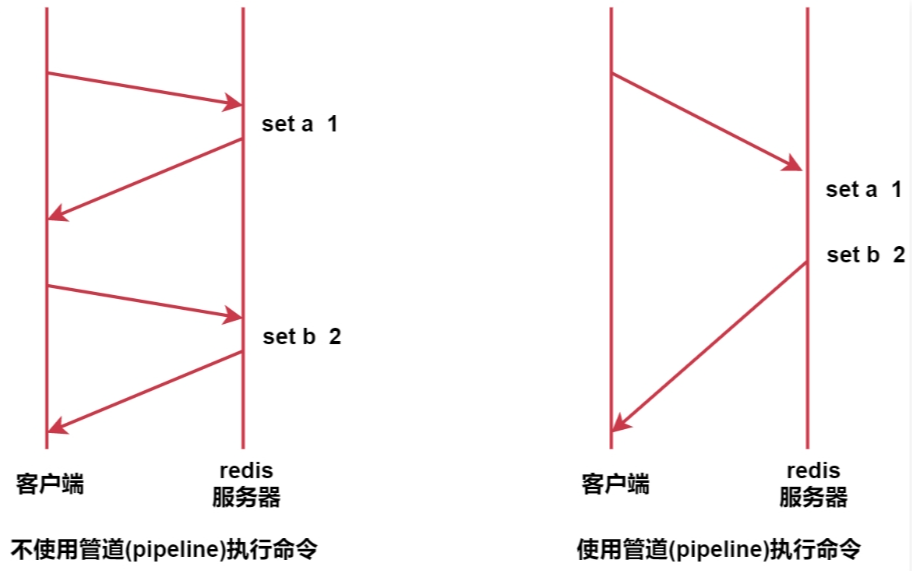
不使用管道的时候,我们每执行一条命令都需要和redis服务器交互一次。 使用管道之后,可以实现一次提交一批命令,这一批命令只需要和redis服务器交互一次,所以就提高了性能。 这个功能就类似于mysql中的batch批处理。
pipeline管道案例: 案例:初始化10万条数据 需求:使用普通方式一条一条添加和使用管道批量初始化进行对比分析。
package com.simoniu.db_redis.redis;

import org.junit.Test;
import org.junit.runner.RunWith;
import org.springframework.boot.test.context.SpringBootTest;
import org.springframework.test.context.junit4.SpringRunner;
import redis.clients.jedis.Jedis;
import redis.clients.jedis.Pipeline;


@RunWith(SpringRunner.class)
@SpringBootTest
public class RedisPipelineTest {

    @Test
    public void testWithoutPipeline(){
        Jedis jedis = RedisUtils.getJedis();
        long start_time = System.currentTimeMillis();
        for (int i = 0; i < 100000; i++) {
            jedis.set("a" + i, "a" + i);
        }
        long end_time = System.currentTimeMillis();
        System.out.println("不使用管道,耗时:" + (end_time - start_time));
    }

    @Test
    public void testWithPipeline(){
        Jedis jedis = RedisUtils.getJedis();
        Pipeline pipelined = jedis.pipelined();
        long start_time = System.currentTimeMillis();
        for (int i = 0; i < 100000; i++) {
            pipelined.set("b" + i, "b" + i);
        }
        pipelined.sync();
        long end_time = System.currentTimeMillis();
        System.out.println("使用管道,耗时:" + (end_time - start_time));
    }
}
运行结果对比:
使用管道,耗时:237
不使用管道,耗时:20959
2.info命令
在代码执行的过程中,我们可以使用info命令观察数据库中的数据条数。
127.0.0.1:6379> info
# Server
redis_version:5.0.14
redis_git_sha1:00000000
redis_git_dirty:0
redis_build_id:289ef70ede6f9e88
redis_mode:standalone
os:Linux 3.10.0-1160.el7.x86_64 x86_64
arch_bits:64
multiplexing_api:epoll
atomicvar_api:atomic-builtin
gcc_version:4.8.5
process_id:1858
run_id:e04e3540dfeba423b26c05bd6def1c8a22e351dc
tcp_port:6379
uptime_in_seconds:1822
uptime_in_days:0
hz:10
configured_hz:10
lru_clock:5306175
executable:/usr/local/redis/src/./redis-server
config_file:/usr/local/redis/redis.conf

# Clients
connected_clients:1
client_recent_max_input_buffer:2
client_recent_max_output_buffer:0
blocked_clients:0

# Memory
used_memory:20584664
used_memory_human:19.63M
used_memory_rss:26824704
used_memory_rss_human:25.58M
used_memory_peak:20651256
used_memory_peak_human:19.69M
used_memory_peak_perc:99.68%
used_memory_overhead:11008982
used_memory_startup:861384
used_memory_dataset:9575682
used_memory_dataset_perc:48.55%
allocator_allocated:20550840
allocator_active:26786816
allocator_resident:26786816
total_system_memory:8181829632
total_system_memory_human:7.62G
used_memory_lua:37888
used_memory_lua_human:37.00K
used_memory_scripts:0
used_memory_scripts_human:0B
number_of_cached_scripts:0
maxmemory:0
maxmemory_human:0B
maxmemory_policy:noeviction
allocator_frag_ratio:1.30
allocator_frag_bytes:6235976
allocator_rss_ratio:1.00
allocator_rss_bytes:0
rss_overhead_ratio:1.00
rss_overhead_bytes:37888
mem_fragmentation_ratio:1.31
mem_fragmentation_bytes:6273864
mem_not_counted_for_evict:0
mem_replication_backlog:0
mem_clients_slaves:0
mem_clients_normal:49694
mem_aof_buffer:0
mem_allocator:libc
active_defrag_running:0
lazyfree_pending_objects:0

# Persistence
loading:0
rdb_changes_since_last_save:0
rdb_bgsave_in_progress:0
rdb_last_save_time:1699804842
rdb_last_bgsave_status:ok
rdb_last_bgsave_time_sec:0
rdb_current_bgsave_time_sec:-1
rdb_last_cow_size:360448
aof_enabled:0
aof_rewrite_in_progress:0
aof_rewrite_scheduled:0
aof_last_rewrite_time_sec:-1
aof_current_rewrite_time_sec:-1
aof_last_bgrewrite_status:ok
aof_last_write_status:ok
aof_last_cow_size:0

# Stats
total_connections_received:6
total_commands_processed:500018
instantaneous_ops_per_sec:0
total_net_input_bytes:18389544
total_net_output_bytes:2511629
instantaneous_input_kbps:0.00
instantaneous_output_kbps:0.00
rejected_connections:0
sync_full:0
sync_partial_ok:0
sync_partial_err:0
expired_keys:1
expired_stale_perc:0.00
expired_time_cap_reached_count:0
evicted_keys:0
keyspace_hits:5
keyspace_misses:2
pubsub_channels:0
pubsub_patterns:0
latest_fork_usec:254
migrate_cached_sockets:0
slave_expires_tracked_keys:0
active_defrag_hits:0
active_defrag_misses:0
active_defrag_key_hits:0
active_defrag_key_misses:0

# Replication
role:master
connected_slaves:0
master_replid:0e8e477ca078ad70e6d82ec46f047ea6fc257e69
master_replid2:0000000000000000000000000000000000000000
master_repl_offset:0
second_repl_offset:-1
repl_backlog_active:0
repl_backlog_size:1048576
repl_backlog_first_byte_offset:0
repl_backlog_histlen:0

# CPU
used_cpu_sys:9.939276
used_cpu_user:3.288731
used_cpu_sys_children:0.023835
used_cpu_user_children:0.371469

# Cluster
cluster_enabled:0

# Keyspace
db0:keys=200018,expires=0,avg_ttl=0
这里面参数比较多,在这我们主要关注几个重要的参数介绍。
# Redis 服务器版本
redis_version:5.0.9
# Redis服务的可执行文件路径
executable:/data/soft/redis-5.0.9/redis-server
# 启动Redis时使用的配置文件路径
config_file:/data/soft/redis-5.0.9/redis.conf
# 已连接客户端的数量
connected_clients:1
# Redis目前存储数据使用的内容
used_memory_human:15.01M
# Redis可以使用的内存总量,和服务器的内存有关
total_system_memory_human:1.78G
# db0表示0号数据库,keys:表示0号数据库的key总量,expires:表示0号数据库失效被删除的key总量
db0:keys=200001,expires=1,avg_ttl=389945