Spark任务的三种提交方式。
1.Spark任务的三种提交方式
- 使用idea
- 使用spark-submit
- 使用spark-shell
直接在idea中执行,方便在本地环境调试代码,上小节就是使用的就是这种方式。
2.使用spark-submit
使用spark-submit就需要对代码打包了,首先在项目的pom文件中添加build配置,和dependencies标签平级。
首先观察下,linux服务器spark使用的scala的版本。
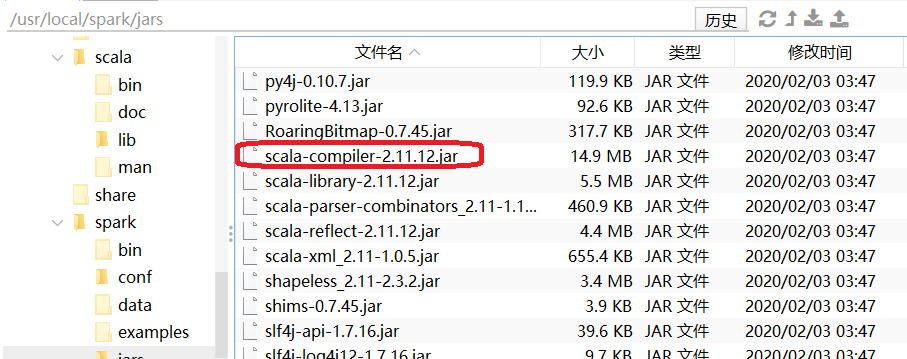
pom.xml里配置的版本必须和spark的版本一致。
<?xml version="1.0" encoding="UTF-8"?>
<project xmlns="http://maven.apache.org/POM/4.0.0" xmlns:xsi="http://www.w3.org/2001/XMLSchema-instance"
         xsi:schemaLocation="http://maven.apache.org/POM/4.0.0 https://maven.apache.org/xsd/maven-4.0.0.xsd">
    <modelVersion>4.0.0</modelVersion>
    <groupId>com.simoniu</groupId>
    <artifactId>sparkdemo</artifactId>
    <version>0.0.1-SNAPSHOT</version>
    <name>sparkdemo</name>
    <description>sparkdemo</description>
    <properties>
        <java.version>1.8</java.version>
        <project.build.sourceEncoding>UTF-8</project.build.sourceEncoding>
        <project.reporting.outputEncoding>UTF-8</project.reporting.outputEncoding>
        <spring-boot.version>2.6.13</spring-boot.version>
        <spark-version>2.4.5</spark-version>
        <scala-version>2.11.12</scala-version>
        <guava-version>14.0.1</guava-version>
    </properties>
    <dependencies>
        <dependency>
            <groupId>org.springframework.boot</groupId>
            <artifactId>spring-boot-starter</artifactId>
        </dependency>

        <dependency>
            <groupId>org.springframework.boot</groupId>
            <artifactId>spring-boot-starter-test</artifactId>
            <scope>test</scope>
        </dependency>

        <dependency>
            <groupId>org.apache.spark</groupId>
            <artifactId>spark-core_2.11</artifactId>
            <version>${spark-version}</version>
            <!--
            <scope>provided</scope>
            -->
            <exclusions>
                <exclusion>
                    <groupId>org.scala-lang</groupId>
                    <artifactId>scala-library</artifactId>
                </exclusion>
            </exclusions>
        </dependency>
        <!---->
        <dependency>
            <groupId>com.google.guava</groupId>
            <artifactId>guava</artifactId>
            <version>${guava-version}</version>
        </dependency>

        <dependency>
            <groupId>org.scala-lang</groupId>
            <artifactId>scala-library</artifactId>
            <version>${scala-version}</version>
        </dependency>

    </dependencies>
    <dependencyManagement>
        <dependencies>
            <dependency>
                <groupId>org.springframework.boot</groupId>
                <artifactId>spring-boot-dependencies</artifactId>
                <version>${spring-boot.version}</version>
                <type>pom</type>
                <scope>import</scope>
            </dependency>
        </dependencies>
    </dependencyManagement>

    <build>
        <finalName>sparksubmitdemo</finalName>
        <plugins>
            <plugin>
                <groupId>org.apache.maven.plugins</groupId>
                <artifactId>maven-compiler-plugin</artifactId>
                <version>3.8.1</version>
                <configuration>
                    <source>1.8</source>
                    <target>1.8</target>
                    <encoding>UTF-8</encoding>
                </configuration>
            </plugin>
            <plugin>
                <groupId>org.springframework.boot</groupId>
                <artifactId>spring-boot-maven-plugin</artifactId>
                <version>${spring-boot.version}</version>
                <configuration>
                    <mainClass>com.simoniu.sparkdemo.SparkdemoApplication</mainClass>
                    <skip>true</skip>
                </configuration>
                <executions>
                    <execution>
                        <id>repackage</id>
                        <goals>
                            <goal>repackage</goal>
                        </goals>
                    </execution>
                </executions>
            </plugin>
            <!-- scala编译插件 -->
            <plugin>
                <groupId>net.alchim31.maven</groupId>
                <artifactId>scala-maven-plugin</artifactId>
                <version>3.1.6</version>
                <configuration>
                    <scalaCompatVersion>2.11</scalaCompatVersion>
                    <scalaVersion>2.11.12</scalaVersion>
                </configuration>
                <executions>
                    <execution>
                        <id>compile-scala</id>
                        <phase>compile</phase>
                        <goals>
                            <goal>add-source</goal>
                            <goal>compile</goal>
                        </goals>
                    </execution>
                    <execution>
                        <id>test-compile-scala</id>
                        <phase>test-compile</phase>
                        <goals>
                            <goal>add-source</goal>
                            <goal>testCompile</goal>
                        </goals>
                    </execution>
                </executions>
            </plugin>
            <!-- 打包插件 -->
            <plugin>
                <artifactId>maven-assembly-plugin</artifactId>
                <configuration>
                    <descriptorRefs>
                        <descriptorRef>jar-with-dependencies</descriptorRef>
                    </descriptorRefs>
                    <archive>
                        <manifest>
                            <mainClass></mainClass>
                        </manifest>
                    </archive>
                </configuration>
                <executions>
                    <execution>
                        <id>make-assembly</id>
                        <phase>package</phase>
                        <goals>
                            <goal>single</goal>
                        </goals>
                    </execution>
                </executions>
            </plugin>
        </plugins>
    </build>

</project>
修改WordCountScalaDemo
package com.simoniu.scalademo

import org.apache.spark.{SparkConf, SparkContext}

object WordCountScalaDemo {
  def main(args: Array[String]): Unit = {
    //第一步:创建SparkContext
    val conf = new SparkConf()
    conf.setAppName("WordCountScala") //设置任务名称
      //.setMaster("local") //local表示在本地执行
    val sc = new SparkContext(conf)
    //第二步:加载数据
    var path = "D:\\uploadFiles\\hello.txt";
    if(args.length ==1){
      path = args(0);
    }
    val linesRDD = sc.textFile(path)
    //第三步:对数据进行切割,把一行数据切分成一个一个的单词
    val wordsRDD = linesRDD.flatMap(_.split(" "))
    //第四步:迭代words,将每个word转化为(word,1)这种形式
    val pairRDD = wordsRDD.map((_, 1))
    //第五步:根据key(其实就是word)进行分组聚合统计
    val wordCountRDD = pairRDD.reduceByKey(_ + _)
    //第六步:将结果打印到控制台
    wordCountRDD.foreach(wordCount => println(wordCount._1 + "--" + wordCount._2))
    //第七步:停止SparkContext
    sc.stop()
  }
}
修改WordCountJavaDemo
package com.simoniu.sparkdemo.javademo;

import org.apache.spark.SparkConf;
import org.apache.spark.api.java.JavaPairRDD;
import org.apache.spark.api.java.JavaRDD;
import org.apache.spark.api.java.JavaSparkContext;
import org.apache.spark.api.java.function.*;
import scala.Tuple2;
import java.util.Arrays;
import java.util.Iterator;

/**
 * 需求:单词计数
 * Created by simoniu
 */
public class WordCountJavaDemo {
    public static void main(String[] args) {
        //第一步:创建SparkContext:
        //注意,针对java代码需要获取JavaSparkContext
        SparkConf conf = new SparkConf();
        conf.setAppName("WordCountJava");
                //.setMaster("local");
        JavaSparkContext sc = new JavaSparkContext(conf);
        //第二步:加载数据
        String path = "D:\\uploadFiles\\hello.txt";
        if(args.length ==1){
            path = args[0];
        }
        JavaRDD<String> linesRDD = sc.textFile(path);
        //第三步:对数据进行切割,把一行数据切分成一个一个的单词
        //注意:FlatMapFunction的泛型,第一个参数表示输入数据类型,第二个表示是输出数据类型
        JavaRDD<String> wordRDD = linesRDD.flatMap(new FlatMapFunction<String, String>() {
            public Iterator<String> call(String line) throws Exception {
                return Arrays.asList(line.split(" ")).iterator();
            }
        });
        //第四步:迭代words,将每个word转化为(word,1)这种形式
        //注意:PairFunction的泛型,第一个参数是输入数据类型
        //第二个是输出tuple中的第一个参数类型,第三个是输出tuple中的第二个参数类型
        //注意:如果后面需要使用到....ByKey,前面都需要使用mapToPair去处理
        JavaPairRDD<String, Integer> pairRDD = wordRDD.mapToPair(new PairFunction<String, String, Integer>() {
            public Tuple2<String, Integer> call(String word) throws Exception {
                return new Tuple2<String, Integer>(word, 1);
            }
        });
        //第五步:根据key(其实就是word)进行分组聚合统计
        JavaPairRDD<String, Integer> wordCountRDD = pairRDD.reduceByKey(new Function2<Integer, Integer, Integer>() {
            public Integer call(Integer i1, Integer i2) throws Exception {
                return i1 + i2;
            }
        });
        //第六步:将结果打印到控制台
        wordCountRDD.foreach(new VoidFunction<Tuple2<String, Integer>>() {
            public void call(Tuple2<String, Integer> tup) throws Exception {
                System.out.println(tup._1 + "--" + tup._2);
            }
        });
        //第七步:停止sparkContext
        sc.stop();
    }
}
打包生成jar包。上传到master机器的/root/examples目录下。再把hello.txt文件上传至hdfs的/test/目录下。
[root@master examples]# hdfs dfs -mkdir -p /test/
[root@master examples]# hdfs dfs -put hello.txt /test/
编写wordCountJob.sh脚本。
spark-submit \
--class com.simoniu.scalademo.WordCountScalaDemo \
--master yarn \
--deploy-mode client \
--executor-memory 1G \
--num-executors 1 \
sparksubmitdemo.jar \
hdfs://master:9000/test/hello.txt
启动 hadoop集群,分别在master、salve1和slave2上启动historyserver进程。
[root@master examples]# cd $HADOOP_HOME
[root@master examples]# bin/mapred --daemon start historyserver
提交spark任务。
[root@master examples]# sh -x wordCountJob.sh
此时任务会被提交到YARN集群中,可以看到任务执行成功了。
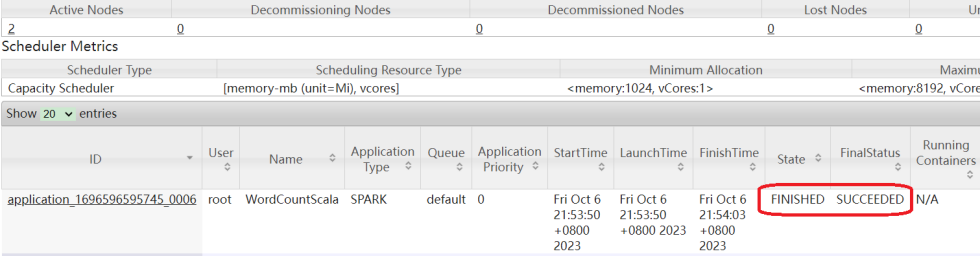
注意:如果提交任务后,报以下异常。
java.lang.NoClassDefFoundError: scala/runtime/java8/JFunction2$mcIII$sp
这个异常绝大多数都是因为maven的scala版本与spark使用的scala版本不一致所引起的。必须修改maven的scala版本重新打包上传即可。
3.使用Spark-Shell
Spark-Shell这种方式方便在集群环境中调试代码,有一些代码对环境没有特殊依赖的时候我们可以直接使用第一种方式,在idea中调试代码。但是有时候代码需要依赖线上的一些环境,例如:需要依赖线上的数据库中的数据,由于权限问题,我们在本地是无法连接的,这个时候想要调试代码的话,可以选择使用spark-shell的方式,直接在线上服务器中开启一个spark的交互式命令行窗口。
注意:使用spark-shell的时候,也可以选择指定开启本地spark集群,或者连接standalone集群,或者使用on yarn模式,都是可以的。
Spark-Shell默认是使用local模式开启本地集群,在spark-shell命令行中sparkContex是已经创建好的了,可以直接通过sc使用。
[root@master examples]# spark-shell
2020-05-23 20:05:59,411 WARN util.NativeCodeLoader: Unable to load native-hadoop library for your platform... using builtin-java classes where applicable
Setting default log level to "WARN".
To adjust logging level use sc.setLogLevel(newLevel). For SparkR, use setLogLevel(newLevel).
Spark context Web UI available at http://bigdata04:4040
Spark context available as 'sc' (master = local[*], app id = local-1590235569080).
Spark session available as 'spark'.
Welcome to
      ____              __
     / __/__  ___ _____/ /__
    _\ \/ _ \/ _ `/ __/  '_/
   /___/ .__/\_,_/_/ /_/\_\   version 2.4.5
      /_/

Using Scala version 2.11.12 (Java HotSpot(TM) 64-Bit Server VM, Java 1.8.0_202)
Type in expressions to have them evaluated.
Type :help for more information.

scala>
输入需要调试执行的代码。
scala> val linesRDD = sc.textFile("hdfs://master:9000/test/hello.txt")
linesRDD: org.apache.spark.rdd.RDD[String] = hdfs://master:9000/test/hello.txt MapPartitionsRDD[1] at textFile at <console>:24

scala> val wordsRDD = linesRDD.flatMap(_.split(" "))
wordsRDD: org.apache.spark.rdd.RDD[String] = MapPartitionsRDD[2] at flatMap at <console>:25

scala> val pairRDD = wordsRDD.map((_, 1))
pairRDD: org.apache.spark.rdd.RDD[(String, Int)] = MapPartitionsRDD[3] at map at <console>:25

scala> val wordCountRDD = pairRDD.reduceByKey(_ + _)
wordCountRDD: org.apache.spark.rdd.RDD[(String, Int)] = ShuffledRDD[4] at reduceByKey at <console>:25

scala> wordCountRDD.foreach(wordCount => println(wordCount._1 + "--" + wordCount._2))
spark--1
hive--1
python--1
hello--6
linux--1
java--1
welcome--3
hadoop--1
flume--1
javascript--1
html--1
Spark-Shell也可以使用on yarn模式。
[root@master examples]# spark-shell --master yarn --deploy-mode client
2023-10-06 22:44:12,573 WARN util.NativeCodeLoader: Unable to load native-hadoop library for your platform... using builtin-java classes where applicable
Setting default log level to "WARN".
To adjust logging level use sc.setLogLevel(newLevel). For SparkR, use setLogLevel(newLevel).
2023-10-06 22:44:20,798 WARN yarn.Client: Neither spark.yarn.jars nor spark.yarn.archive is set, falling back to uploading libraries under SPARK_HOME.
Spark context Web UI available at http://master:4040
Spark context available as 'sc' (master = yarn, app id = application_1696596595745_0008).
Spark session available as 'spark'.
Welcome to
      ____              __
     / __/__  ___ _____/ /__
    _\ \/ _ \/ _ `/ __/  '_/
   /___/ .__/\_,_/_/ /_/\_\   version 2.4.5
      /_/

Using Scala version 2.11.12 (Java HotSpot(TM) 64-Bit Server VM, Java 1.8.0_271)
Type in expressions to have them evaluated.
Type :help for more information.

scala>
到YARN上可以确认一下。
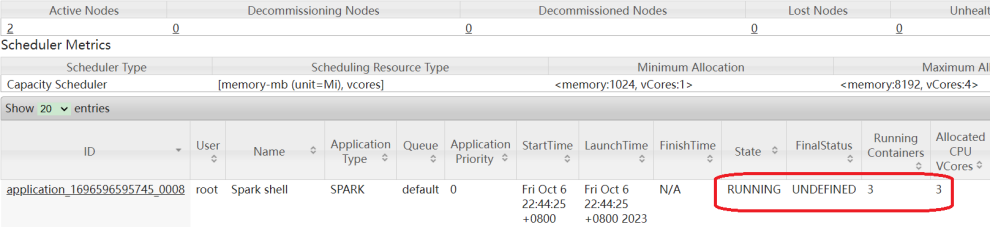
scala> val linesRDD = sc.textFile("/test/hello.txt")
linesRDD: org.apache.spark.rdd.RDD[String] = /test/hello.txt MapPartitionsRDD[1] at textFile at <console>:24

scala> val wordsRDD = linesRDD.flatMap(_.split(" "))
wordsRDD: org.apache.spark.rdd.RDD[String] = MapPartitionsRDD[2] at flatMap at <console>:25

scala> val pairRDD = wordsRDD.map((_,1))
pairRDD: org.apache.spark.rdd.RDD[(String, Int)] = MapPartitionsRDD[3] at map at <console>:25

scala> val wordCountRDD = pairRDD.reduceByKey(_ + _)
wordCountRDD: org.apache.spark.rdd.RDD[(String, Int)] = ShuffledRDD[4] at reduceByKey at <console>:25

scala> wordCountRDD.foreach(wordCount=>println(wordCount._1+"--"+wordCount._2))
[Stage 0:>                                                          (0
[Stage 0:===================>                                       (1
[Stage 0:=======================================>                   (2
如果想要使用spark-shell连接spark的standalone集群的话,只需要通过–master参数指定集群主节点的url信息即可。