Hive的数据类型和常用操作
Hive的数据类型和常用操作
1.基本数据类型
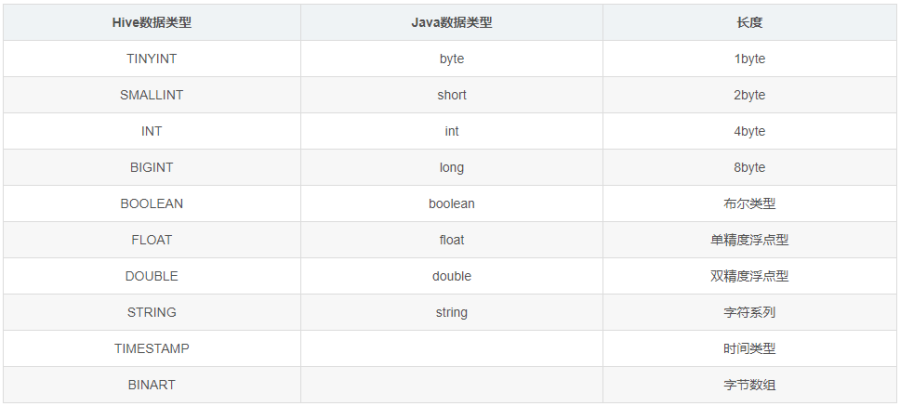
Hive的String类型相当于MySQL数据库的varchar类型,是一个不可变的字符串。
2.集合数据类型
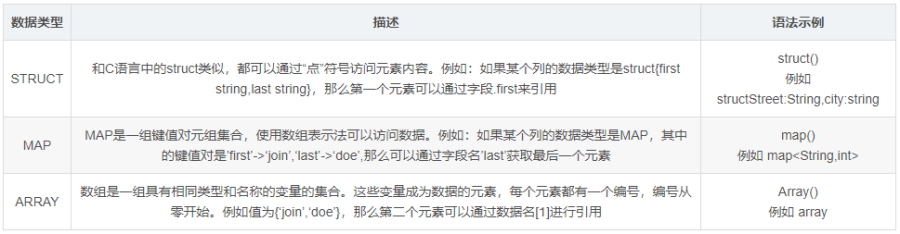
3.常用操作
DDL语句和数据导入
#创建一个用户表
create table users (uid int,username string,password string)
row format delimited
fields terminated by ' '
collection items terminated by ','
;


#数组类型数据资料,/root/test/provice01.txt
河南 郑州,开封,周口,新乡
浙江 杭州,宁波,台州
陕西 西安,渭南,宝鸡,汉中

#Array类型
create table t_province(
   province string,
   city array<string>
)
row format delimited
fields terminated by ' '
collection items terminated by ','
;

#数据导入
hive> load data local inpath '/root/test/province01.txt' into table t_province;


#Map数据类型数据资料,/root/test/province02.txt
河南 郑州:4001,开封:4002,周口:4003,新乡:4004
浙江 杭州:0755,宁波:0701,台州:0703
陕西 西安:029,渭南:0910,宝鸡:0920,汉中:0930

#Map类型

#删除t_province;
drop table t_province;

#创建表
create table t_province(
   province string,
   items map<string,string>
)
row format delimited
fields terminated by ' '
collection items terminated by ','
map keys terminated by ':'
;

#数据导入
hive> load data local inpath '/root/test/province02.txt' into table t_province;

#Struct数据类型数据资料,/root/test/person.txt
张三 浙江省,杭州市,西湖区
罗某 上海市,浦东区,浦东新区大道
张三丰 湖北省,十堰市,武当山光明顶

#Struct数据类型

#创建表

create table t_person(
    name string,
    addr struct<province:string,city:string,street:string>
)
row format delimited
fields terminated by ' '
collection items terminated by ','
;

#导入数据
hive> load data local inpath '/root/test/person.txt' into table t_person;
DML语句和查询语句
#插入Map数据类型。
insert into table t_province values("四川",map("成都","028","绵阳","9101","眉山","9102","广元","9271"));


#插入struct数据类型。
insert into t_person (name,addr) select "令狐冲",named_struct("province", "陕西省","city","华阴市","street","华山");


#查询语句
select * from t_province;

select name,addr.province,addr.city,addr.street from t_person;

#查看表结构
desc t_province;

#炸裂函数
hive> select explode(items) from t_province;
注意了,hive后面可以使用 -e 命令,这样这条hive命令就可以放到脚本中定时调度执行了,因为这样每次hive都会开启一个新的会话,执行完毕以后再关闭这个会话。
[root@master]# bin/hive -e "select * from t_province"

#当然了beeline也可以,后面也是跟一个-e参数
[root@master]# bin/beeline -u  jdbc:hive2://master:10000 -n root -e "select * from t_province";

#指定数据库
[root@master bin]# beeline -u  jdbc:hive2://master:10000/myschool -n root -e "select * from t_person"