SKLearn基础教程(七)
cv2库
OpenCV-Python是OpenCV的Python API,结合了OpenCV c++ API和Python语言的最佳特性。
1.OpenCV-Python简介 Opencv(Open Source Computer Vision Library)是一个基于开源发行的跨平台计算机视觉库,它实现了图像处理和计算机视觉方面的很多通用算法,已成为计算机视觉领域最有力的研究工具。在这里我们要区分两个概念:图像处理和计算机视觉的区别:图像处理侧重于“处理”图像–如增强,还原,去噪,分割等等;而计算机视觉重点在于使用计算机来模拟人的视觉,因此模拟才是计算机视觉领域的最终目标。 OpenCV用C++语言编写,它具有C ++,Python,Java和MATLAB接口,并支持Windows,Linux,Android和Mac OS, 如今也提供对于C#、Ch、Ruby,GO的支持。
2.OpenCV-Python读取图片
安装OpenCV-Python
pip install opencv-python
实例:
import cv2

# 输出图片的基本信息
def funOutputImgProperties(img):
    print("properties:shape:{},size:{},dtype:{}".format(img.shape, img.size, img.dtype))


# 读取本地图片并显示
# 使用imread读取本地图片
image = cv2.imread('dinosaur_logo.png', cv2.IMREAD_COLOR)
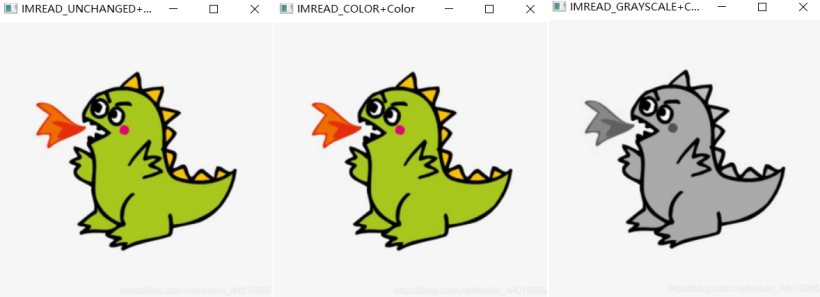
cv2.imshow('IMREAD_UNCHANGED+Color', image)
cv2.waitKey()
funOutputImgProperties(image)
cv2.imread不能读取网络资源的图片,可以借助Python内置模块urllib,读取字节文件,再按照图片编码转换即可。
import cv2
import numpy as np
import urllib.request


# ouput img properties
def funOutputImgProperties(img):
    print("properties:shape:{},size:{},dtype:{}".format(img.shape, img.size, img.dtype))


# 读入完整图片,含alpha通道
res = urllib.request.urlopen("https://img.simoniu.com/dinosaur_logo.png")
# 读取字节数组
img = np.asarray(bytearray(res.read()), dtype="uint8")
img = cv2.imdecode(img, cv2.IMREAD_COLOR)
cv2.imshow('IMREAD_UNCHANGED+Color', img)
cv2.waitKey()
funOutputImgProperties(img)

# 读入彩色图片,忽略alpha通道
res = urllib.request.urlopen("https://img.simoniu.com/dinosaur_logo.png")
img = np.asarray(bytearray(res.read()), dtype="uint8")
img = cv2.imdecode(img, cv2.IMREAD_COLOR)
cv2.imshow('IMREAD_COLOR+Color', img)
cv2.waitKey()
funOutputImgProperties(img)

# 彩色图片按,灰度图片读入
res = urllib.request.urlopen("https://img.simoniu.com/dinosaur_logo.png")
img = np.asarray(bytearray(res.read()), dtype="uint8")
# 按灰度读取图片
img = cv2.imdecode(img, cv2.IMREAD_GRAYSCALE)
cv2.imshow('IMREAD_GRAYSCALE+Color', img)
cv2.waitKey()
funOutputImgProperties(img)
运行结果: