Express+Nodemailer实现发送邮件验证码
Express+Nodemailer实现发送邮件验证码
Nodemailer 是一个简单易用的 Node.JS 邮件发送模块(通过 SMTP,sendmail,或者 Amazon SES),支持 unicode,你可以使用任何你喜欢的字符集。
1.实例
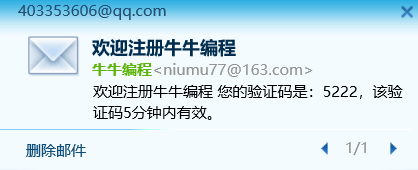
使用Express+Nodemailer实现给电子邮箱发送验证码。
1).package.json 添加依赖
{
  "name": "node_mailer_demo",
  "version": "1.0.0",
  "description": "",
  "main": "server.js",
  "scripts": {
    "start": "node server.js",
    "test": "echo \"Error: no test specified\" && exit 1"
  },
  "keywords": [],
  "author": "",
  "license": "ISC",
  "dependencies": {
    "body-parser": "^1.19.0",
    "cors": "^2.8.5",
    "express": "^4.17.1",
    "nodemailer": "^6.4.2"
  }
}
2).sendEmail.js
sendEmail 封装了发送邮件的基本功能。
const nodemailer = require('nodemailer'); //引入模块
let transporter = nodemailer.createTransport({
    service: '163', //类型163邮箱,注意:如果是QQ邮箱,类型就填写qq
    port: 465,
    secure: true, // true for 465, false for other ports
    auth: {
        user: 'xxxx@163.com', // 发送方的邮箱
        pass: 'xxxxxxxxxxxx' // smtp 的授权码
    }
});

function sendMail(mail, code, call) {

    console.log("------执行sendMail()--------")
    // 发送的配置项
    let mailOptions = {
        from: '"牛牛编程" <xxxx@163.com>',
        to: mail,
        subject: '欢迎注册牛牛编程',
        text: '欢迎注册牛牛编程,您的验证码是:'+code+',该验证码5分钟内有效。',
        html: '<p><h3>欢迎注册牛牛编程</h3><div>您的验证码是:'+code+',该验证码5分钟内有效。</div></p>'
    };
    console.log("------------mailOptions---------------")
    console.log(mailOptions);


    //发送函数
    transporter.sendMail(mailOptions, (error, info) => {
        if (error) {
            console.log("----------发送邮件出现错误-----------")
            console.log(error);
            console.log(info);
            call(false)
        } else {
            call(true) //因为是异步 所有需要回调函数通知成功结果
        }
    });
}

module.exports = {
    sendMail
}
3).server.js
服务器端实现发送邮件接口。
const express = require('express')
const app = express()
const email = require('./sendEmail.js'); //引入封装好的函数
const bodyParser = require('body-parser')
const cors = require('cors'); // 解决跨域问题
const styles = {
    'bold': ['\x1B[1m', '\x1B[22m'],
    'italic': ['\x1B[3m', '\x1B[23m'],
    'underline': ['\x1B[4m', '\x1B[24m'],
    'inverse': ['\x1B[7m', '\x1B[27m'],
    'strikethrough': ['\x1B[9m', '\x1B[29m'],
    'white': ['\x1B[37m', '\x1B[39m'],
    'grey': ['\x1B[90m', '\x1B[39m'],
    'black': ['\x1B[30m', '\x1B[39m'],
    'blue': ['\x1B[34m', '\x1B[39m'],
    'cyan': ['\x1B[36m', '\x1B[39m'],
    'green': ['\x1B[32m', '\x1B[39m'],
    'magenta': ['\x1B[35m', '\x1B[39m'],
    'red': ['\x1B[31m', '\x1B[39m'],
    'yellow': ['\x1B[33m', '\x1B[39m'],
    'whiteBG': ['\x1B[47m', '\x1B[49m'],
    'greyBG': ['\x1B[49;5;8m', '\x1B[49m'],
    'blackBG': ['\x1B[40m', '\x1B[49m'],
    'blueBG': ['\x1B[44m', '\x1B[49m'],
    'cyanBG': ['\x1B[46m', '\x1B[49m'],
    'greenBG': ['\x1B[42m', '\x1B[49m'],
    'magentaBG': ['\x1B[45m', '\x1B[49m'],
    'redBG': ['\x1B[41m', '\x1B[49m'],
    'yellowBG': ['\x1B[43m', '\x1B[49m']
};


app.use(bodyParser.urlencoded({
    extended: false
}))
app.use(bodyParser.json())
app.use(cors());
app.use(express.static(__dirname + '/'));//静态目录
const check = {} //声明一个对象缓存邮箱和验证码,留着
app.post('/send_email', function (req, res, next) {
    console.log("-----request body内容------")
    console.log(req.body)
    const mail = req.body.email
    const token = req.body.token
    console.log("-------要发送的邮件地址-------")
    console.log(mail);

    const data = {
        rst: true,
        data: "",
        msg: ""
    }
    if (!mail) {
        return res.send('参数错误')
    } //email出错时或者为空时
    const code = parseInt(Math.random(0, 1) * 10000) //生成随机验证码
    console.log("随机生成的验证码:"+code)
    check[mail] = code
    //发送邮件
    result = {}
    email.sendMail(mail, code, (state) => {
        if (state) {
            result.code = 200;
            result.msg = "验证码发送成功!";
            result.token = token;
            result.randomCode= code;
            return res.send(JSON.stringify(result))
        } else {
            result.code = 400;
            result.msg = "验证码发送失败!";
            return res.send(JSON.stringify(result))
        }
    })
});

/* GET home page. */
app.listen(3001, () => {
    console.log('\x1B[33m%s\x1b[0m', "服务开启成功"); //yellow
})
测试发送邮件验证码。
请求接口:http://xxx.xxx.xxx.xxx:3001/send_email
请求体body内容如下:
{
    "email": "xxxxxxx@qq.com",
    "token": "rrewr34drtt45234fsdferwe246"
}