UniApp基础教程(十八)
uni-datetime-picker组件
uni-datetime-picker组件
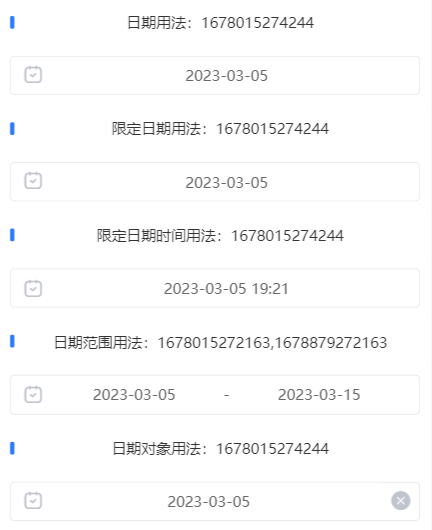
uni-datetime-picker组件支持日期+时间范围选择,同时支持PC和移动端。
实例:
<template>
  <view class="container">
    <uni-section :title="'日期用法:' + date" type="line"></uni-section>
    <view class="example-body">
      <uni-datetime-picker type="date" :clear-icon="false" @change="showDate" v-model="date"
        @maskClick="maskClick" />
    </view>
    <uni-section :title="'限定日期用法:' + limitedDate" type="line"></uni-section>
    <view class="example-body">
      <uni-datetime-picker type="date" :start="start" :end="end" :clear-icon="false" @change="showDate"
        v-model="limitedDate" @maskClick="maskClick" />
    </view>
    <uni-section :title="'限定日期时间用法:' + dateTime" type="line"></uni-section>
    <view class="example-body">
      <uni-datetime-picker type="datetime" :start="start" :end="end" :clear-icon="false" @change="showDateTime"
        v-model="dateTime" @maskClick="maskClick" hide-second="true" />
    </view>
    <uni-section :title="'日期范围用法:' + dateRange" type="line"></uni-section>
    <view class="example-body">
      <uni-datetime-picker type="daterange" :clear-icon="false" @change="showDateRange" v-model="dateRange"
        @maskClick="maskClick" />
    </view>
    <uni-section :title="'日期对象用法:' + dateObj" type="line"></uni-section>
    <view class="example-body">
      <uni-datetime-picker type="date" return-type="date" :clear-icon="true" @change="showDateObject"
        v-model="dateObj" @maskClick="maskClick" />
    </view>
  </view>
</template>


<script>
  export default {

    data() {
      return {
        date: '',
        limitedDate: '',
        dateTime: '',
        start: Date.now() - 2 * 24 * 3600 * 1000,
        end: Date.now() + 2 * 24 * 3600 * 1000,
        dateRange: [Date.now(), Date.now() + 10 * 24 * 3600 * 1000],
        dateObj: Date.now()
      }
    },
    onLoad() {

    },

    watch: {

    },
    mounted() {
      setTimeout(() => {
        this.date = Date.now();
        this.limitedDate = Date.now();
        this.dateTime = Date.now();
        this.dateObj = Date.now();

      }, 1000)

    },

    methods: {
      showDate(e) {
        this.date = e
        console.log('选中日期是:', this.date = e);
        //console.log(this.date);
      },

      showLimitedDate(e) {
        this.limitedDate = e
        console.log('选中限定的日期是:', this.limitedDate = e);
        //console.log(this.limitedDate);
      },
      showDateTime(e) {
        this.dateTime = e
        console.log('选中日期时间是:', this.dateTime = e);
        //console.log(this.dateTime);
      },

      showDateRange(e) {
        this.dateRange = e
        console.log('选中日期范围是:', this.dateRange = e);
        //console.log(this.dateRange);
      },

      showDateObject(e) {
        this.dateObj = e;
        console.log('选中日期对象是:', this.dateObj = e);
      },

      changeLog(e) {
        console.log('change事件:', e);
      },
      maskClick(e) {
        console.log('maskClick事件:', e);
      }

    }
  }
</script>

<style lang="scss" scoped>
  .container {
    width: 98%;
    height: auto;
    font-size: 14px;
    text-align: center;
    margin: 0rpx auto;
  }

  .example-body {
    background-color: #fff;
    padding: 10px;
  }
</style>
运行效果: